1. How to Setup the SKYVVA Module Parameters in SAP PI/PO with V3?
This document describes on the list of SKYVVA module parameters used in SAP PI/PO with V3 module. Currently, bulk mode and Batch are old inbound processing, which supports flat message to fetch large data. New enhanced bulk mode and batch mode processing now supports V3 Inbound processing to handle hierarchical message payload.
- #### SKYVVA Module in SOAP Adapter
The SKYVVA module is integrated into SAP-PI and extends its functionality (as shown in the figure below).
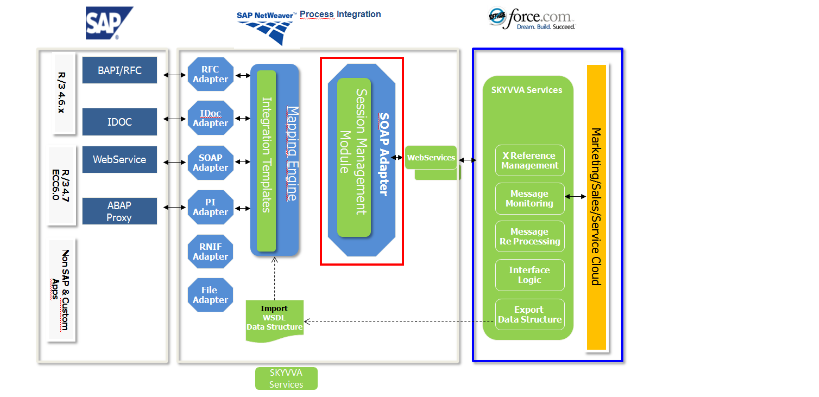
This module is only used by the SOAP receiver channel to call SKYVVA Salesforce web services. Its functionality consists of establishing a session with Salesforce (retrieving the session Id), use of a session until expiration and session renewal upon expiration.
- #### Configuring the SOAP Sender Channel
A SOAP sender channel is created for data transfer from Salesforce to SAP-PI. Both synchronous and asynchronous are supported and are configurable from SAP-PI. The screenshot below shows a channel set up for synchronous communication.
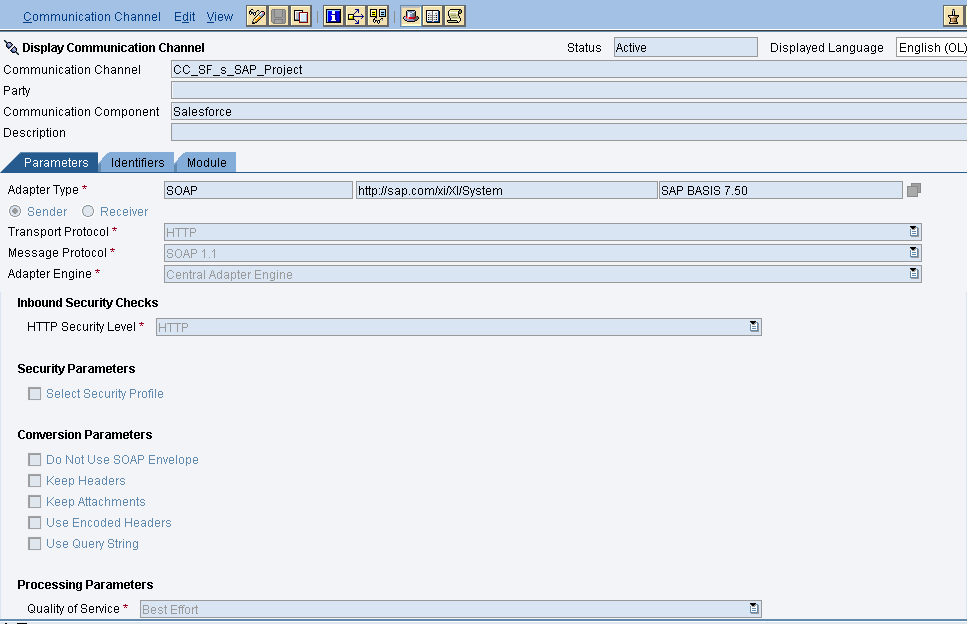
Settings in Advanced tab, Adapter status should be active.

No need to specify anything in Identifiers and module tab for sender SOAP Channel.
- #### Configuring the SOAP Receiver Channel
Create a SOAP receiver channel in SAP PI/PO as shown below. Configurations for General tab
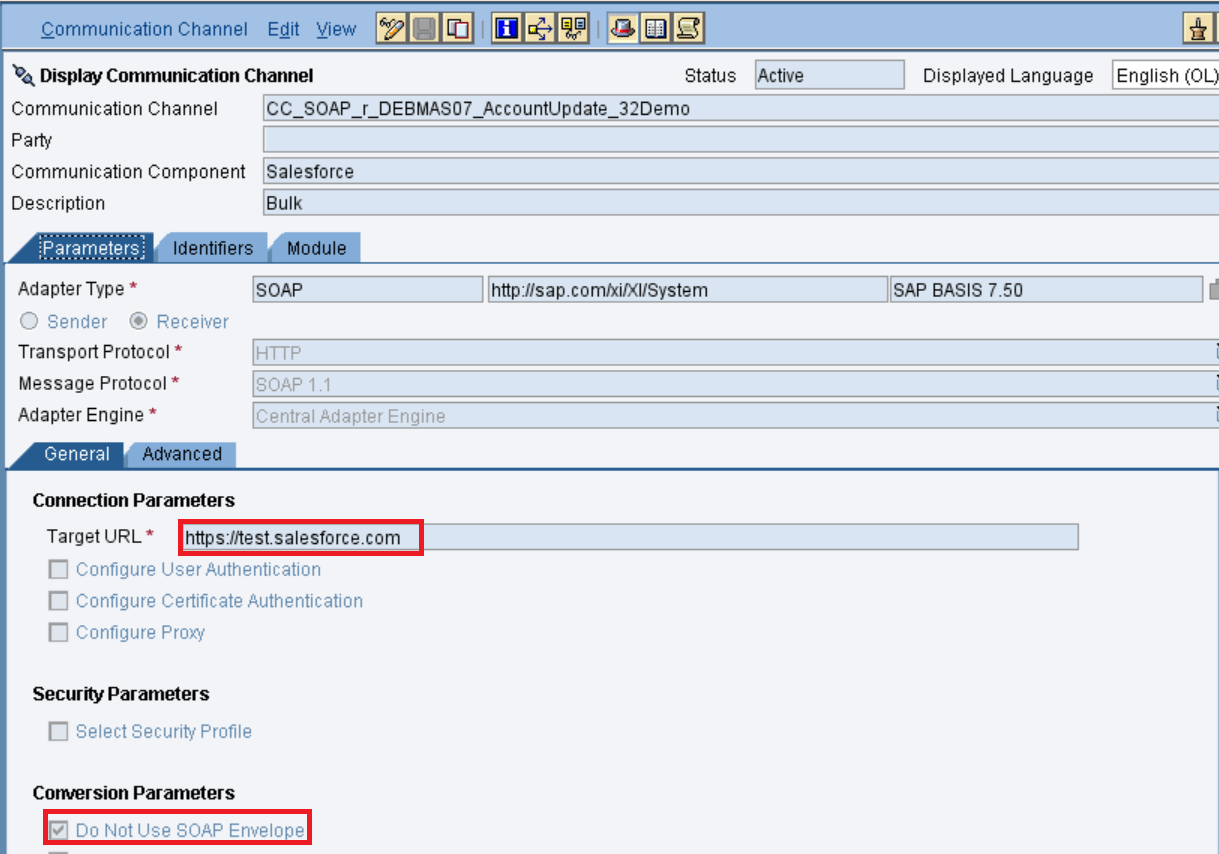
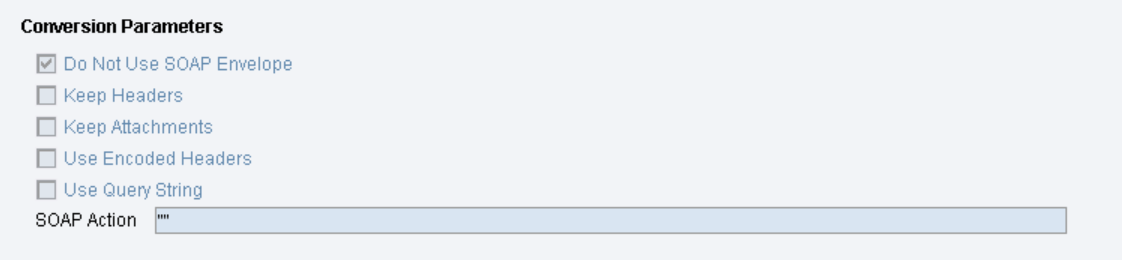
Below is the configuration for the "Advanced" Tab.
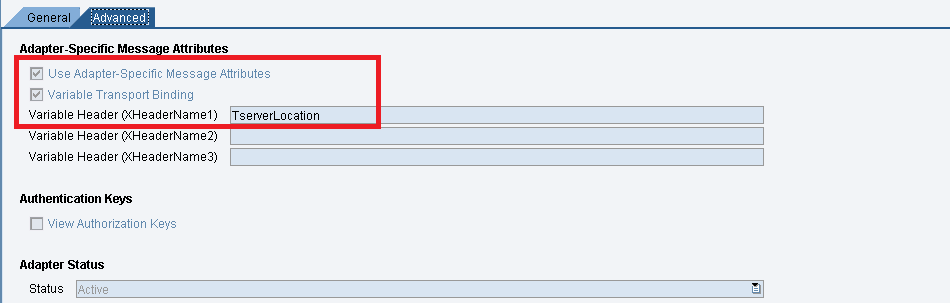
These two flags have to be checked. The value "TserverLocation" has to be entered for the parameter "Variable Header (XHeaderName1)". No need to specify anything in the Identifiers tab. Below are the settings for Tab "Module". Here, the SKYVVA module containing the logic for session handling and transformation logic must be specified. Below are the module parameters for the Webservice operation "integrate".
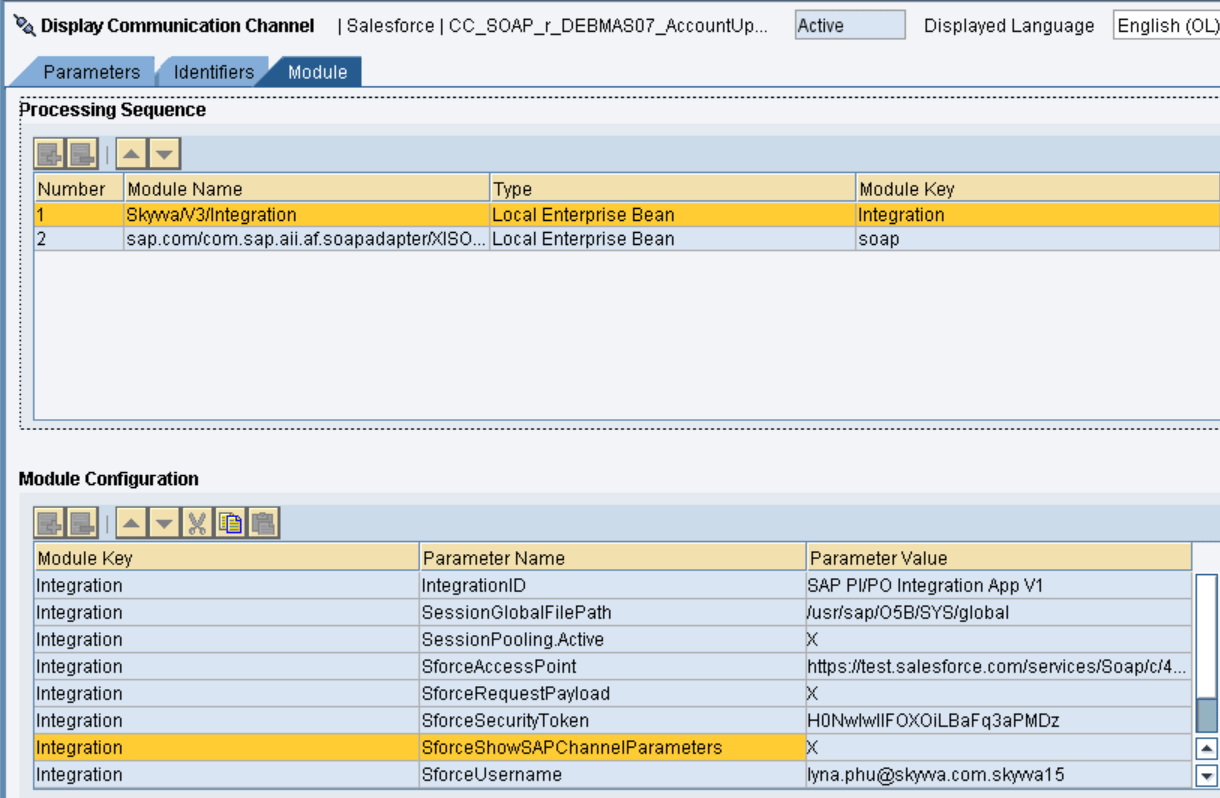

- Skyvva Module Parameters for new V3
"Skyvva/V3/Integration" to be used with SOAP receiver channels. Module parameters are outlined below.
Parameter Description Value
IntegrationID This parameter contains the skyvva engine integration id on Salesforce. Here we recommend to use only Integration name instead of id because if we transport the objects from one environment to other environment IntegrationId will be changed but Integration Name will not be changed. SAP PI/PO Integration App V1
SessionGlobalFilePath This parameter holds the path in which the session id is being stored /usr/sap/O5B/SYS/global
SforceAccessPoint This parameter represents the URL(endpoint) for getting the session id. The URL is that of the Enterprise WSDL for Salesforce used for logging in and getting the session id https://test.salesforce.com/services/Soap/c/43.0
SessionPooling.Active A flag that actives or deactivates the session pooling. Set for better performance X
SforceRequestPayload It will show the request payload of skyvva X
SforceSecurityToken This parameters holds the security token from salesforce. Necessary only of configured in the salesforce instance By54dfe0000DerYvvv
SforceShowSAPChannelParameters It displays the SAP PI parameters in the output log X
SforceUsername This parameter is the salesforce username xxx@bbbb.com
SforceWebServiceOperation Defines the webservice operation in skyvva integrate
pwdSforceLoginPassword It holds the password of the salesforce user used to log in to the salesforce xxxxxxx
ResponseFormat
SforceBulkPackageSize
This will convert the JSON response into xml
This parameter determines how many records are split into chunks of the package size. For example if PI message contains 1000 records and the value of this parameter is 100 then we will get 10 batches each contain 100 records. xml
Ex – 1000
sforceBulkMode It specifies the mode of Bulk Skyvva Bulk
skyvvaVersion Skyvva version needs to be specify here Ex. 2.44
SforceBulkOperation This parameter is set when the interface uses the Bulk API. The bulk API enables transferring of mass data X
SforceBulkInterfaceId It specifies the name of the skyvva interface AccountContactIntegrateBulk
SforceUseAutoSwitchMode If the number of records (Data)<=Integrate Max Size, Interface will run in Normal Mode. If the number of records (Data)>Integrate Max Size and number of records (Data)<=Integrate Batch Max Size, Interface will run inBatch Mode. If the number of records (Data)>Integrate Batch Max Size, Interface will run in BULK Mode. This parameter will switch automatically based upon the above results. X
BulkCreateLogFile
SforceIntegrateMaxBatchSize
This parameter is used to create the error log file for bulk batch job
Maximum number of records that SKYVVA Integration using method integrate Batch. The default value is 5000. If a number of records to be integrated is bigger than this value, Agent will switch to use the Bulk API method automatically.
X
5000
BulkLogFileFolder This will create the folder for the error log files X
SforceIntegrateMaxSize Maximum number of records that SKYVVA Integration Agent can integrate using method integrate. The default value is 200. If the number of records to be integrated is bigger than this value, Agent will switch the API method automatically. 200
SforceUseFastBatchCreationMode This parameters works in conjunction with the “SforceAutoSwitchMode” and threshold flags (“SforceIntegrateMaxBatchSize” and “SforceIntegrateMaxSize”). If “SforceAutoSwitchMode” is not set but this flag is set , then bulk integration is used(Provided that the required parameters are set) If “SforceWebServiceOperation” is set to “integrateBatch” and this flag is set, then do bulk integration. If Bulk integration is used, the value of this parameter can be discarded. X
SforceShowSAPChannelParameters When set displays the SAP PI parameters in the output log X or Empty
SforceShowSSLCertificates This parameter is used in conjunction with “SforceShowSSLCertificates” and represents the password of the certificate store. If set certificate contents are also displayed in the log e.g xxxx (hidden password string)
MessagePayloadFolder It defines the path to store the message payload Ex: /home/p1addm/work
http.proxyHost This parameter holds the HTTP Proxy host if SAP-PI has to connect through a proxy 192.168.87.234
http.proxyPort This parameter holds the HTTP Proxy port 3128
https.proxyHost This parameter holds the HTTPS Proxy host if SAP-PI has to connect through a proxy 192.168.87.234
https.proxyPort This parameter holds the HTTPS Proxy port 3128
ProxyUsername This parameter holds the Proxy username Ex: username
pwdProxyPassword This parameter holds the Proxy password Ex:
useObjectNamePrefix This parameter will add the object name as prefix in all the fields Ex: Account.Name
BulkSetFieldValueToNULL This parameter will set null value for salesforce field when the field from sap is blank with salesforce direct bulk api X
StoreMessagePayloadToFile It creates two files for each message e.g one to store the sap pi message and one for the Skyvva message. The sap pi message id as file name to create the file. So name the file like
useObjectNamePrefix = true It will generate the prefix to differentiate between the field from the header and item Ex. Account.Name
Following parameters are dynamic and mandatory:
Parameter Description Value
IntegrationID This parameter contains the skyvva engine integration id on Salesforce. Here we recommend to use only Integration name instead of id because if we transport the objects from one environment to other environment IntegrationId will be changed but Integration Name will not be changed. SAP PI/PO Integration App V1
SforceAccessPoint This parameter represents the URL(endpoint) for getting the session id. The URL is that of the Enterprise WSDL for Salesforce used for logging in and getting the session id https://test.salesforce.com/services/Soap/c/43.0
- Mandatory Parameters from Salesforce
This chapter describes parameters who's values has to be retrieved from Salesforce. It has a dependency on Salesforce customizing and need to take out of the customizing setting from Salesforce. There are only some parameters where the value is dynamic and has to adapt accordingly.
- Parameter “IntegrationID”
This parameter is the integration id. Developing interfaces in Salesforce with skyvva solution is divided at runtime into the so-called integration instance. First, you have to create an integration instance where data is sent to or coming from this instance. You can have set up different integration instance in one Salesforce instance and thus has to distinguish between them. For example, you can create a integrations instance for Training, an integration instance for logistic interface and another integration instance for financial interfaces. Thus you have different integration instance within one Salesforce instance e.g. your development Salesforce instance. In order to send the data into the right integration instance, you have to point to the correct instance id. Be aware that the integration instance has to be created before you can develop any interface with the skyvva solution. Prerequisite: The integration instance has been created. Follow these step to get the integration instance-id: login into Salesforce instance. If your instance has the skyvva solution deployed you will see a tab with the name "Integration". Open the integration which you have created.

Now you see the Integration ID. In this example, the value is " SAP PI/PO Integration App V1". Just copy and paste this value into the parameter configuration tab of the soap receiver channel.
- #### Parameter “SforceAccessPoint”
The skyvva solution needs to call the web service operation login from the standard Salesforce Enterprise WSDL. Therefore you have to download the Enterprise WSDL from your Salesforce instance. Follow the following step: Logon into Salesforce instance of your organization Goto set up and then click on "Develop" and then on "API". Now download the Enterprise WSDL and save somewhere on your desktop.
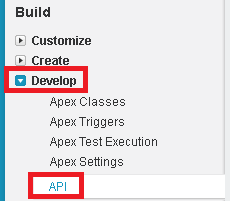

Now create a SOAP Project using this WSDL.

Here we can see the SforceAccessPoint. In this example, the value is " https://test.salesforce.com/services/Soap/c/43.0". Just copy and paste this value into the parameter configuration tab of the soap receiver channel.