How to use Cache Monitoring on Agent Control Board ?
Cache monitoring
Cache Monitoring is a dashboard to monitor the new agent cache where we use the H2 database to store the SKYVVA object. For the bulk api, for example, we need some fields from the interface like the following:
- skyvvasolutions__SObjectFieldExtId__c ↔ which contain a field we use as the External Id
- skyvvasolutions__OperationType__c ↔ update, insert, delete, etc.
- skyvvasolutions__Source_Name__c ↔ the sObject we use in the inbound interface such as Account, Contact, etc..
We need this information for example to create a bulk job at the first step in the series of operations we need to use with the bulk api. Therefore we need at run-time the interface metadata to be replicated down to SAP.
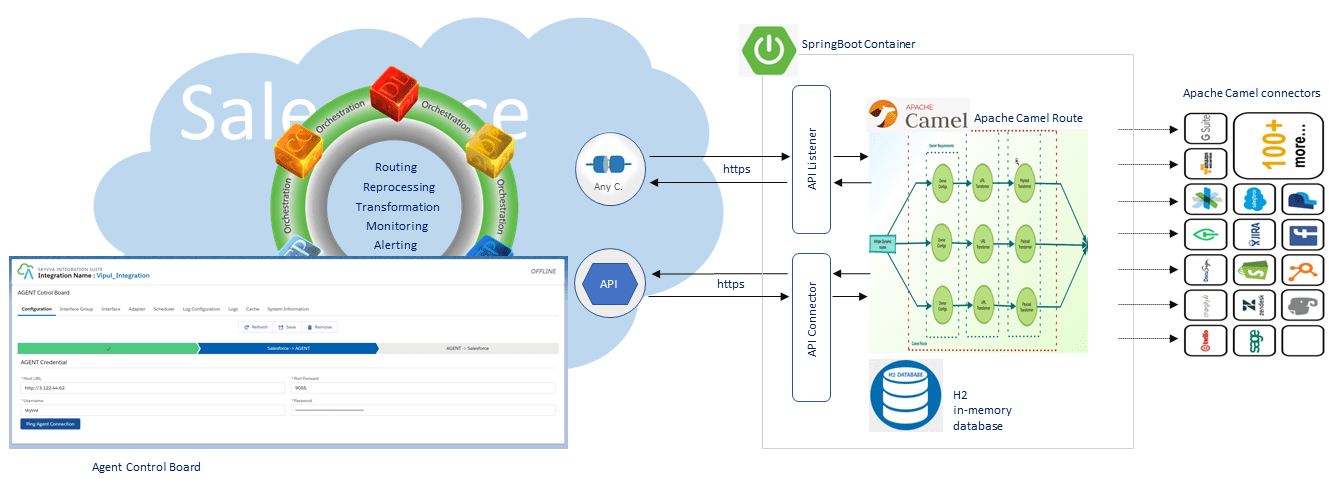
To keep the data synchronous and up-to-date:
- When we create a new integration and save it then it needs to be pushed down to Agent immediately. When integration is changed and the user clicks on the SAVE-Button then again we need to push down to Agent.
[su_box title="Note" box_color="#2a8af0" title_color="#000000"]We need to check that the connection to Agent is active and working. cache monitoring also needs to show data from the same connection.[/su_box]
- The user can work interactively with the SKYVVA application screen. For example, to create, insert, and delete the integration, interface, mapping, workflow, IChained interface (will be generated automatically in the future), define scheduler, adapter + property, etc.
- In all cases except the mapping, we will use the after insert and after update trigger. For the mapping object, we are using the SAVE-Button to handle the list result after the user has added new, delete and change mapping records in the mapping editor. For the after insert trigger we know that the object is newly created and thus we can call the API with the mode INSERT and pass all the data fields e.g. full mode. In the after update trigger, we know that the user updates some fields and we can detect the specific fields which have been changed. Only those fields we need to pass through the API. This is the delta data mode with the mode UPDATE.
Caching Functionality
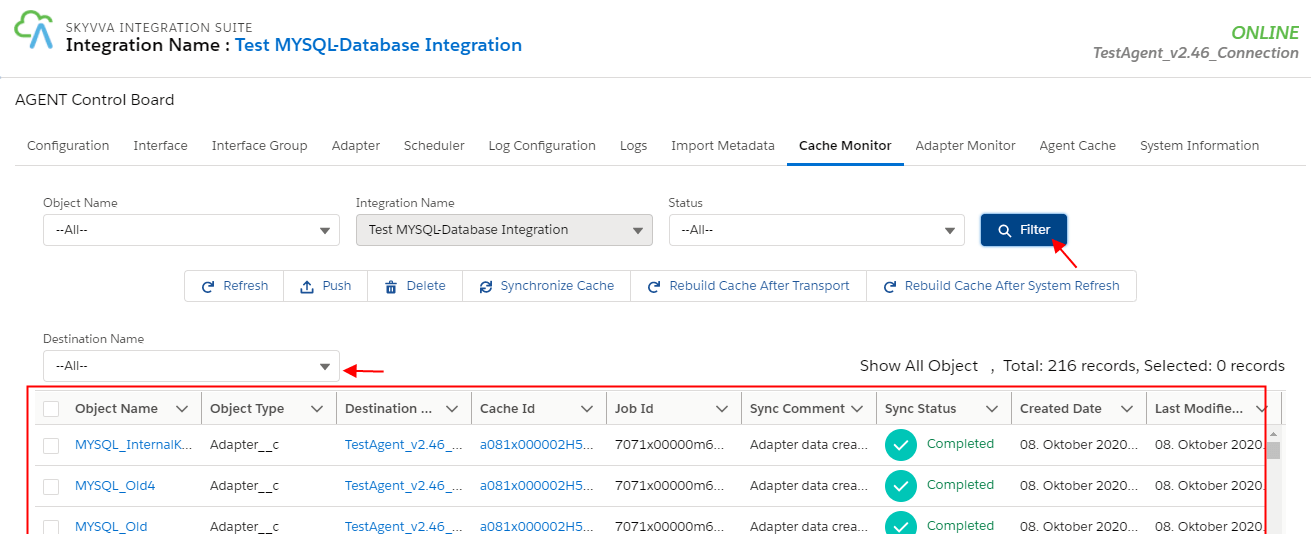
We have different components in the Object filter. We have this application for the admin to be able to cache again any object which was failed for the first time.
- If it is failed then the cache status is red.
- If the caching has not been started then the color is yellow.
- If the cache was successfully transferred then the color is green.
When we push the data from the cache we always push in the full mode.
This object has the own save button and thus we added an apex code for the save button to cache down when the data has been changed and the user clicks on the save button. We have different components in the Object filter:
- Integration
- Interface
- Mapping
- Adapter
- InterfaceGroup
- Workflow
- Scheduler
Integration and Interface Object The integration will be cache down when the interface is saved and have a connection destination. The user needs to set a connection destination for the interface when he wants to deploy this interface. If he doesn't set a connection destination then the interface will run locally in Salesforce as we have right now. Then the run-time instance is Salesforce and not Agent or SAP. For Salesforce there is no connection destination or it is null. Interface Dependent object:
- Integration
- Child-Interface
- Mapping
- Workflow
- Interface Group

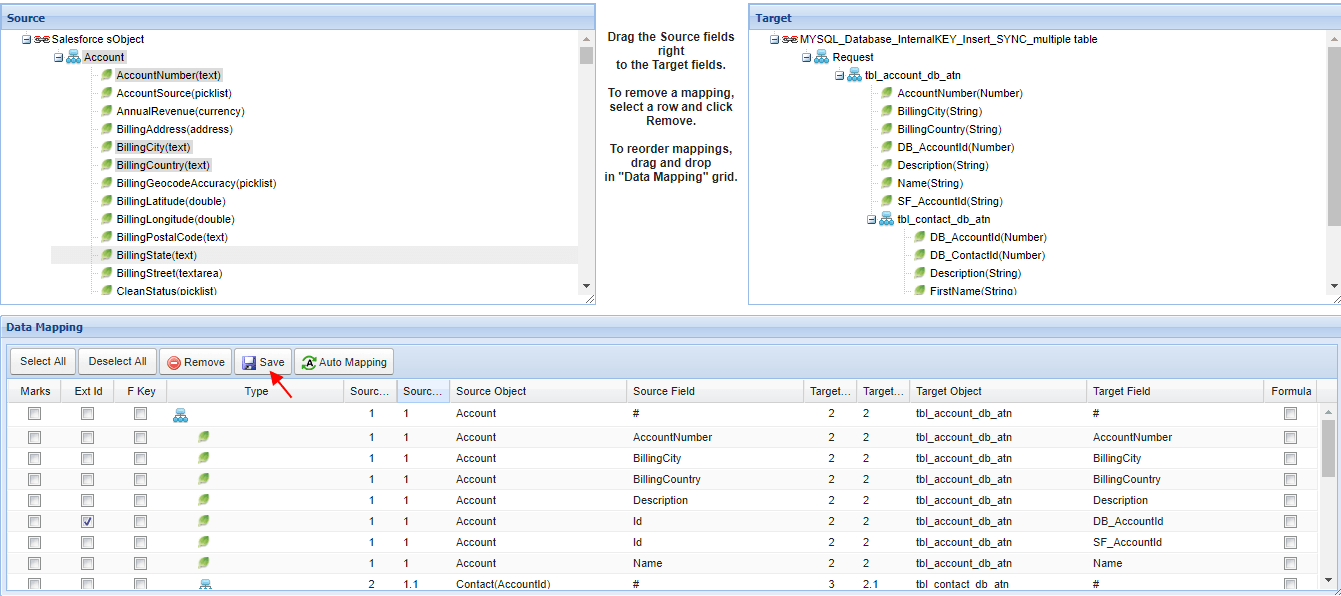
Mapping Actions like Insert new, update or delete mapping line can be performed at the same time. At the end-user clicked on the SAVE-Button so the updated result sends to the Agent. It comes with the request body to the Agent where the agent has to be compared with the current result in Agent.
Adapter When we cache the adapter we take all its properties. Workflow: The workflow is not a standalone and independent object. It is always linked to an interface that can be the main or sub- e.g. child interface. We can handle the caching through the trigger and take the connection destination for the main interface. If the workflow is defined for the main interface then the connection destination is directly there on the interface but if it is a child interface then we need to go up to make the connection Interface group: For each integration, we create automatically two interface groups e.g. with the name Skyvva_DefaultIG which contains all inbound interfaces of that integration, and the Skyvva_DefaultIG_Outbound which contains all outbound interfaces. For SAP/Agent only the interface group with the inbound interface is relevant. Scheduler: The schedule is created automatically and the user just needs to define the time setting and start or stop it. We will create on 3 levels the scheduler e.g.
- per integration
- per-interface group
- per interface
Status Cache Status is used to show the cache status like Failed, Successful, Pending.

Buttons →

Refresh The refresh button would bring up the most recent content published on that page. Essentially, you're asking the cache page to show updated data from the h2 database. Synchronize Cache This function allows you to synchronize again the cache for a situation where you are not sure if the objects have been correctly caching down to the Agent already or not. This function can be used to repair the cache in a situation you don't know the reason why the normal cache fails.
- Click on button

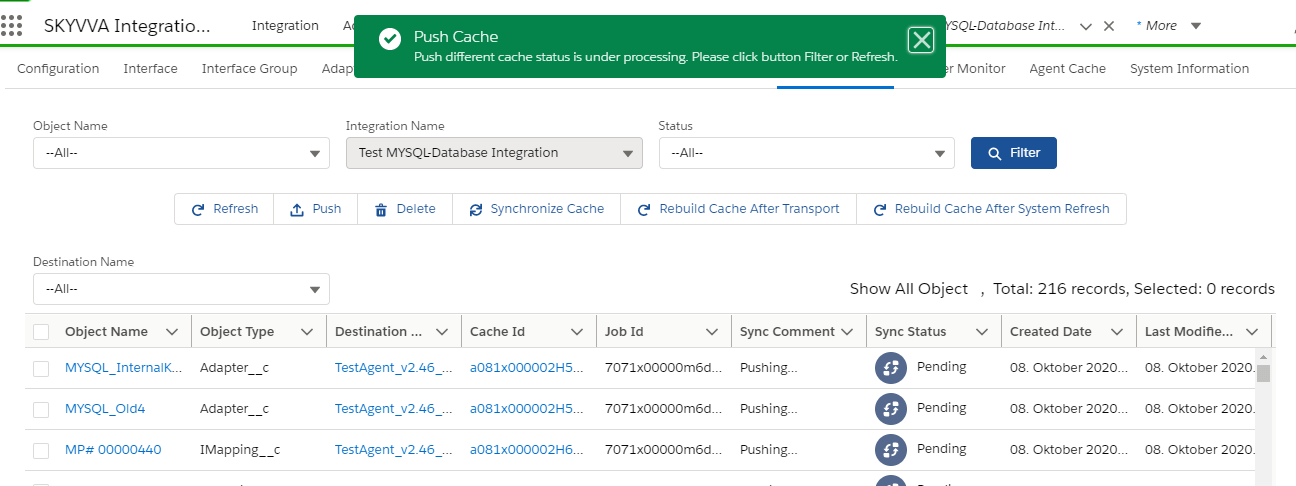
When the yes button get clicked to synch Asynch data It will show synch status as pending:
Rebuild Cache after Transport This function allows you to create a cache on the Agent after you have transported the SKYVVA object e.g. integration, interface, mapping, etc. You can create a cache for all or choose individual objects.
- Click on the rebuild cache After Transport button
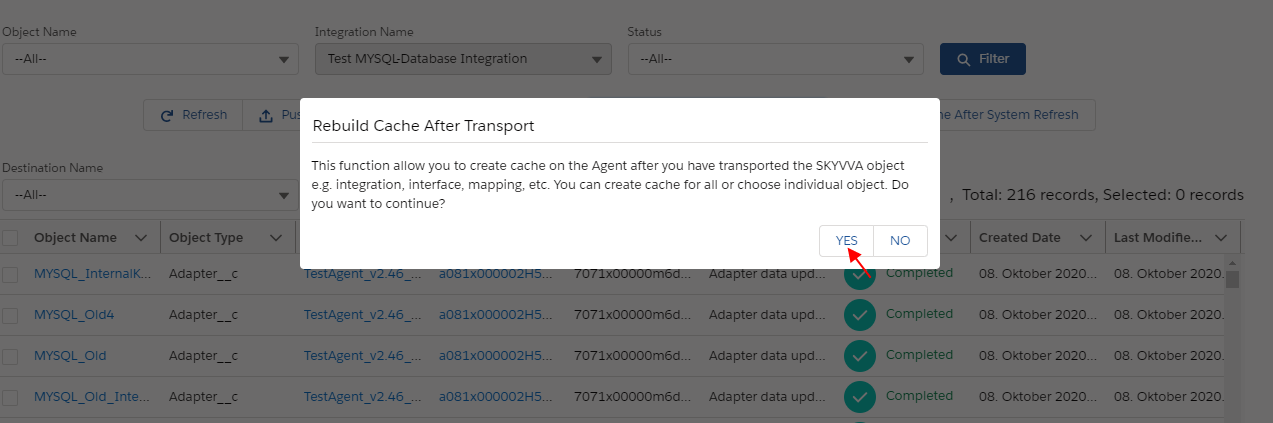
- When the user clicked on the yes button it will navigate to

Here user can see the selected object

Rebuild Cache after System Refresh This function will use after the salesforce system refresh. After salesforce system refresh sObject in target Org. will drop and insert new. We need this function to removed old cache records on the Agent side in the target Org. and insert new ones.
- Go to tab Configuration to remove connection destination comes from the source Org. e.g. Production
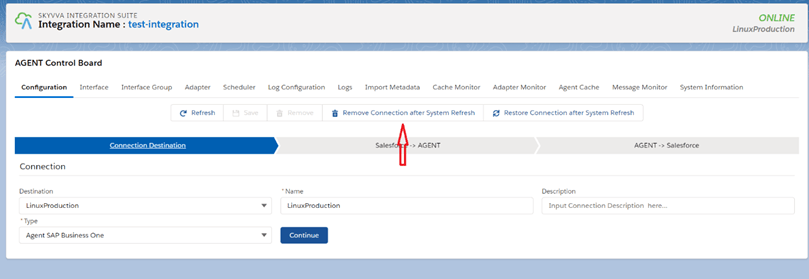
- Please make sure we removed all connection destinations that come from the source org.
- If we unable to delete like in the picture below

- Go to tab Adapter and change every adapter used in this connection destination to another connection destination.
- Before change connection destination
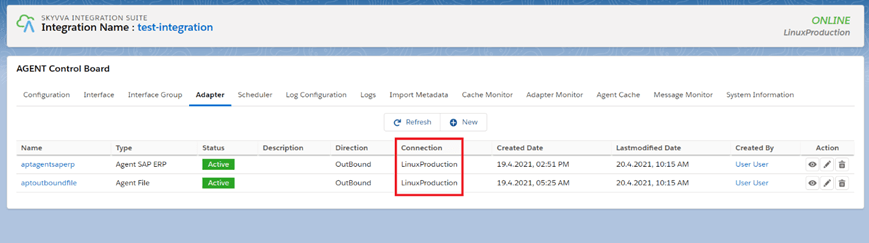
- After changed
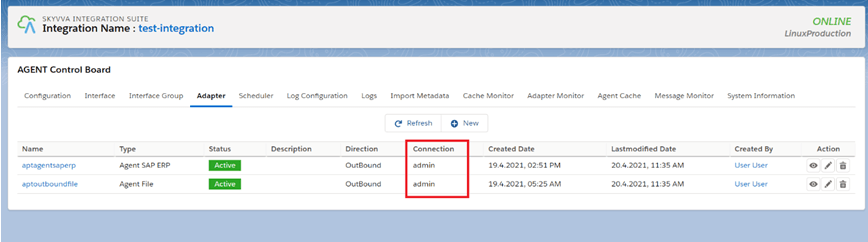
- Now user removed the connection destination come from the source Org. successfully.
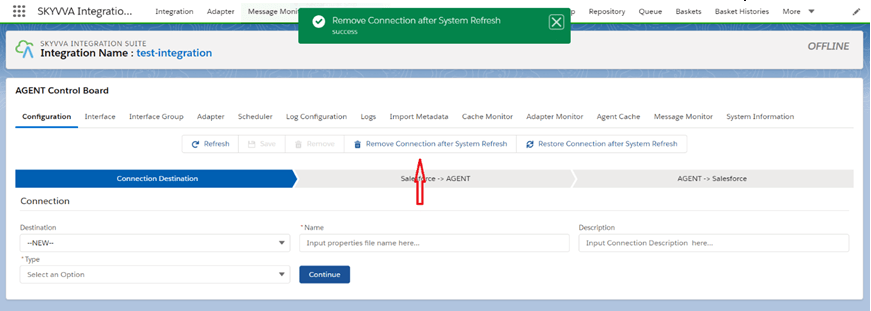
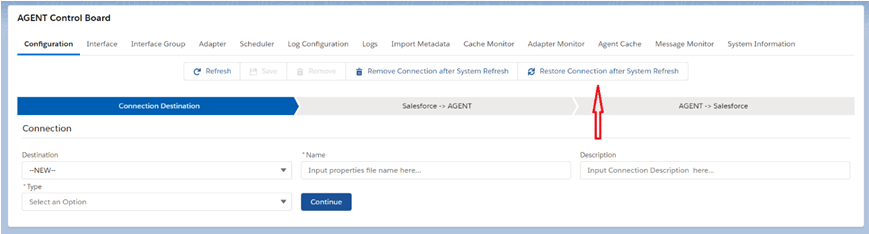
- Restore old connection/restore Connection after System Refresh
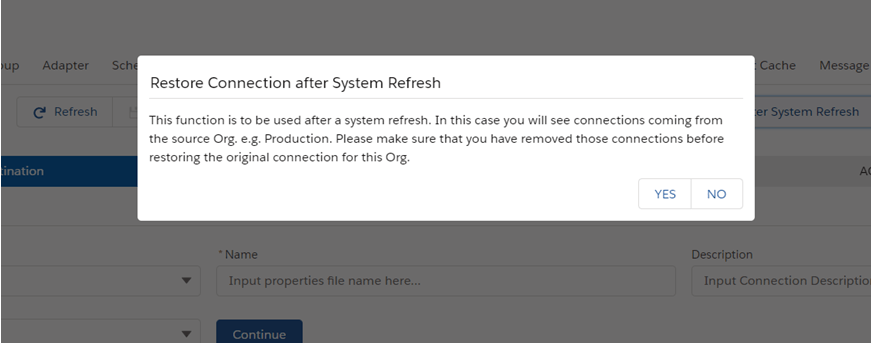
we use Restore Connection after System Refresh to restore old connection from Agent side to use it again salesforce
- Read Instruction
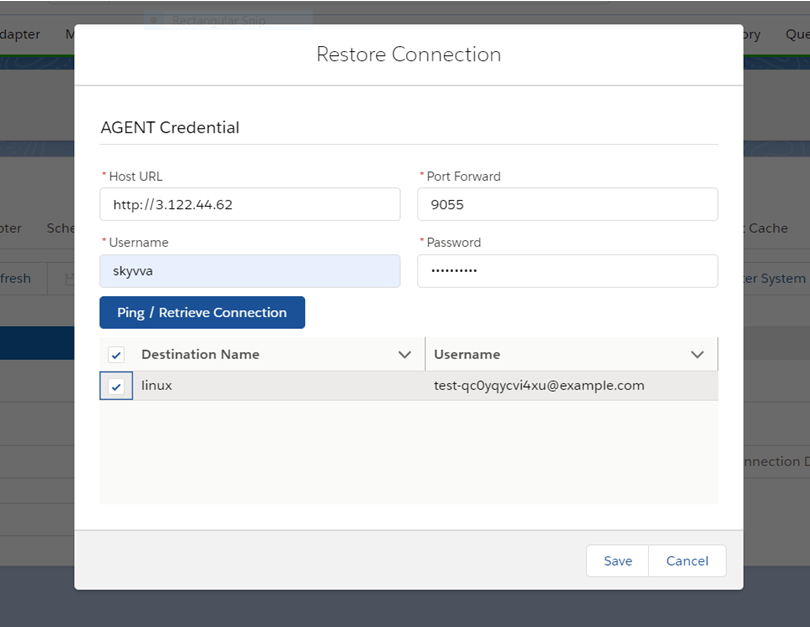
- Go to tab adapter again and put every adapter we have been changed with this connection destination.
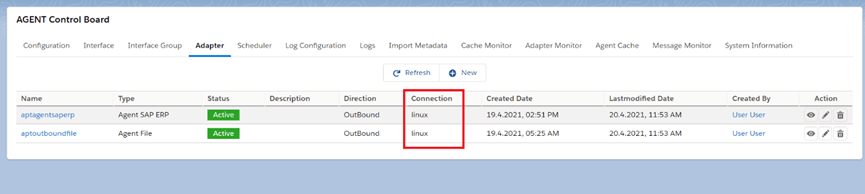
- Go to tab Cache Monitor and use the button Rebuild Cache after System Refresh
- Read Instruction


Summary
This tutorial is learning about whenever a user creates a new integration and saves it then it needs to be pushed down to Agent immediately. When integration is changed and the user clicks on the SAVE-Button then again we need to push down Agent. Thus we guarantee that the data are always the same in Agent as in Salesforce by using the Synchronize cache, Rebuild Cache After Transport buttons, Rebuild Cache after System Refresh, Restore Connection after System Refresh.