How to use execute outbound interface group ?
Learning Objectives
- Explain what is interface group.
- How to create it and how to use it.
- We can now execute the group consisting of many interfaces.
Introduction
What is an interface group? An interface group is a unit to groups logical interfaces together. For example, you can group interfaces that are related to each other e.g. Account and Contact into one interface group. The interface group is the object the user defines at configuration time.
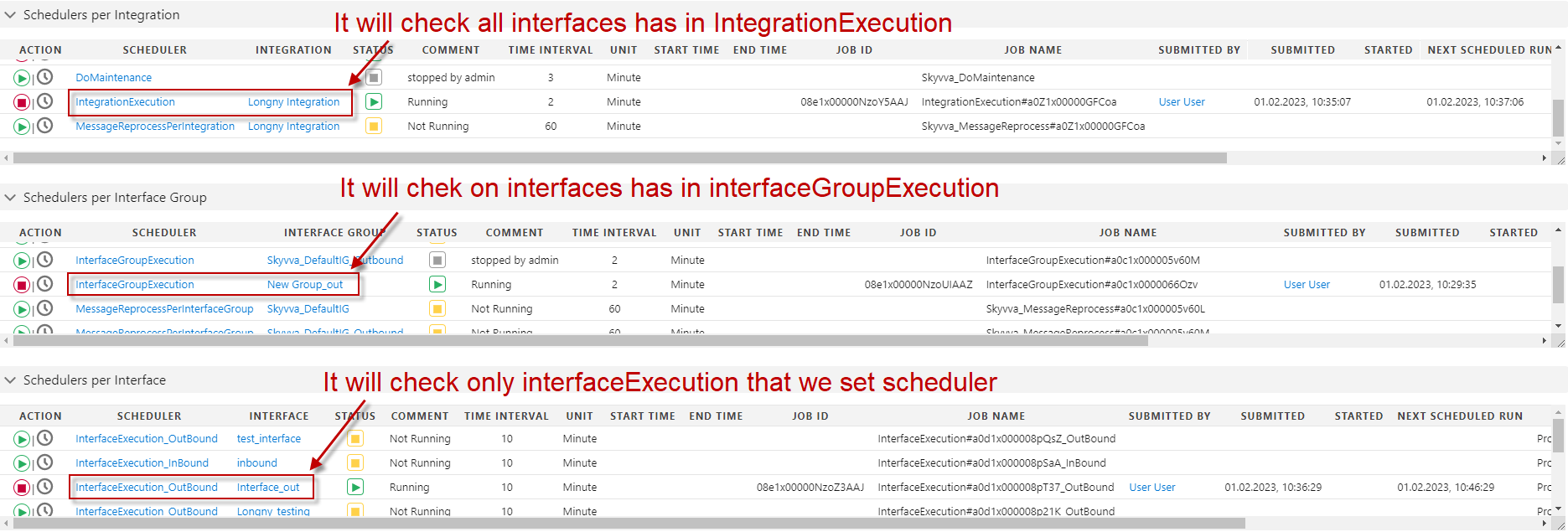
Interface Execution Scheduler?
This scheduler is only used with the outbound interface and is generated automatically for any outbound interface inside an integration. It uses the SOQL in the field “SOQL Query for filter sObject”. In this field, the user can write the SOQL statement which filters sObject to be passed on the method invokeCallout2(). The scheduler uses the method invokeCallout2() to execute the outbound interface. If the SOQL is not powerful enough to solve the requirement of a customer then they can use apex class to write their own logic for data selection. Then the flag “Use Apex Class” has to be set and in the field “Apex Class for Filter sObject” an apex class has to be specified. Step 1: We have to create the following data for inbound processing:
- Create Metadata for message type -> Create I structure Repository in it -> Create appropriate message type.
- The next step is to create Integration.
- Then Create an Inbound Interface where we have to select your Metadata, Repository, and message type.

Step 2: Do mapping and save it.

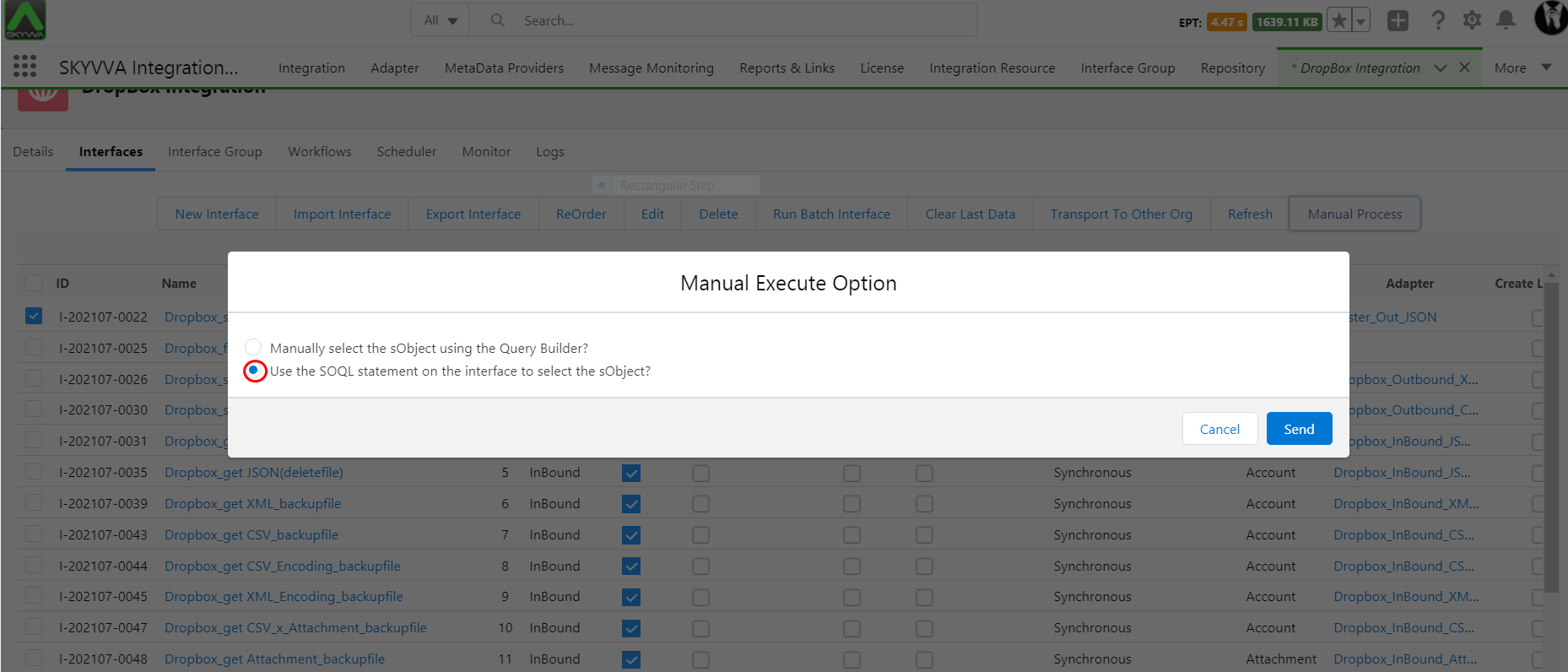
Step 3: Select the interface and select the manual process as shown in Fig.

Step 4: Select the execute option and select send button.
Create Outbound Interface:-
- Select Operation type- Query/ PullQuery.
- Processing mode- Asynchronous.
- Select Outbound Adapter.
- In Section “SOQL Query for filter sObject”
- Filter Query:- SELECT Id FROM Account WHERE BillingCity = ‘PhnomPenh’ AND SAP_Sales_Org__c =”
- Interface to change condition:- Enter Inbound Interface ID.
- In the section “SOQL Query to select sObject data” or by using “Query Editor” we can write the query:-


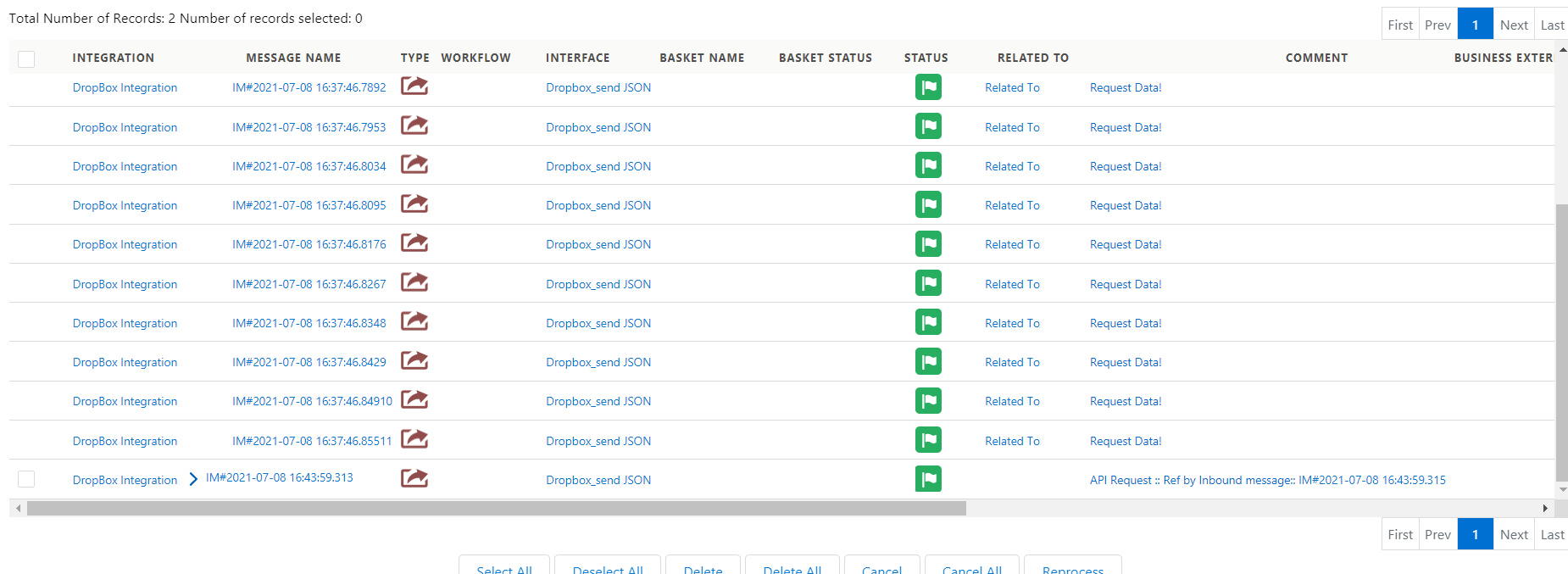
Check Result on Message Monitoring :

Step 6:
Select the interface group and manually process it.

Check on message monitoring.
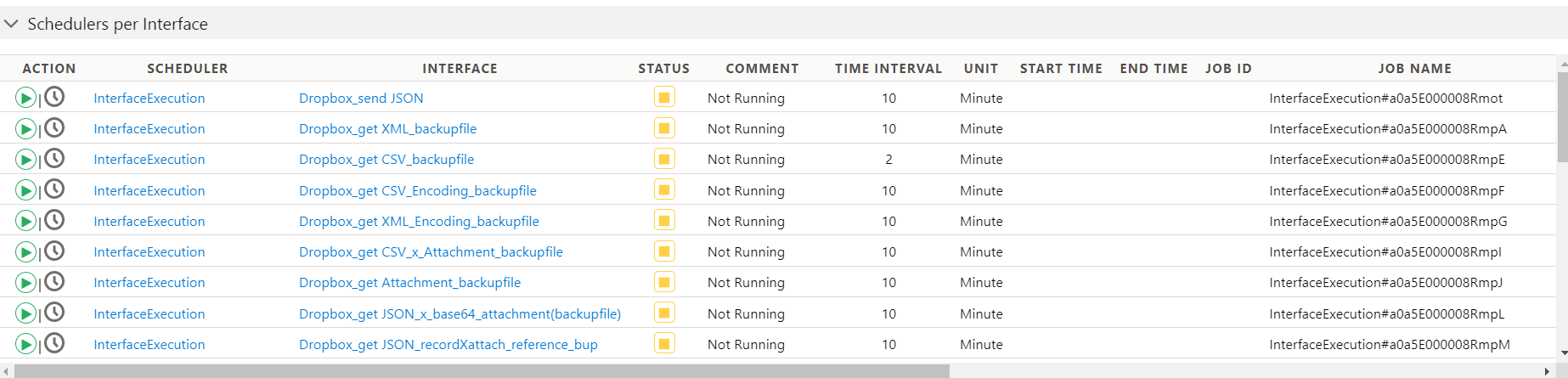
Run the scheduler:-


How to Execute Outbound Interface?
SKYVVA application support for outbound interface execution scheduling and manual processing with parameter expressions based on the last run date or creation date.
- Scheduling Outbound Interface Execution:
SKYVVA application allows users to schedule outbound interface executions based on specified time intervals (e.g., hourly, daily, weekly) or custom schedules.
- The user can configure the outbound interface in the SKYVVA application to run at the desired schedule as per the business requirement.
- Manual Processing:
Manual processing involves allowing users to trigger interface executions manually when needed as per the business requirement.
- SKYVVA application provides a user interface or API for initiating manual runs.
- Parameter Expressions:
Parameter expressions dynamically pass values to the outbound interface based on certain conditions.
- In the context of the last run date or creation date, Integrate the calculated parameters into the outbound processing. This depends on the specifics of your system. The user needs to configure them in the interface configuration.
- Last Run Date/Creation Date:
To utilize the last run date, the user stores this information in the configuration file and retrieves it as needed to calculate the date range for the interface.
- On the other hand, the creation date might refer to the date when a specific record was created, and the user can filter data based on this date.
Two parameter expressions in the system: {!_SKYVVA__RecordCreationDate} and {!_SKYVVA__RecordModificationDate}. These expressions are used to capture and reference date and time information related to records in the system. Here's a breakdown of how these parameter expressions are being used:
- {!_SKYVVA__RecordCreationDate}:
This expression is used to capture the datetime of the latest record creation in the SKYVVA application.
- It likely holds the timestamp when the most recent record was created.
- {!_SKYVVA__RecordModificationDate}:
This expression is used to capture the datetime of the latest record modification in your SKYVVA application.
- It likely holds the timestamp when the most recent record was modified.
How to Execute Outbound Interface By Scheduler?
Business Scenario: Test with 1000 records to send data out by InterfaceExecute.
To perform a test with 1000 records to send data out using InterfaceExecute. Here's a general outline of steps the user has to follow for testing with 1000 records:
- Data Preparation: First, ensure that the user has the 1000 records want to send out ready in a suitable data format (e.g., CSV, JSON, database, etc.). Make sure that the data is properly formatted and clean for testing.
- InterfaceExecute: Identify the interface method the user wants to use to send the data out using InterfaceExecute. This depends on the SKYVVA application.
- Data Validation: After sending the data, validate that it has been processed correctly and that the results match user expectations.
[su_box title="Expectation: " box_color="#2a8af0" title_color="#000000"]When the InterfaceExecute scheduler runs, it will take 1000 records with NewCreateDate or LastModifyDate to send data out. [/su_box] The scheduler "InterfaceExecute" that the user wants to run. The user expectation is that when this scheduler runs, it should process or take 1000 records based on either "NewCreateDate" or "LastModifyDate" and send that data out.
Here's a breakdown of what this expectation means:
- Scheduler: "InterfaceExecute" is the scheduler or process the user needs to run.
- Number of Records: The user expects it to process or select 1000 records.
- Criteria for Record Selection: The records are to be selected based on either "NewCreateDate" or "LastModifyDate." It seems like the user wants to filter records based on the values in these date fields. The user might be looking for records that were created or modified within a certain time frame.
- Data Sending: After selecting these 1000 records, you expect the scheduler to send this data out. The method and destination for sending the data are not specified, so it could involve various forms of data transmission like sending it to another system or exporting it to a file.
Required step:
- SAP CPI Outbound Adapter
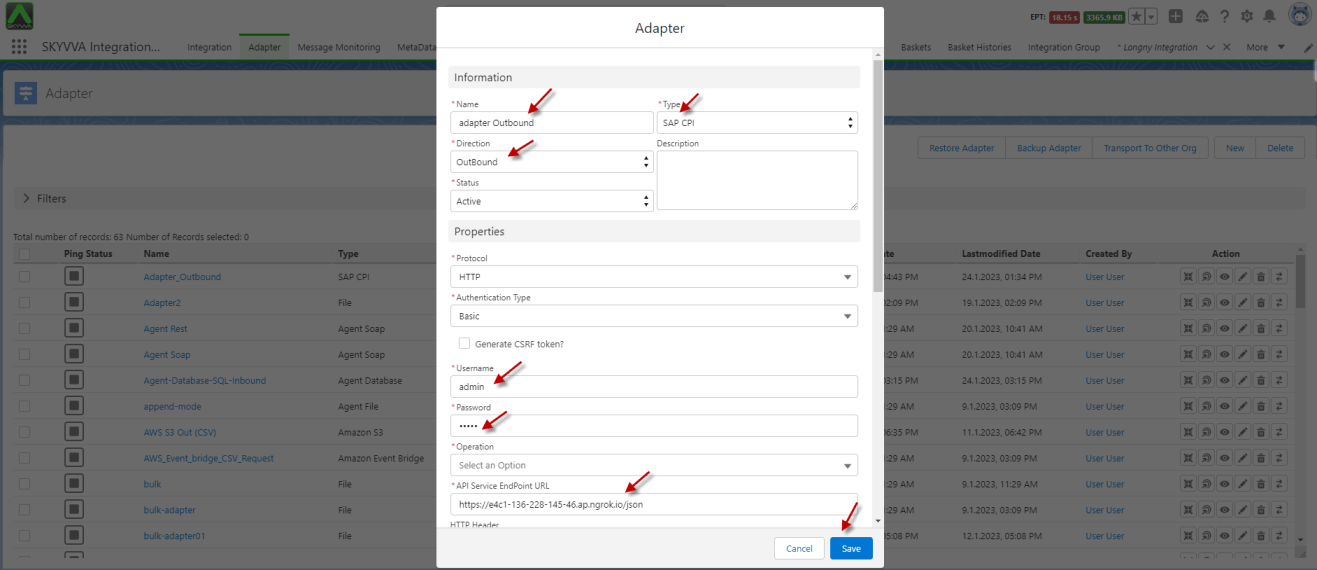
- Created the Outbound Interface
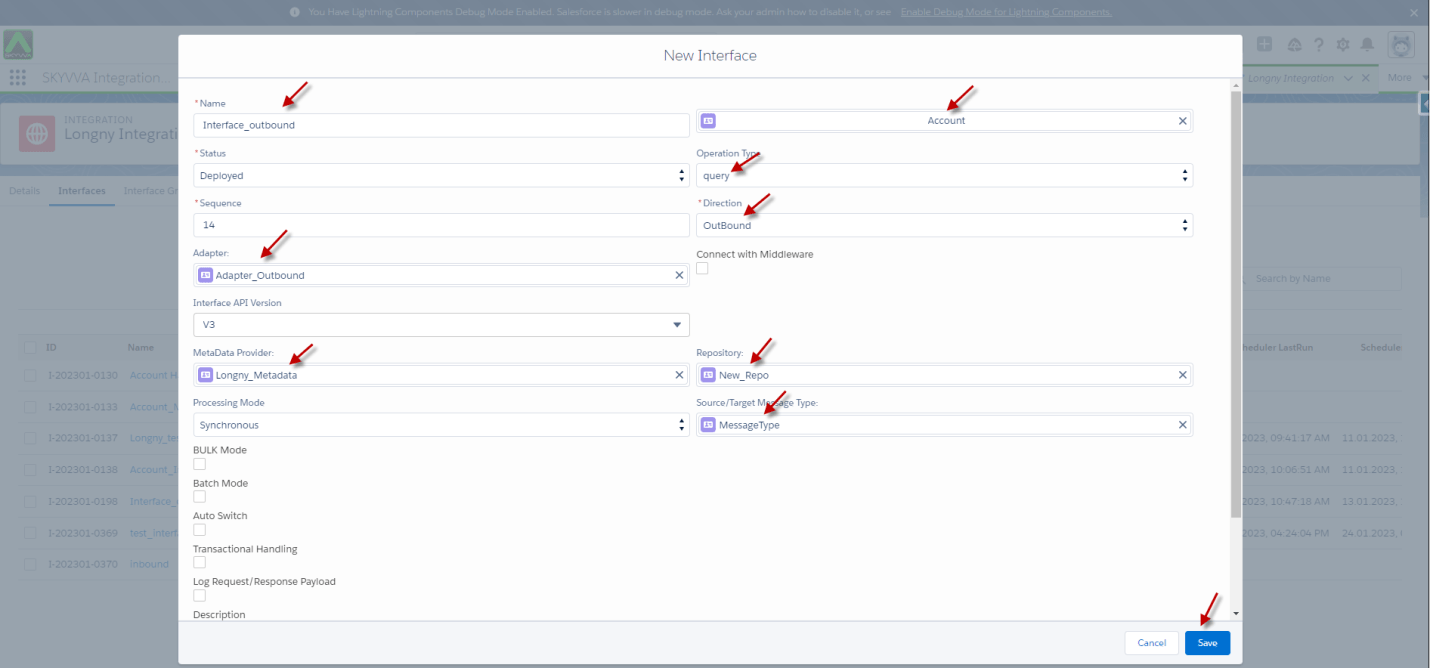
- Mapping

- Go to SOQL Query for filter sObject section
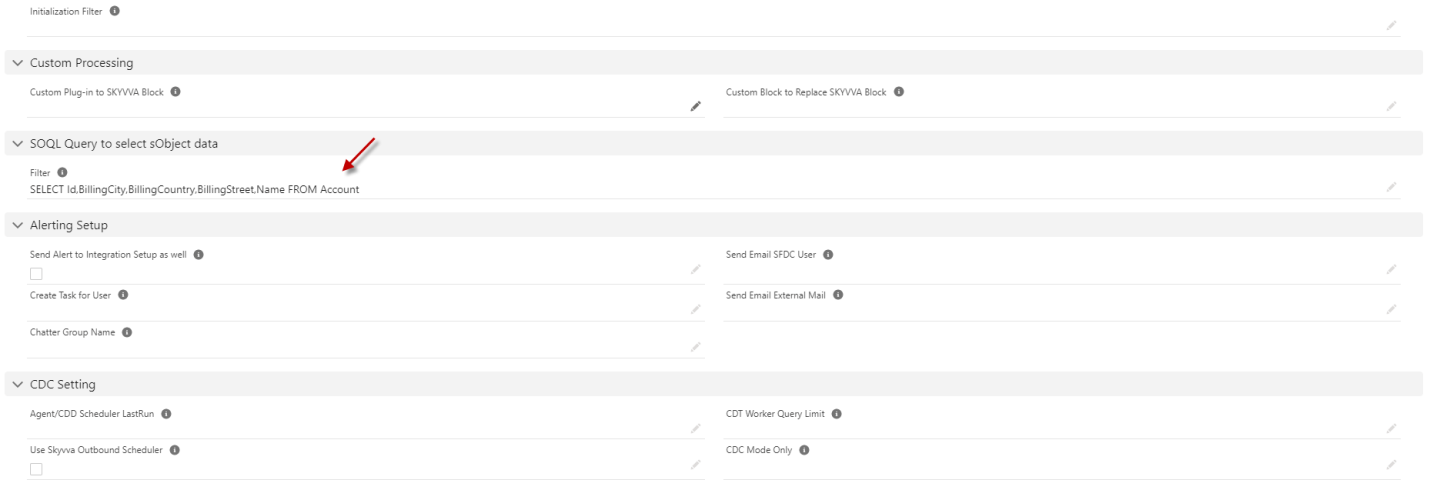
- Please add the query condition
{!_SKYVVA__RecordCreationDate}: use for latest records creation date time
{!_SKYVVA__RecordModificationDate}: use for latest records modification time

- Then go to the Integration -> Scheduler Button let's start the InterfaceExecution scheduler
- After the Scheduler Process is Completed it will send a message monitoring
Message Monitoring

[su_box title="Result:" box_color="#2a8af0" title_color="#000000"]After the InterfaceExecute scheduler run is completed, it will take 1000 records with NewCreateDate or the LastModifyDate to send data out.[/su_box]
A scheduler and record selection criteria based on either the "NewCreateDate" or the "LastModifyDate" fields. After the "InterfaceExecute" scheduler run is completed, the process will select 1000 records that meet the specified criteria to send data out.
Here's a breakdown of the key components:
- Scheduler: There is a scheduler called "InterfaceExecute" that runs periodically or as part of a specified workflow.
- Record Selection: The process involves selecting records based on two date-related fields: "NewCreateDate" and "LastModifyDate."
- Criteria: It is the process of selecting records that either have a "NewCreateDate" or a "LastModifyDate" that meets certain criteria.
- Data Sending: Once the 1000 records meeting the criteria are selected, they are prepared for sending data out. This could involve sending them to another destination which the user defines as per business scenario.
How to Execute Outbound Interface By Manual Process?
The business scenario where an integrated SKYVVA application. The user experienced a record update due to a manual process. This is a common practice for data updates.
Here's a breakdown of the information you provided:
- Record Update: A record within the SKYVVA application has been updated. This means that some information associated with a particular data entry or transaction has been modified.
- LastModifiedDate: "LastModifiedDate" is a date field that indicates when the record was last modified. It helps keep track of changes made to the data.
- Manual Process: The update to the record is done manually by a user.
[su_box title="Expectation:" box_color="#2a8af0" title_color="#000000"]We use the manual process to transfer records that have the latest updated[/su_box]
- Now I will change one record for the test
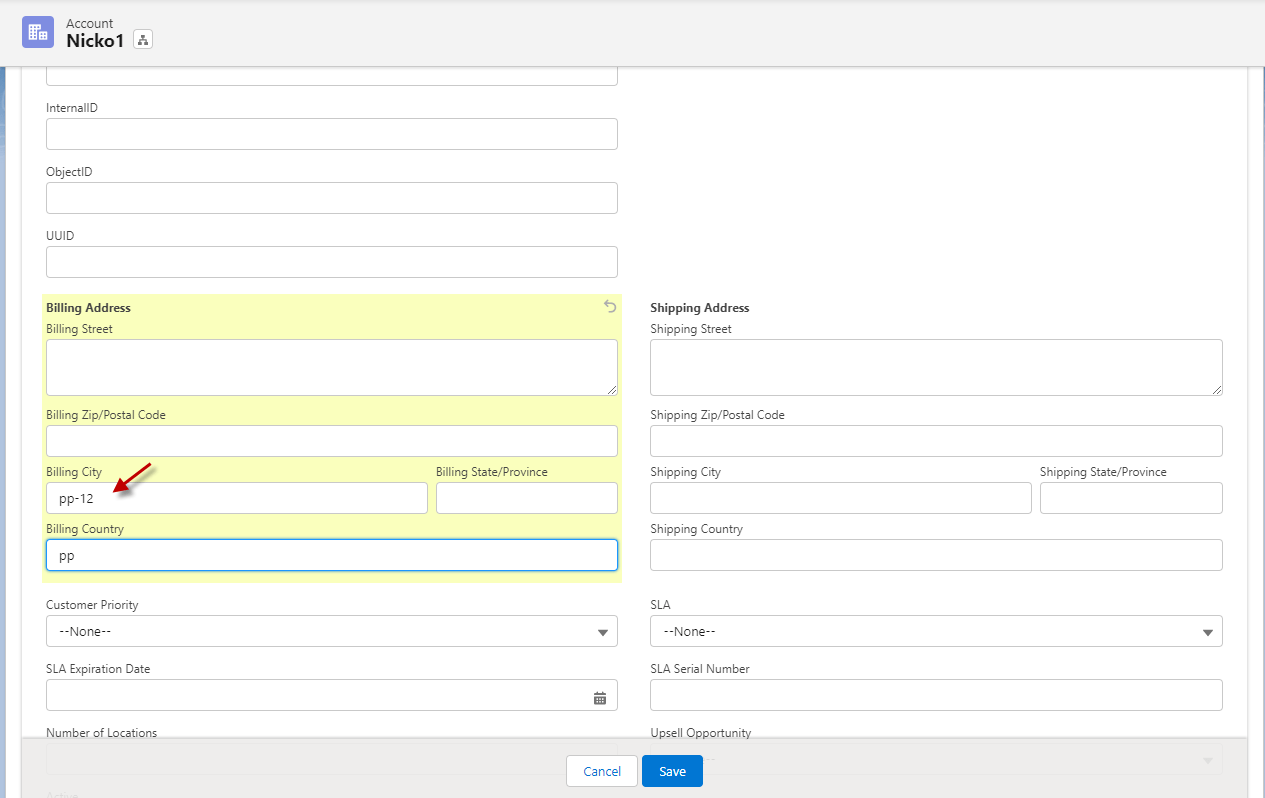
- Then go to integration click interface and select manual process
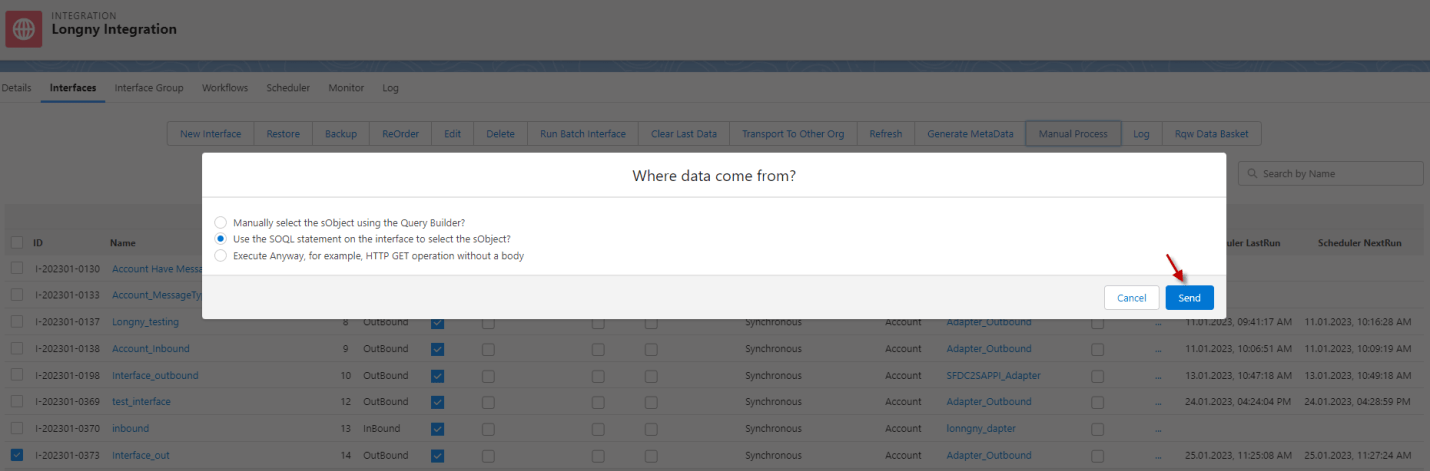
- After the Manual Process is Completed it will send a message monitoring
Message Monitoring

The results related to transferring records based on their LastModifiedDate field. Data processing means that the user has to send out data that has been updated most recently.
Here's a breakdown of the statement:
- "It will transfer records": This part indicates that there is a process that is responsible for transferring or sending records/data.
- "that have the latest updated (LastModifiedDate)": This specifies the criteria for selecting records. Records that have the most recent updates are being targeted for transfer.
- "to send data out": The ultimate goal of this process is to send the selected records/data to some destination.
[su_box title="Result:" box_color="#2a8af0" title_color="#000000"]It will transfer records that have the latest updated (LastModifiedDate) to send data out.[/su_box]