1. How to use the New Agent File adapter?
[su_box title="Note" box_color="#2a8af0" title_color="#000000"]
- The user has to assign SkyvvaAllPermissions set to the current user.
- The user has to add skyvvasolutions namespace inside callout logic.[/su_box]
Introduction
Agent File adapter uses to integrate data from file to SFDC and from Salesforce to file. The File type that Agent support is CSV, XML, and Excel that can be integrated with their content. A File Adapter is an object used to manage file-based information through Clarify. File Adapters aid in the management of file-based resources: they can create, edit, delete, read, or write files on the local file system or on mapped network drives.
How Agent File Works
Business Processes use Agent File Adapter to perform file-based operations on data. Writing data immediately after transformation activity is the most common use of File Adapter. In addition to the data, Business Processes can supply runtime directions to the adapter. For example, a user may want to supply the name of a file to be written to the local file system. The Business Process can supply the file name (and other common runtime values) to the File write Adapter.
Prerequisites
- The user has to assign a SkyvvaAllPermissions set to the current user.
- The user has to add skyvvasolutions namespace inside callout logic.
- Supports Asynchronous mode, Asynchronous mode is a switching technique used by SKYVVA that uses asynchronous time-division multiplexing to encode data into small, fixed-sized cells. An Asynchronous mode is working as when you make a request and whatever the result. Whether you failed or success just call the function SKYVVA gonna give you a call back code. So Asynchronous never waits for a call to come back in order to execute the rest of the code.
Business Flow
Assign SkyvvaAllPermissions to current User
- Go to SETUP Users
- Click on Username
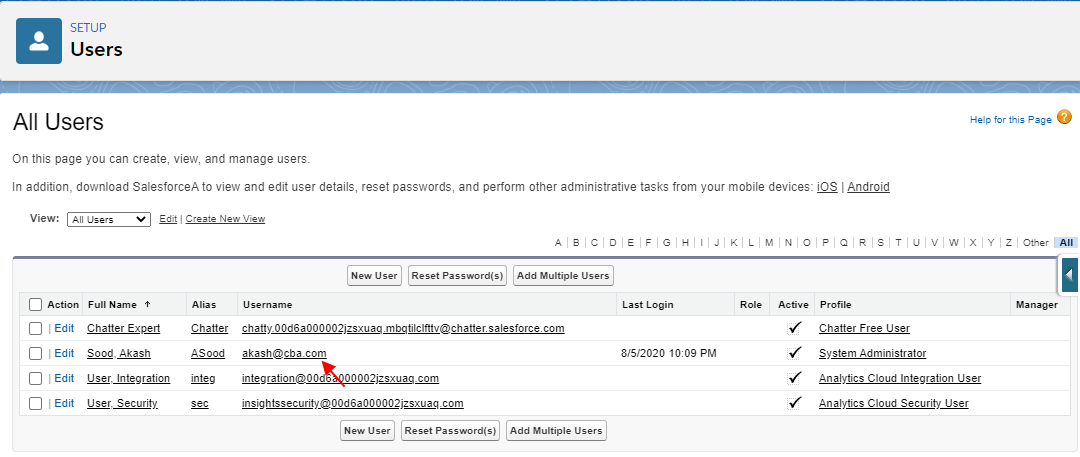
- Scroll Down to Edit Permission Set Assignments
- Click on the Edit Assignments button
- Add SkyvvaAllPermissions to Enable Permission Sets
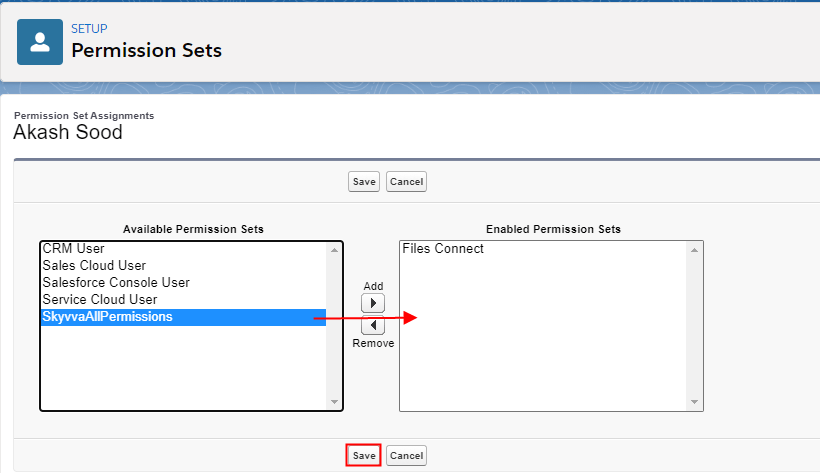
- Click on save

Creating an Agent File Adapter
Outbound Asynchronous mode
- Create an Integration & Interface
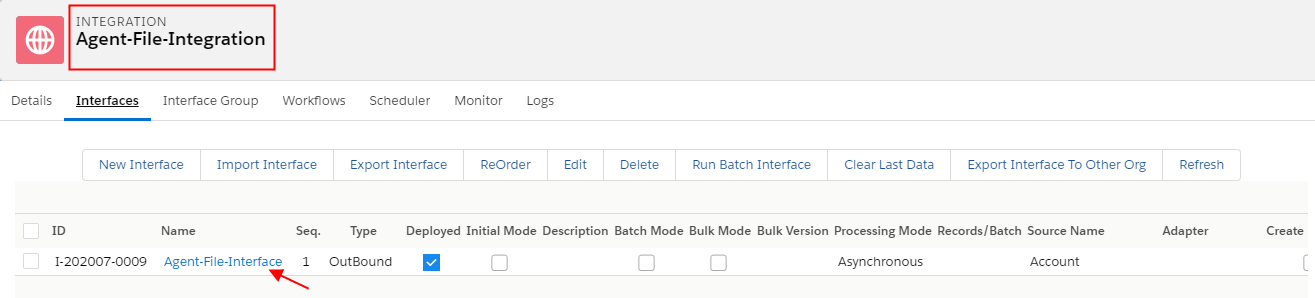
Now Click on Adapter Outbound
- Create Outbound Adapter Type Agent File
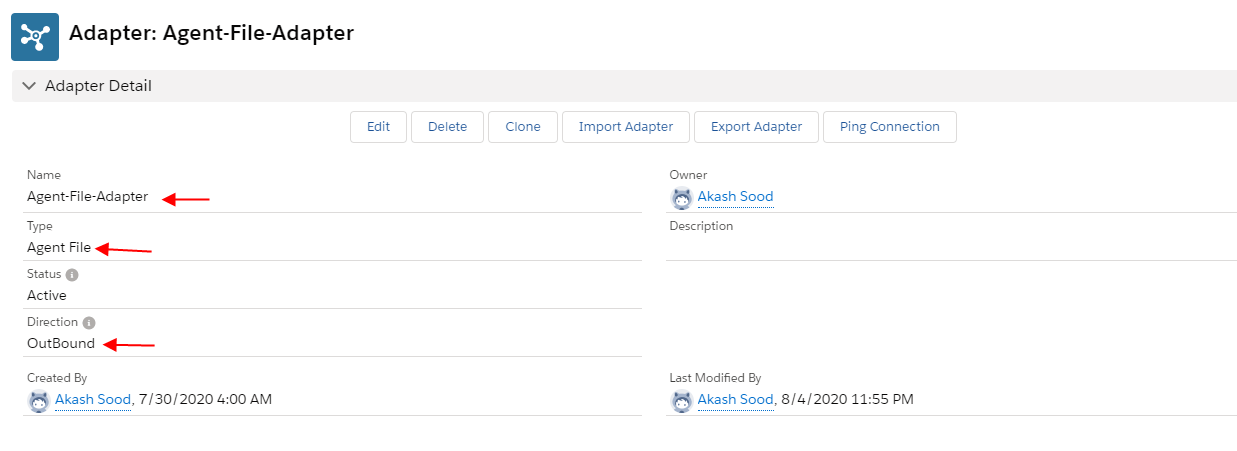
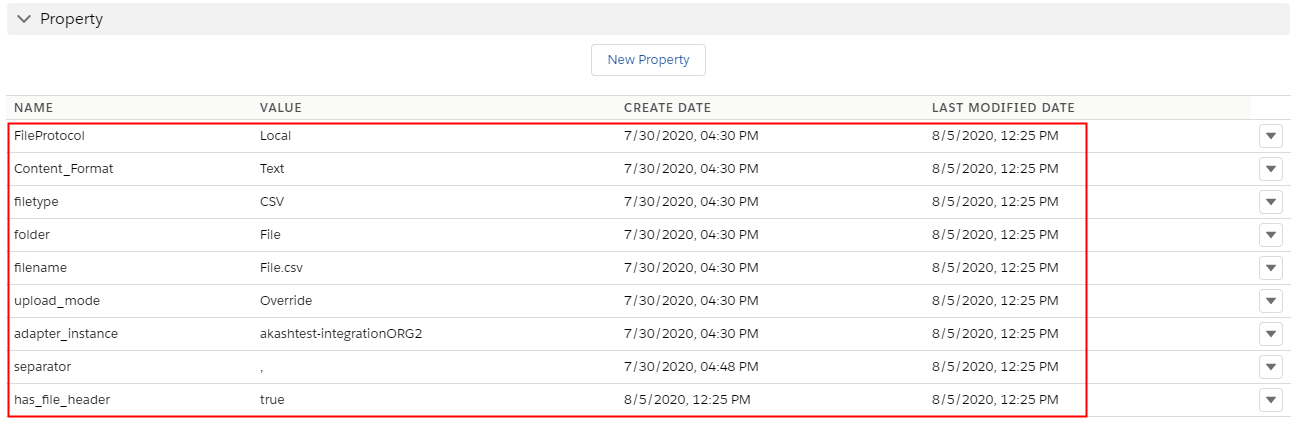
- Adapter property made a connection successfully with Agent and Agent File Adapter
- upload_mode —Override
- filetype —CSV
- FileProtocol—Local
- Separator— (,), (;), (Tab), (I)
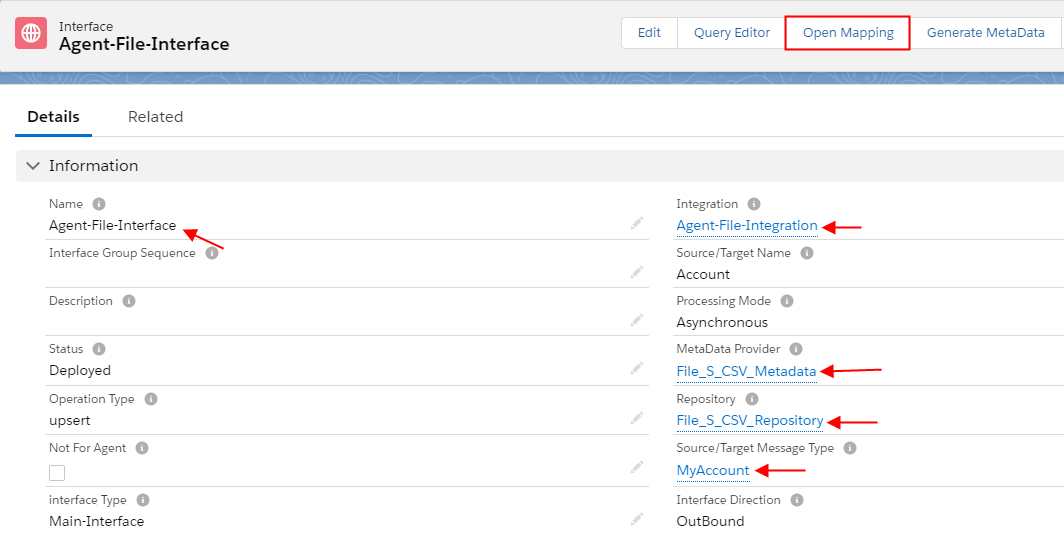
Now the user has to go to the Interface Detail page
- Scroll down to Outbound Setup Section
- Select Adapter-File-Outbound user just created

- Click on Mapping Button
[su_box title="Package Size" box_color="#2a8af0" title_color="#000000"]Define package size based on how many records user required to process at a time on Processing Mode = Asynchronous[/su_box]
- Map the target fields according to Account Salesforce source sObject
- Click on Auto Mapping button
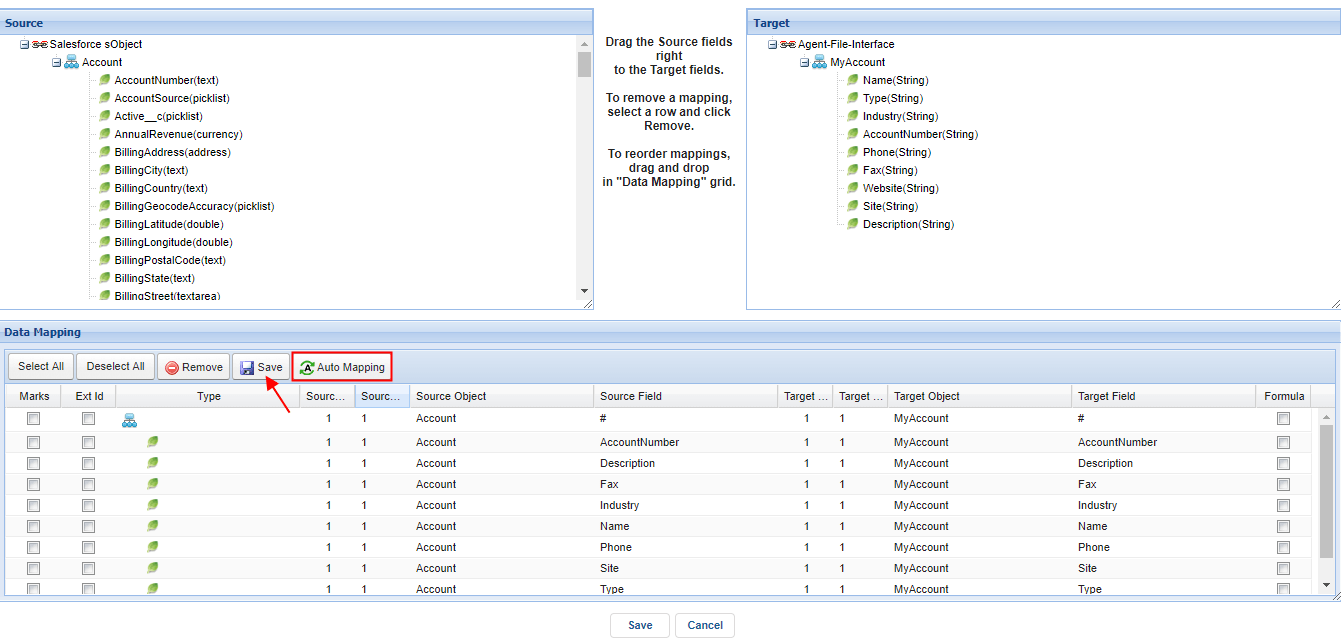
- Save
Click on Agent Control Board Tab –How to use the Agent Control Board?
Since the user now completely understand; How to use the Agent Control Board, by hitting the upper link, now we understand the Architect of the Agent Control Board now follows below on Salesforce org.
- Click on the Cache tab
- Select your Integration Name
- Click on a Push button

Now Go to Setup and open Developer console

Open the anonymous Window Ctr+E
- This triggered Callout code shows existing records in Message Board
- String[] ids= new String[]{'0013u000017a5B3AAI'}; (means that User has to Pass Account Record Ids) it can be more than one.
- List result = skyvvasolutions.Iservices.invokeCalloutV3('Agent-File-Integration','Agent-File-Interface',ids,'AUTO',c)(means that user has to write skyvvasolutions namespace because this invokeCalloutV3 method has written on our SKYVVA Product). It is a must to write skyvvasolutions namespace in dev/production Org. No need to write skyvvasolutions namespace in Sandbox because SKYVVA is a managed package.
- On the other side of code in which the user has to pass an argument user has to mention 'Integration Name','Interface Name'
[aux_code language="javascript" theme="tomorrow" title="" extra_classes=""]skyvvasolutions.CallOutControl c = new skyvvasolutions.CallOutControl(); c.returnJSONComplete=true; c.actionDoIntegrate=true; c.isCreateMessage=true; String[] ids= new String[]{'0013u000017a5B3AAI'}; List result = skyvvasolutions.Iservices.invokeCalloutV3('Agent-File-Integration','Agent-File-Interface',ids,'AUTO',c);[/aux_code]
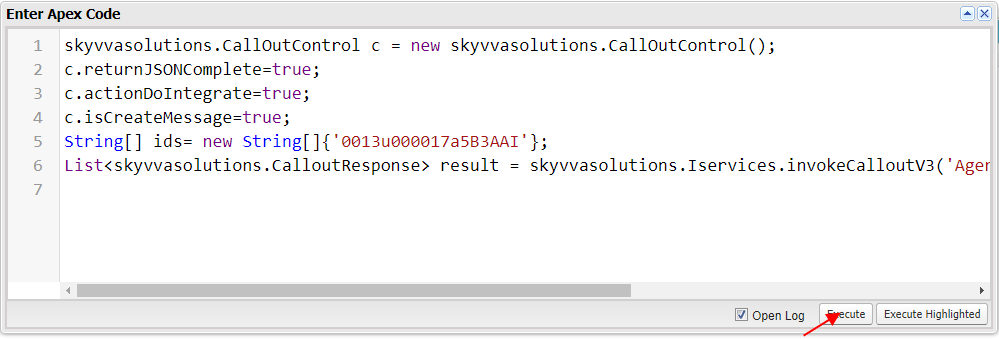
- Then click on Execute button
Now Go to Message Monitor Tab
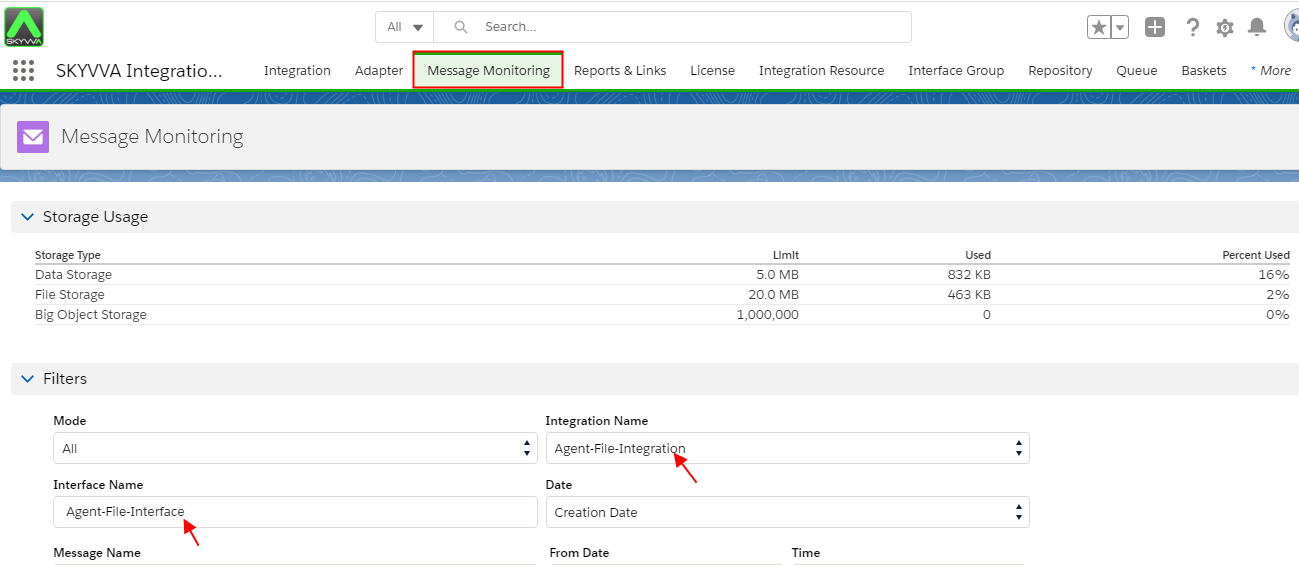
- Scroll down to Messageboard
- Click on the search button
- Record created successfully

Summary
Users have learned about How to use the Agent File adapter. User has to follow the upper steps to understand New Agent File Adapter is always work with Processing Mode=’Asynchronous’ and CSV and EXCEL File is work with flat mapping and XML file is work with hierarchical mapping).