How to use the OAuth2 client-credential flow?
Starting with SKYVVA SAP PI/PO connector module v2.3.6, you can authenticate from SAP PI/PO to Salesforce using the OAuth2 Client-Credentials flow in addition to the existing Username-Password flow. This article explains when to use it and how to configure it.
Why we added this flow
Salesforce no longer supports the legacy Connected App for new technical integrations. The replacement, the External Client App, does not offer the Username-Password flow; for a server-to-server integration such as SAP PI/PO, use the Client-Credentials flow. If you are setting up a new Salesforce integration today, or your Salesforce administrator has migrated an existing integration to an External Client App, you must use this flow — Username-Password authentication is not available there.
Upgrading the module to v2.3.6 does not change existing channels: channels using Username-Password against a Connected App keep working as before. The two flows run side by side; a single channel parameter (OAuth2Flow) selects which one applies to that channel.
Note: Salesforce is retiring the OAuth 2.0 Username-Password flow for Connected Apps as well (release update Retirement of OAuth 2.0 Username-Password Flow for Connected Apps — your org shows the enforcement date under Setup → Release Updates). Plan the move to Client-Credentials for both places where the channel logs in — see The SAP REST adapter logs in separately below.
Prerequisites
1. Salesforce — External Client App
Create an External Client App in Salesforce, enable the Client-Credentials flow, and assign a Run-As user. The detailed steps live in the Salesforce documentation — this is a Salesforce-side setup and not a SKYVVA feature, so we don't duplicate Salesforce's documentation here. After the app is created, copy the two values you will paste into the SAP PI/PO channel:
- Consumer Key (the OAuth
client_id) - Consumer Secret (the OAuth
client_secret)
You will also need the OAuth2 token endpoint for your Salesforce org. The URL pattern is:
https://<your-domain>.my.salesforce.com/services/oauth2/token
For sandbox orgs, replace the host with the sandbox my.salesforce.com host that Salesforce assigns to your org. The path (/services/oauth2/token) is the same in production and sandbox.
2. SKYVVA managed package on Salesforce — version 2.44 or later
From v2.3.6 the module reads the field Max Number Of API Retry on the SKYVVA Interface object:
skyvvasolutions__Max_Number_Of_API_Retry__c
This field is part of the SKYVVA managed package from version 2.44 onwards, so your Salesforce org needs SKYVVA 2.44 or later. To check, open Setup → Object Manager → Interface → Fields & Relationships and look for Max Number Of API Retry (your SKYVVA version is shown under Setup → Installed Packages). If the field is not listed, upgrade the SKYVVA managed package before you deploy v2.3.6 to your SAP PI/PO system.
You cannot add this field yourself. Fields namedskyvvasolutions__…belong to the SKYVVA managed package. A field you create in your own org does not get theskyvvasolutions__prefix, so the module still cannot find it.
If the field is missing, the module cannot read the interface settings from Salesforce, and messages processed with Skyvva Batch, Skyvva Bulk or Skyvva Autoswitch can fail with Cannot find Interface='<interface>' and integration:'<integration>' — see Troubleshooting below.
The field sets how many times the module retries one of its own calls to Salesforce after a temporary error. Leave it empty to use the default of 5 retries; a value of 0 also means 5.
3. SAP PI/PO — V3 REST receiver channel
This article assumes you already have a working REST receiver channel that uses the Skyvva/V3/RestIntegration module. For the base setup, see 3. Operation Integrate in the Migration Guide, section 3.3 Creating the REST receiver channel.
Note: the article How to Setup the SKYVVA Module Parameters in SAP PI/PO with V3? describes the older SOAP moduleSkyvva/V3/Integration. The Client-Credentials flow is available only with the REST moduleSkyvva/V3/RestIntegration.
Switching to Client-Credentials changes how the channel authenticates — in two places, see The SAP REST adapter logs in separately below. Everything else (Operation, BulkPackageSize, payload format, interface, integration) is unchanged.
Channel parameters
Open your receiver channel's Module tab and configure the parameters below. The table is split into three groups: (a) parameters that select the flow, (b) authentication parameters specific to each flow, (c) parameters shared with the existing V3 setup.
Important: parameter names are case-sensitive. Copy them exactly from this table.
Flow selector
| Parameter Name | Parameter Value | Required | Notes |
|---|---|---|---|
OAuth2Flow | Client-Credentials | Yes — for this flow | Exact match: Client-Credentials or Username-Password. If the parameter is missing, the module defaults to Username-Password. Typos throw a fail-fast error at message start. |
Authentication parameters
| Parameter Name | Used for Client-Credentials | Used for Username-Password | Notes |
|---|---|---|---|
AuthorizationServerURL | Required | Required | OAuth2 token endpoint, e.g. https://<your-host>/services/oauth2/token |
ConsumerKey | Required | Required | The OAuth client_id copied from your Salesforce External Client App (or Connected App). |
ConsumerSecret | Required | Required | The OAuth client_secret copied from Salesforce. |
SforceUsername | Ignored | Required | For Client-Credentials, the Run-As user is configured server-side in the External Client App. If you set this parameter on a Client-Credentials channel, the module ignores it and emits one info-log line. |
pwdSforceLoginPassword | Ignored | Required | Same as above. Owned by the External Client App, not the channel. |
Shared with V3 base setup
These exist in your channel already if it follows the V3 setup. They are unchanged for Client-Credentials.
| Parameter Name | Example | Notes |
|---|---|---|
Integration | Ly-Na | Your SKYVVA integration name. |
Interface | V3RestIntegration_Bulk | Your SKYVVA interface name. Needed only if the message does not already carry it in an Interface element. Note the spelling: a parameter named Inteface is not read. |
Operation | Skyvva Bulk | The integration operation, e.g. integrate, Skyvva Batch, Skyvva Bulk, Salesforce Bulk. |
BulkPackageSize | 5 | Bulk processing package size — applies when Operation is a Bulk variant. |
AppVersion | 2.48 | The SKYVVA managed package version on Salesforce. |
SessionPooling.Active | X | Recommended — re-uses the OAuth session across messages and triggers automatic renewal when Salesforce returns INVALID_SESSION_ID. |
SessionGlobalFilePath | /usr/sap/<SID>/SYS/global | Path on the SAP-PO host where the OAuth session is cached as a .ser file. |
SforceShowSAPChannelParameters | X | Optional — when set, emits the parameter dump in the audit log (useful when troubleshooting). |
SforceRequestPayload | X | Optional — when set, emits the request body in the audit log. |
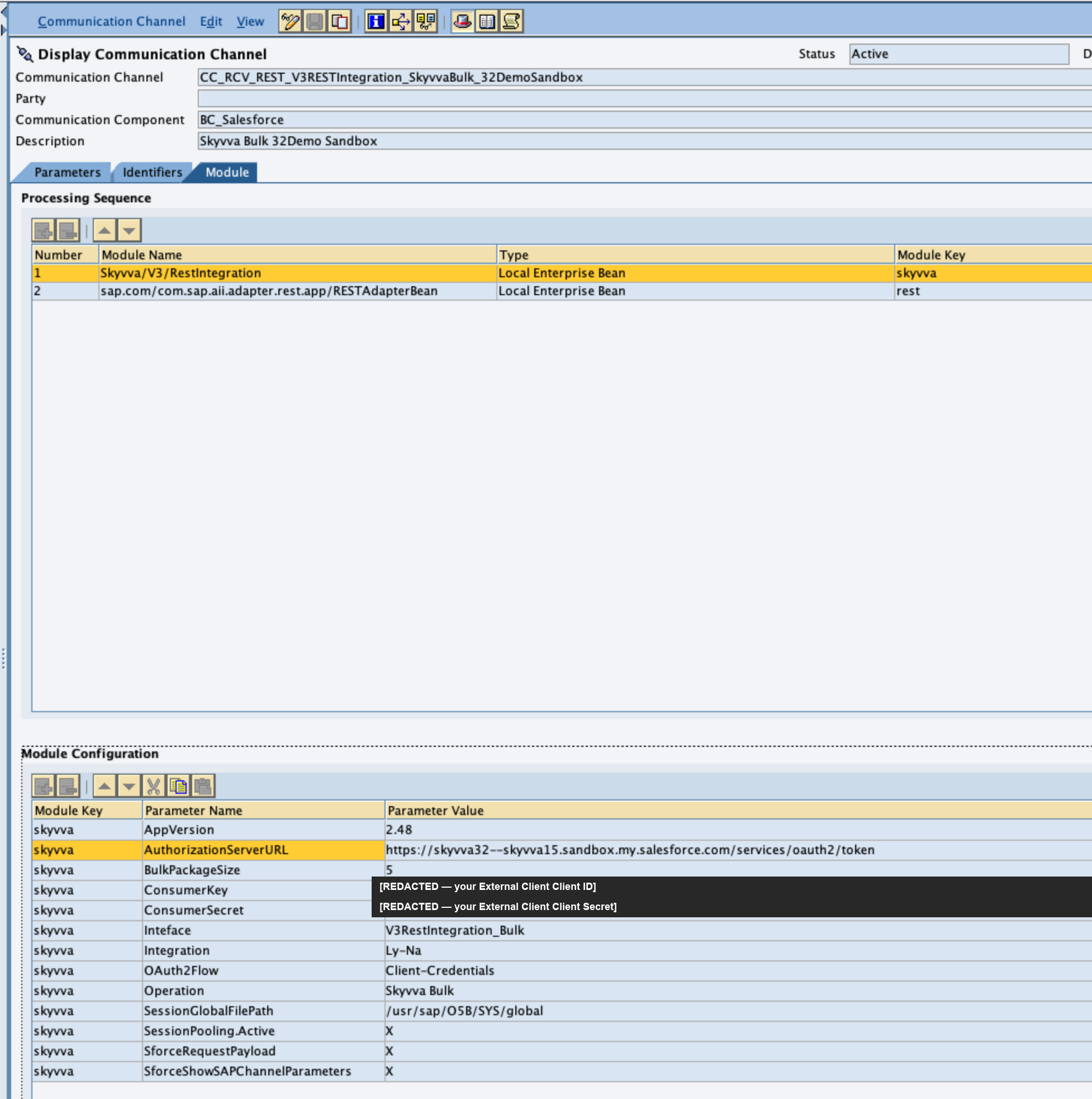
Screenshot example
The below screenshot show an example how to use the new parameter "OAuth2Flow". This screenshot is just ane example and you cannot copy the parameter name from it. Copy the parameter name from the table above.
About ConsumerKey vs. the legacy ConsumeKey name
Older SKYVVA versions read this parameter under the misspelled name ConsumeKey (missing the trailing r). Both names are accepted in v2.3.6 — the canonical name ConsumerKey is preferred (it matches the sibling ConsumerSecret), but channels using the legacy name keep working and emit a one-line deprecation message in the audit log. You can rename the parameter at your convenience.
The SAP REST adapter logs in separately — switch it too
A channel with the Skyvva/V3/RestIntegration module authenticates to Salesforce in two places, and the OAuth2Flow parameter controls only one of them:
| Component | Where it is configured | When it logs in to Salesforce |
|---|---|---|
| SKYVVA module | Module tab — the parameters above | Only for the calls the module makes itself: Skyvva Batch, Skyvva Bulk, Salesforce Bulk, Skyvva Autoswitch, and reading the interface settings. A channel whose Module tab carries no ConsumerKey / ConsumerSecret never logs in through the module. |
| SAP REST adapter | General tab — Authorize with OAuth | On every message, whatever the Operation — the REST adapter sends the request to Salesforce. |
So when you move a channel off Username-Password, switch the REST adapter as well. Its grant type Resource Owner Password Credentials Grant is the OAuth Username-Password flow (grant_type=password): it is not available with an External Client App, and the Salesforce retirement of that flow affects it in the same way.
Configure the REST adapter for Client Credentials
On the REST receiver channel's General tab, with Authorize with OAuth checked and OAuth 2.0 Grant Type Flow selected:
| Field | Value |
|---|---|
| OAuth 2.0 Grant Type | Client Credentials Grant (instead of Resource Owner Password Credentials Grant) |
| Authorization Server URL | Your My Domain token endpoint, e.g. https://<your-domain>.my.salesforce.com/services/oauth2/token — the same value as the module's AuthorizationServerURL |
| Client ID | The Consumer Key of the External Client App |
| Client Secret | The Consumer Secret of the External Client App |
| Scope | Optional — can stay empty |
Keep Use credentials and OAuth 2.0 access token as set to HTTP Header. The username and password fields of the previous grant type are no longer used. If Client Credentials Grant is not offered, check the support package level of your SAP PO system with your Basis team.
Set a token lifetime, or the REST adapter requests a new token for every message
The REST adapter reuses a token for as long as the expires_in value in the token response allows. Salesforce's token response contains no expires_in, so without a default the REST adapter cannot reuse the token and requests a new one — a new Salesforce login for the integration user — for every message.
Keep Use OAuth Token Caching checked (the default) and set a default token lifetime in seconds, per channel or globally:
| Level | Property | Type |
|---|---|---|
| Channel | OAuth20TokenExpiresIn | module property of the REST receiver channel |
| Global | GlobalSettingForOAuth2.0TokenExpiresIn | application property of the REST adapter |
If both are set, the channel value wins. Choose a value shorter than the session timeout that applies to the integration user in Salesforce — for example 3600 (one hour) with Salesforce's default two-hour session timeout. If these options are missing in the Integration Builder, SAP Note 2032345 describes the required update of the REST adapter metadata.
For the details, see SAP Help: Configuring OAuth (SAP NetWeaver 7.5, REST adapter).
Migration from Username-Password to Client-Credentials
If you have an existing channel using Username-Password and your Salesforce administrator wants to switch to Client-Credentials:
- Get the Consumer Key and Consumer Secret from the External Client App in Salesforce.
- On the receiver channel's Module tab:
- Add or set parameter
OAuth2FlowtoClient-Credentials. - Replace
ConsumerKeyandConsumerSecretwith the External Client values. - Set
AuthorizationServerURLto your My Domain token endpoint,https://<your-domain>.my.salesforce.com/services/oauth2/token. Change it even if it already ends in/services/oauth2/token:login.salesforce.comandtest.salesforce.comwork for Username-Password, but Salesforce rejects the Client-Credentials flow there. - You may leave
SforceUsernameandpwdSforceLoginPasswordin place (they are ignored), or remove them.
- Add or set parameter
- On the channel's General tab, switch the SAP REST adapter to Client Credentials Grant and set a token lifetime — see The SAP REST adapter logs in separately above.
- Save and activate the channel.
- Send a test message and confirm success (next section).
If the channel's Module tab carries no ConsumerKey / ConsumerSecret (the module only builds the request and the REST adapter sends it), skip step 2 — only the REST adapter needs to be switched.
The session cache file is keyed by the OAuth flow plus the Consumer Key, so switching flows does not collide with cache files from the previous flow. The first message after the switch performs a fresh OAuth token request and writes a new cache file named SKYVVA_SalesforceContainer_CC_<short-hash>.ser for Client-Credentials. Subsequent messages reuse the cached session until Salesforce invalidates it.
Verify success in the audit log
Send a test message and inspect the receiver channel's audit log. A successful Client-Credentials run shows these log lines (line numbers omitted for clarity):
skyvva_v2.3.6/SKYVVA/...RestIntegrationV3.4: Begin session handling (SKYVVA version 2.3.6)
skyvva_v2.3.6/SKYVVA/DisplaySAPChannelParams.1: [INFO] SAP-PO channel parameters:
  OAuth2Flow: Client-Credentials
  AuthorizationServerURL: https://<host>/services/oauth2/token
  ConsumerKey: <your-key>
  ...
skyvva_v2.3.6/SKYVVA/...RestIntegrationV3TransLogic.1: Begin transformation
skyvva_v2.3.6/SKYVVA/com.skyvva.xml.RestIntegrationV3TransHandler.4: (getNewSalesforceContainerPooling) check deadlock
skyvva_v2.3.6/SKYVVA/com.skyvva.xml.RestIntegrationV3TransHandler.5: (getNewSalesforceContainerPooling) determine user home cache : /usr/sap/<SID>/SYS/global
skyvva_v2.3.6/SKYVVA/com.skyvva.xml.RestIntegrationV3TransHandler.6: (getNewSalesforceContainerPooling) from .../SKYVVA_SalesforceContainer_CC_<short-hash>.ser
skyvva_v2.3.6/SKYVVA/com.skyvva.xml.RestIntegrationV3TransHandler.7: (getNewSalesforceContainerPooling) Pick up new session id from Salesforce    ← first call only
skyvva_v2.3.6/SKYVVA/com.skyvva.xml.RestIntegrationV3TransHandler.7: (getNewSalesforceContainerPooling) Session Id from Cache <session-id>        ← subsequent calls
skyvva_v2.3.6/SKYVVA/...RestIntegrationV3TransLogic.2: End transformation
skyvva_v2.3.6/SKYVVA/...RestIntegrationV3.13: End session handling
Three lines to check specifically:
Begin session handling (SKYVVA version 2.3.6)— confirms the deployed module is v2.3.6. If you see an older version, the SDA was not redeployed correctly.OAuth2Flow: Client-Credentialsin the channel parameter dump — confirms the channel was read with the right flow. If you seeUsername-Password(or noOAuth2Flowline), the parameter is missing or misspelled.Pick up new session id from Salesforceon the first message;Session Id from Cacheon every subsequent message. This is the normal pattern — the first call obtains the OAuth token, subsequent calls reuse it.
If you set SforceUsername or pwdSforceLoginPassword on a Client-Credentials channel, you will additionally see one info-log line confirming the module ignored them:
OAuth2Flow=Client-Credentials: SforceUsername and pwdSforceLoginPassword are ignored. Configure the Run-As user in the Connected App's OAuth Policies instead.
This is informational only — the message processes normally.
Check that both logins switched
The audit log shows only the module's login. To confirm the SAP REST adapter switched too, open Setup → Login History in Salesforce and check the logins of your SAP PI/PO integration: after the switch there should be no new logins with the login subtype OAuth Username-Password. If they continue, one of the two places — usually the REST adapter — still uses the Username-Password flow.
Troubleshooting
OAuth2Flow=Client-Credentials requires the following channel parameters but they are missing or blank: ...
The channel is missing one of AuthorizationServerURL, ConsumerKey, or ConsumerSecret. The error names the missing parameter — fix the channel configuration and re-send the message. This check runs before the OAuth call so misconfiguration fails fast with a clear cause instead of an opaque Salesforce error.
Unsupported OAuth2Flow value '<value>'. Expected 'Username-Password' or 'Client-Credentials'.
The flow value was typed incorrectly (for example Cleint-Credentials, client_credentials, CC). The accepted values are exactly Username-Password and Client-Credentials — case-insensitive but no fuzzy matching. Correct the channel parameter.
Salesforce OAuth2 Client-Credentials error: invalid_client - <description>
Salesforce rejected the token request. The <description> from Salesforce names the cause — typically one of:
- The External Client App is not enabled for the Client-Credentials flow.
ConsumerKeyorConsumerSecretwere copied incorrectly.- The Run-As user assigned to the External Client App is inactive or locked.
- The External Client policy does not permit the calling IP or domain.
Fix the External Client App setup in Salesforce. The SAP PI/PO module configuration is correct if you reach this error.
Salesforce OAuth2 Client-Credentials error: invalid_grant - request not supported on this domain
AuthorizationServerURL points at login.salesforce.com or test.salesforce.com. The Client-Credentials flow works only on your org's My Domain host — set it to https://<your-domain>.my.salesforce.com/services/oauth2/token. The same applies to the Authorization Server URL on the REST adapter's General tab.
Salesforce OAuth2 Client-Credentials response missing access_token
Salesforce returned a token response without an access_token field. Indicates a Salesforce-side issue (the External Client App's OAuth Policies are misconfigured, or the userinfo endpoint is unreachable). Inspect the full Salesforce response in the audit log and consult Salesforce documentation.
Cannot find Interface='<interface>' and integration:'<integration>'
The module could not read the interface from Salesforce. Known causes:
- The names do not match. The interface and integration names — taken from the message, or from the channel parameters
InterfaceandIntegration— must match the names in SKYVVA exactly. - The SKYVVA managed package is older than 2.44. The module's interface query includes the field
skyvvasolutions__Max_Number_Of_API_Retry__c, which older packages do not have, so the query fails. Check the field as described under Prerequisites → 2 and upgrade the SKYVVA package — adding the field yourself does not help. - v2.3.6 with
SessionPooling.Active=X: the cached session has expired. In v2.3.6 the interface query does not renew an expired session. Delete the session cache file as described in the last entry of this section; the next message logs in again.
Audit log shows INVALID_SESSION_ID detected. Renewing Salesforce session and retrying the API call once.
This is not an error. The module detected that the cached session was invalidated by Salesforce (typically because an admin ended the session, or the session timed out), and is automatically renewing it. The next line should show the renewal succeeding and the original API call retrying. If the retry also fails with INVALID_SESSION_ID, the module gives up with Session invalid even after renewal — verify that the External Client App is still active in Salesforce.
After upgrading from an older version, the first message uses a stale cached session
If the session cache file under SessionGlobalFilePath was written by an older module version, delete it and let v2.3.6 write a fresh one:
rm /usr/sap/<SID>/SYS/global/SKYVVA_SalesforceContainer_*.ser
The next message creates a new cache file using the v2.3.6-format key (which includes OAuth2Flow + ConsumerKey + USERNAME + PASSWORD + TOKEN so different flows and Connected Apps isolate cache slots).
Related articles
- 3. Operation Integrate (Migration Guide) — creating the REST receiver channel with the
Skyvva/V3/RestIntegrationmodule; base setup for this article. - How to check the SKYVVA Java module version which is deployed in SAP PI/PO — confirms the running version after deploy.
- SAP Help: Configuring OAuth — the SAP REST adapter's OAuth grant types and token caching.
This article applies to SKYVVA SAP PI/PO connector module v2.3.6 and later. Earlier versions support only the Username-Password flow.