How to use the Set the status for the empty message?
Introduction
The SKYVVA Integration App is a powerful tool designed to facilitate seamless data integration between Salesforce and external systems. With its robust features, businesses can efficiently manage complex integration scenarios, ensuring data consistency and reliability. One critical aspect of this integration process is handling empty messages during inbound processing, which can occur when an external system sends a message with missing or null content. Properly managing these empty messages is essential to maintaining the integrity of your data flow and preventing disruptions in your business processes.
In the context of API integrations, particularly with SKYVVA's API v3 and v4, handling empty messages involves setting the appropriate status based on predefined business rules. The SKYVVA Integration App allows you to raise errors and set specific statuses when an empty message is encountered during inbound processing. These statuses include:
- Failed: When an empty message is received, you can configure the system to raise an error and set the status to 'Failed'. This indicates that the message was not processed successfully due to missing content, allowing you to quickly identify and address the issue.
- Pending: In some scenarios, you may want to flag the empty message for further review or processing later. By setting the status to 'Pending', you can keep track of these messages and determine the appropriate action without immediately failing the transaction.
- Cancelled: If an empty message is deemed unnecessary or irrelevant, you can raise an error and set the status to 'Cancelled'. This option helps you manage your message queue efficiently by removing messages that do not require processing.
By using the SKYVVA Integration App’s API v3 and v4 capabilities to handle empty messages in this manner, you can ensure that your data integration processes remain robust and error-free. This approach enhances your ability to manage exceptions effectively, maintain data integrity, and streamline your overall integration workflow.
Case1 API integrateV3():
To utilize the API integrateV3() for managing empty message status and handling errors with the SKYVVA integration application, follow these steps:
- Identify Empty Message: Before invoking the API, ensure the user has detected an empty message that handles status. An empty message occurs when there's a lack of data or invalid input.
Business scenario by using Postman
- The error occurs when the payload does not match the mapping message type on the interface.

- API integrateV3(): Once an empty message is identified, API integrateV3() to process it. This API lets you interact with the SKYVVA integration application to set the status and manage the message flow.
- Raise an Error and set the status to 'Failed': The empty message cannot be processed due to critical errors or missing data, raise an error within the message monitoring and set the status to 'Failed' using the Runtime configuration-Inbound "What to do with an empty message?" picklist.
- Raise an Error and set the status to 'Pending': In scenarios where the processing of the empty message is temporarily halted or awaiting further actions, raise an error accordingly and set the status to 'Pending' using the Runtime configuration-Inbound "What to do with an empty message?" picklist.
- Raise an Error and set the status to 'Cancelled': The processing of the empty message needs to be terminated quickly or canceled due to specific conditions, raise an error and set the status to 'Cancelled' using the Runtime configuration-Inbound "What to do with an empty message?" picklist
Case2 API integrateV4():
To utilize the API integrateV4() for managing empty message status and handling errors with the SKYVVA integration application, follow these steps:
- Identify Empty Message: Before invoking the API, ensure the user has detected an empty message that handles status. An empty message occurs when there's a lack of data or invalid input.
Business scenario by using Postman
- The error occurs when the payload does not match the mapping message type on the interface.


- API integrateV4(): Once an empty message is identified, API integrateV4() to process it. This API lets you interact with the SKYVVA integration application to set the status and manage the message flow.
- Raise an Error and set the status to 'Failed': The empty message cannot be processed due to critical errors or missing data, raise an error within the message monitoring and set the status to 'Failed' using the Runtime configuration-Inbound "What to do with an empty message?" picklist.
- Raise an Error and set the status to 'Pending': In scenarios where the processing of the empty message is temporarily halted or awaiting further actions, raise an error accordingly and set the status to 'Pending' using the Runtime configuration-Inbound "What to do with an empty message?" picklist.
- Raise an Error and set the status to 'Cancelled': The processing of the empty message needs to be terminated quickly or canceled due to specific conditions, raise an error and set the status to 'Cancelled' using the Runtime configuration-Inbound "What to do with an empty message?" picklist
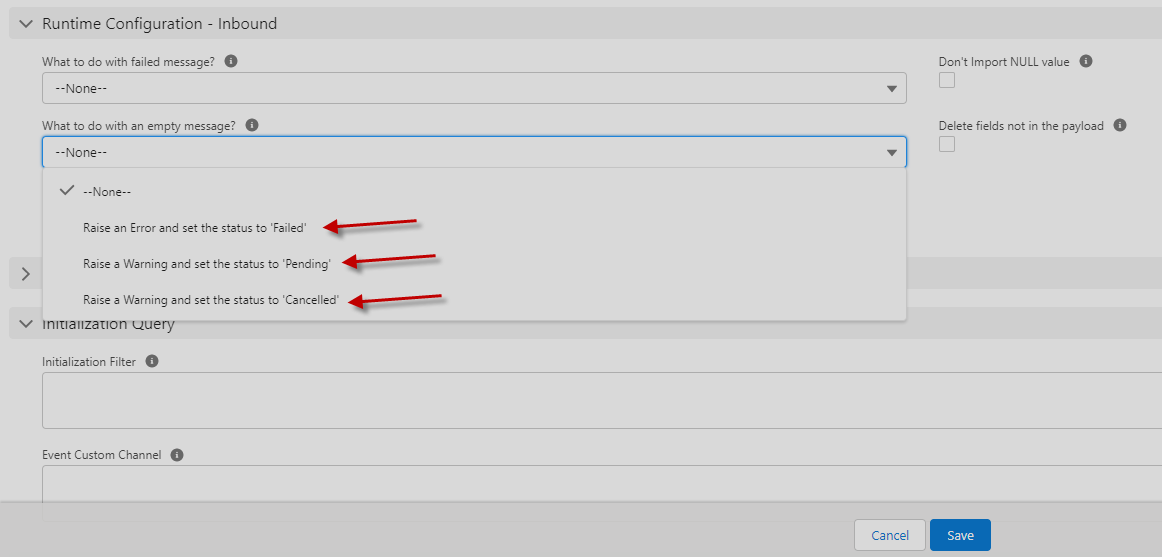
By effectively following these steps and leveraging the API integrateV3() & integrateV4() the user can efficiently manage empty message status and handle errors within your SKYVVA integration application.
Raise an Error and set the status to 'Failed':
- Message integrity is essential for data integration. When encountering an empty message within the SKYVVA integration application, the appropriate response is crucial to maintaining system functionality and data accuracy.
- If critical errors in data render a message empty and thus unprocessable, the recommended action is to raise an error.
- SKYVVA's Runtime configuration provides a robust mechanism for handling such scenarios. By leveraging the "What to do with an empty message?" picklist within the Inbound settings, users can set the status to 'Failed'. This designation flags the message as uncertain, prompting immediate attention efforts.
- Setting the status to 'Failed' not only signifies the occurrence of an issue but also triggers predefined workflows, ensuring timely resolution of disruption to operations. Additionally, it facilitates comprehensive tracking of message monitoring.
- By adhering to best practices such as raising errors and setting appropriate status indicators, organizations can uphold data quality standards and maintain the efficiency of their integration processes within the SKYVVA environment.

[su_box title="Result:" box_color="#2a8af0" title_color="#000000"]After sending data from Postman to Salesforce we get the Failed message that has no data.[/su_box]
Raise an Error and set the status to 'Pending':
- The SKYVVA integration application, managing empty messages within the runtime configuration is crucial for ensuring seamless data processing and system functionality. When encountering scenarios where the processing of an empty message temporarily requires further actions.
- By utilizing the "What to do with an empty message?" picklist within the Runtime configuration-Inbound settings, the user can configure the system to raise an error appropriately and set the status of the message to 'Pending'. This configuration empowers users to define specific actions that should be taken when encountering empty messages, thus streamlining the handling process disruptions to data flow.
- Setting the status of empty messages to 'Pending' allows for easy identification and prioritization of these messages, ensuring that they are addressed efficiently. Moreover, raising errors provides valuable insights into potential issues within the integration process.
- Overall, leveraging the Runtime configuration features with the SKYVVA integration application enhances operational agility, enabling organizations to effectively manage empty messages to maintain optimal data processing workflows.

[su_box title="Result:" box_color="#2a8af0" title_color="#000000"]Here is the use case send data from Postman to Salesforce raise a warning and set the status message to Pending.[/su_box]
Raise an Error and set the status to 'Cancelled':
- The SKYVVA integration application, efficient handling of empty messages is excellent to maintain system integrity and streamline processes. When confronted with specific conditions necessitating the cancellation of the processing, raising an error and setting the status to 'Cancelled'.
- With the SKYVVA integration application, achieving this functionality is facilitated through the Runtime configuration-Inbound "What to do with an empty message?" picklist. By configuring this setting, system administrators can define the appropriate course of action when encountering an empty message, aligning it with the specific requirements of their integration workflows.
- In the event of encountering such conditions, the integration application swiftly raises an error, signaling the presence of an issue that warrants immediate attention. Simultaneously, the status of the processing is set to 'Cancelled,' effectively tentative any further execution related to the empty message.
- This proactive approach to error handling not only ensures data integrity but also promotes the efficient allocation of resources by swiftly identifying issues within the integration pipeline. As a result, attending smoother operations to business processes.

[su_box title="Result:" box_color="#2a8af0" title_color="#000000"]Here is the use case send data from Postman to Salesforce raise a warning and set the status message to Cancelled.[/su_box]
Summary
Users now understand how to utilize the API integrateV3() & API integrateV4() within the SKYVVA integration application to manipulate message statuses. They can set the status to 'Failed', 'Pending', or 'Cancelled' by raising corresponding errors via the API, empowering precise control over message handling for streamlined workflow management.