How to use /V4/IntegrateWithIMessage?
Introduction
Our V3 version of this API needs to mix the SKYVVA system parameters as integration, interface, and mode into the body with the iMessage record. This is not good. Therefore we want to change similar to the V4/Integrate to move the SKYVVA system parameter into the query parameter.
The V3 version encounters challenges with the integration of SKYVVA parameters as an integration, interface, and mode into the body alongside iMessage records. Recognizing the inability of this approach, we aim to enhance the system in line with the V4/Integrate model. The proposed solution involves relocating SKYVVA parameters to the query parameter, aligning with improved practices. This optimization is facilitated through the utilization of the SKYVVA integration application, ensuring a more streamlined and effective integration process for enhanced performance and user experience.
[su_box title="Note" box_color="#ff0000" title_color="#000000"] Because in V4 user-built only iMessage structure and all configuration move to URL parameters Easy to understand than V3[/su_box]
Pre-requisites:- ⦁ Create an Integration ⦁ Create Metadata Provider ⦁ Create Repository. ⦁ Create a Message Type.
1. Create Inbound Interface:- a. Enter Metadata Provider. b. Enter Repository. c. Message Type.
Here is the sample URL: https://customer-customer-4908-dev-ed.cs89.my.salesforce.com/services/apexrest/skyvvasolutions/V4/IntegrateWithIMessage?integration=V4_Integration&interface=2_JSON_Contains_Fields_Only&mode=Synchronous&response-format=JSON&numberOfTree=5 [su_box title="Note" box_color="#ff0000" title_color="#000000"]numberOfTree is required when mode=Batch request: body can json or XML[/su_box] json: { "requestBody": { "messages": [ "msg": { "Name": "IM#2020-08-28 23:46:32.492004", "skyvvasolutions__ProcessMode__c": "Hierarchical", "skyvvasolutions__isRoot__c": "true", "skyvvasolutions__ExternalId__c": "YOL1T4-KEEGXDT8", "skyvvasolutions__ExternalId2__c": "YOL1T4-KEEGXDT8", "skyvvasolutions__Type__c": "Inbound", "skyvvasolutions__Integration__C": "a0W1x000001a1RtEAI", "skyvvasolutions__Interface__c": "a0a1x000001BLuzAAG", "skyvvasolutions__Status__c": "New", "skyvvasolutions__ModificationDate__c": "2020-08-28T16:46:32.000Z", "skyvvasolutions__CreationDate__c": "2020-08-28T16:46:32.000Z", "skyvvasolutions__MessageType__c": "sObject Message", "skyvvasolutions__HLevel__c": "1", "skyvvasolutions__Data__c": "{\"Name,Type,Industry,AccountNumber,Phone,Fax,Website,Site,Description\":\"Testing Kafka InBound Account4,Prospect,Agriculture,A04,1001203213,123456789,https:\\/\\/www.google.com,https:\\/\\/www.google.com,Testing Kafka InBound Account4 Description.\"}" } ] } }
- How to import iMessage record with JSON
- Configuration Requirement in SKYVVA side
- Create message type
- Create Integration and inbound interface
- Do mapping
– How to create message type from different file format?
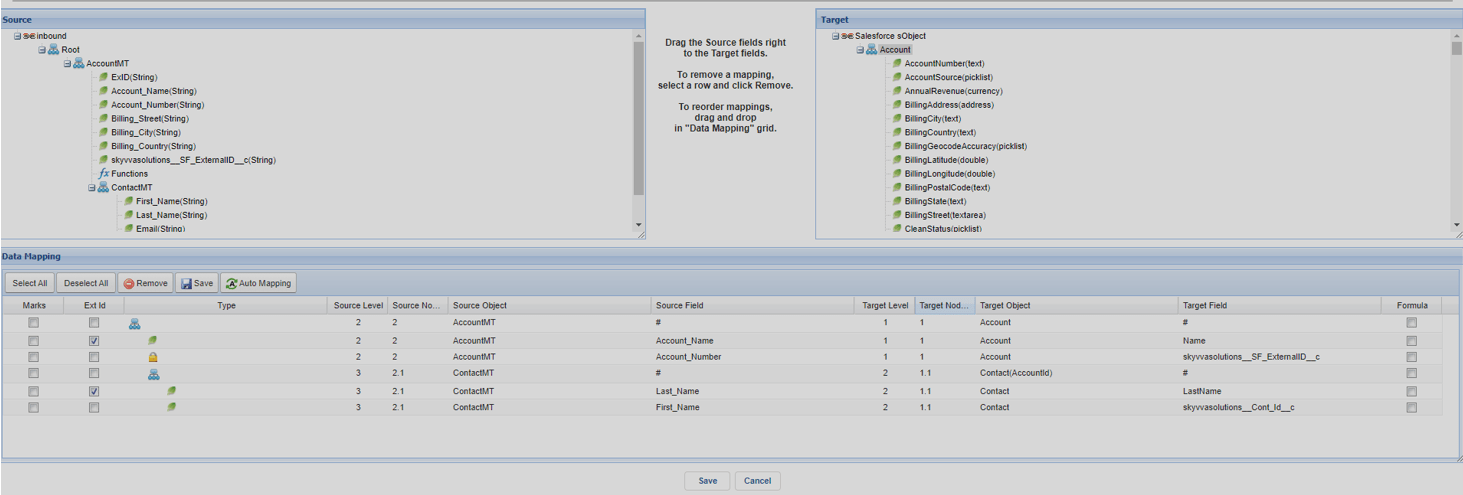
Configuration Requirement on PostMan side
- Create request page
- Select operation POST
- Fill out with Instance URL and V4 IntegrateWithIMessage API
/services/apexrest/skyvvasolutions/V4/IntegrateWithIMessage?

- Click the Body tab and raw and then past iMessage record like the sample below
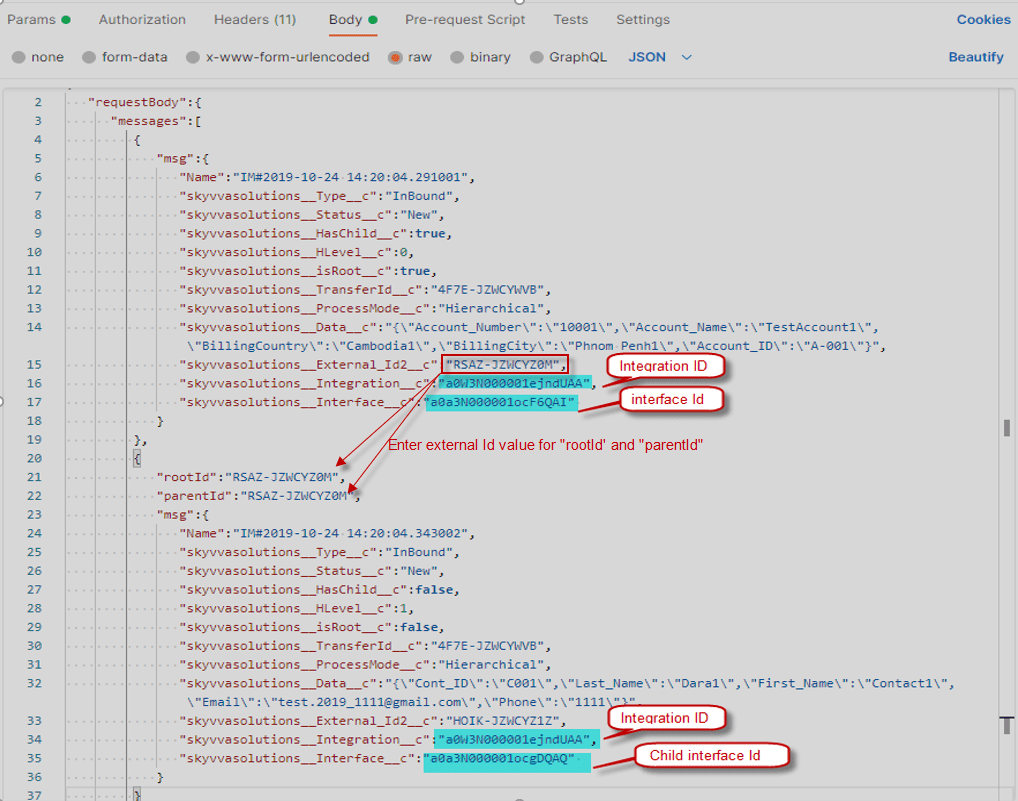
Here is a soft iMessage record
{ "requestBody":{ "messages":[ { "msg":{ "Name":"IM#2019-10-24 14:20:04.291001", "skyvvasolutions__Type__c":"InBound", "skyvvasolutions__Status__c":"New", "skyvvasolutions__HasChild__c":true, "skyvvasolutions__HLevel__c":0, "skyvvasolutions__isRoot__c":true, "skyvvasolutions__TransferId__c":"4F7E-JZWCYWVB", "skyvvasolutions__ProcessMode__c":"Hierarchical", "skyvvasolutions__Data__c":"{\"Account_Number\":\"10001\",\"Account_Name\":\"TestAccount1\",\"BillingCountry\":\"Cambodia1\",\"BillingCity\":\"Phnom Penh1\",\"Account_ID\":\"A-001\"}", "skyvvasolutions__External_Id2__c":"RSAZ-JZWCYZ0M", "skyvvasolutions__Integration__c":"a0W3N000001ejndUAA", "skyvvasolutions__Interface__c":"a0a3N000001ocF6QAI" } }, { "rootId":"RSAZ-JZWCYZ0M", "parentId":"RSAZ-JZWCYZ0M", "msg":{ "Name":"IM#2019-10-24 14:20:04.343002", "skyvvasolutions__Type__c":"InBound", "skyvvasolutions__Status__c":"New", "skyvvasolutions__HasChild__c":false, "skyvvasolutions__HLevel__c":1, "skyvvasolutions__isRoot__c":false, "skyvvasolutions__TransferId__c":"4F7E-JZWCYWVB", "skyvvasolutions__ProcessMode__c":"Hierarchical", "skyvvasolutions__Data__c":"{\"Cont_ID\":\"C001\",\"Last_Name\":\"Dara1\",\"First_Name\":\"Contact1\",\"Email\":\"test.2019_1111@gmail.com\",\"Phone\":\"1111\"}", "skyvvasolutions__External_Id2__c":"HOIK-JZWCYZ1Z", "skyvvasolutions__Integration__c":"a0W3N000001ejndUAA", "skyvvasolutions__Interface__c":"a0a3N000001ocgDQAQ" } } ] } }
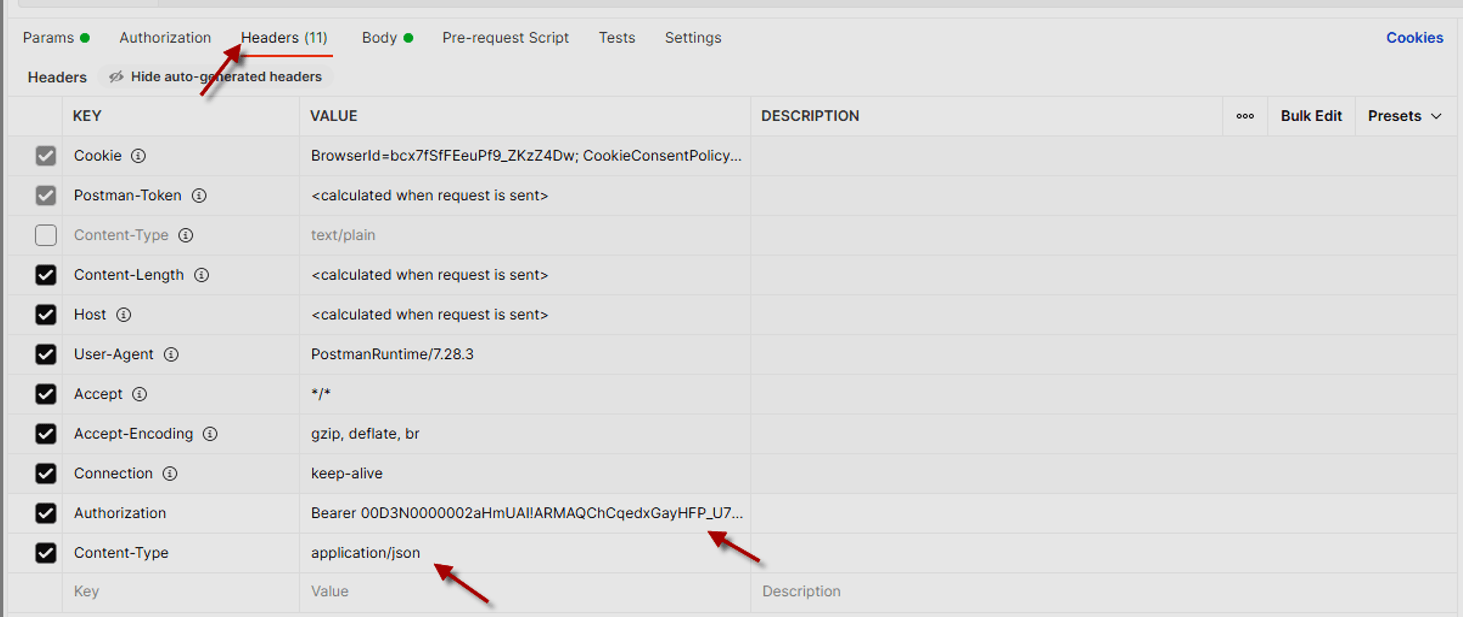
- Go to Headers
- Create Authorization for Session Id
- Create Content-Type with application/json
- Go to the Params tab to create Query Params
- In this case, we sent an iMessage record with Mode = Synchronous don’t Batch mode
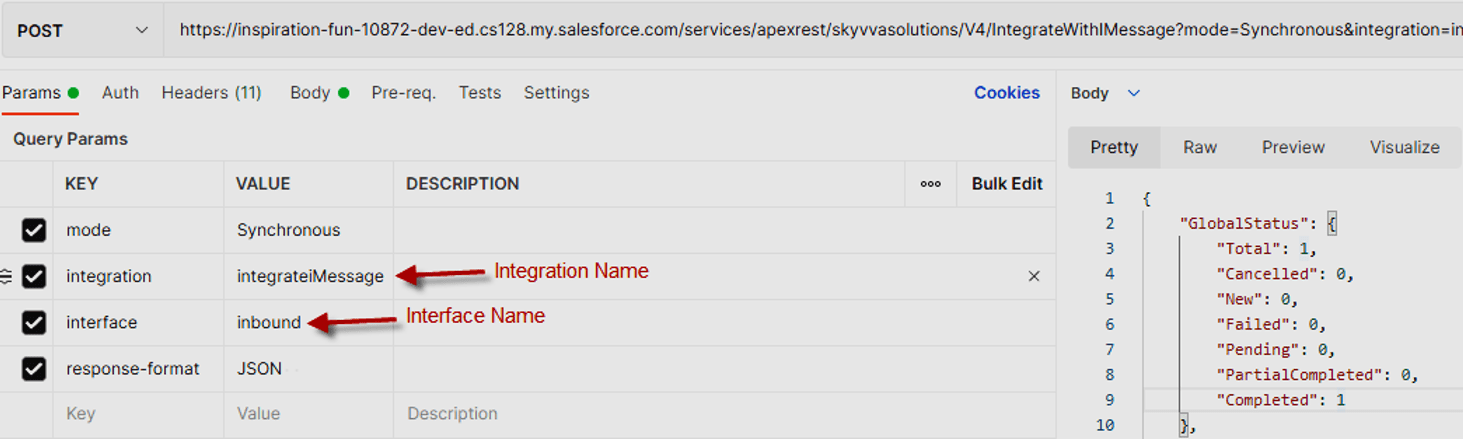
Now the user is configured already so we can send the iMessage record to Salesforce.
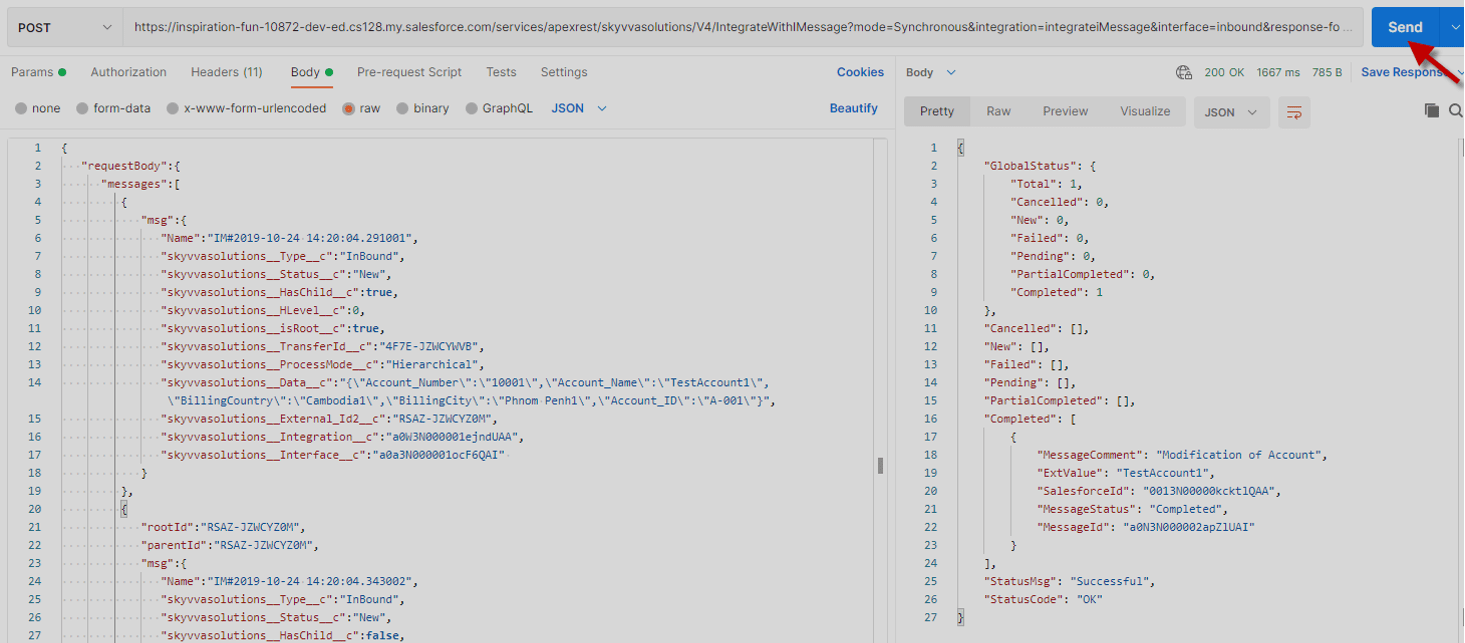
Here is the message result on message monitoring after we sent

Here is a case sending an iMessage record to salesforce with Mode=Batch
- We just change the mode Synchronous to Batch and add the keyword numberOfTree=1
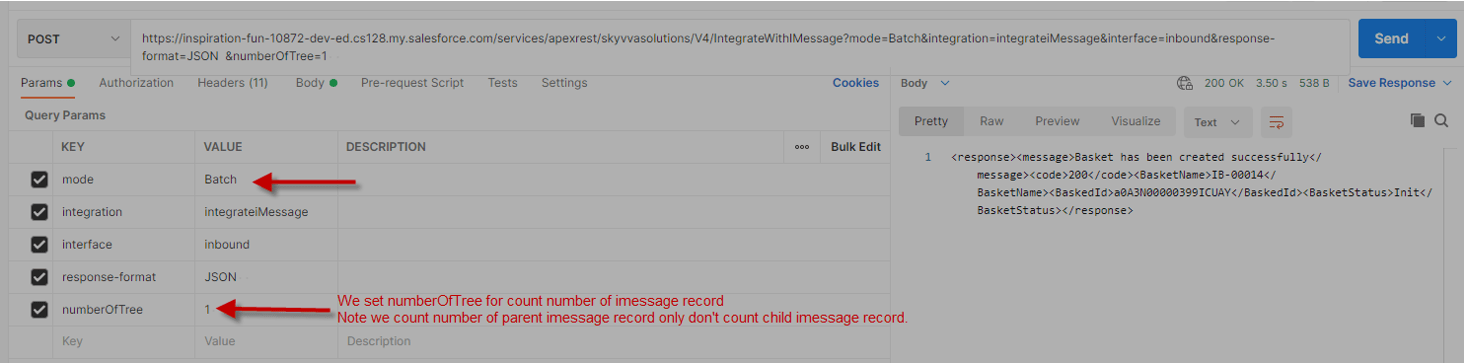
Here is the result on the Batch Control Board after sending iMessage record from PostMan
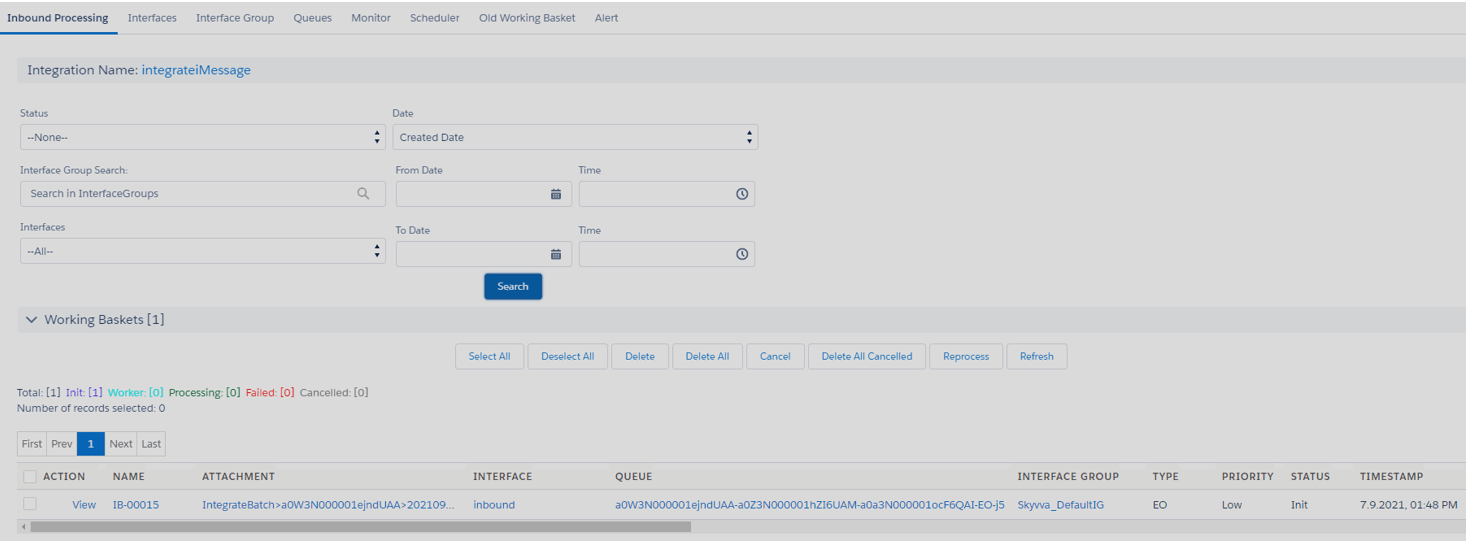
[su_box title="Note" box_color="#ff0000" title_color="#000000"] If we set the number of iMessage records in numberOfTree is incorrect the basket can’t process data successfully.[/su_box]
How to import iMessage record with XML format
- Everything we configure like the JSON step
- User changes application/json to application/XML in Content-Type
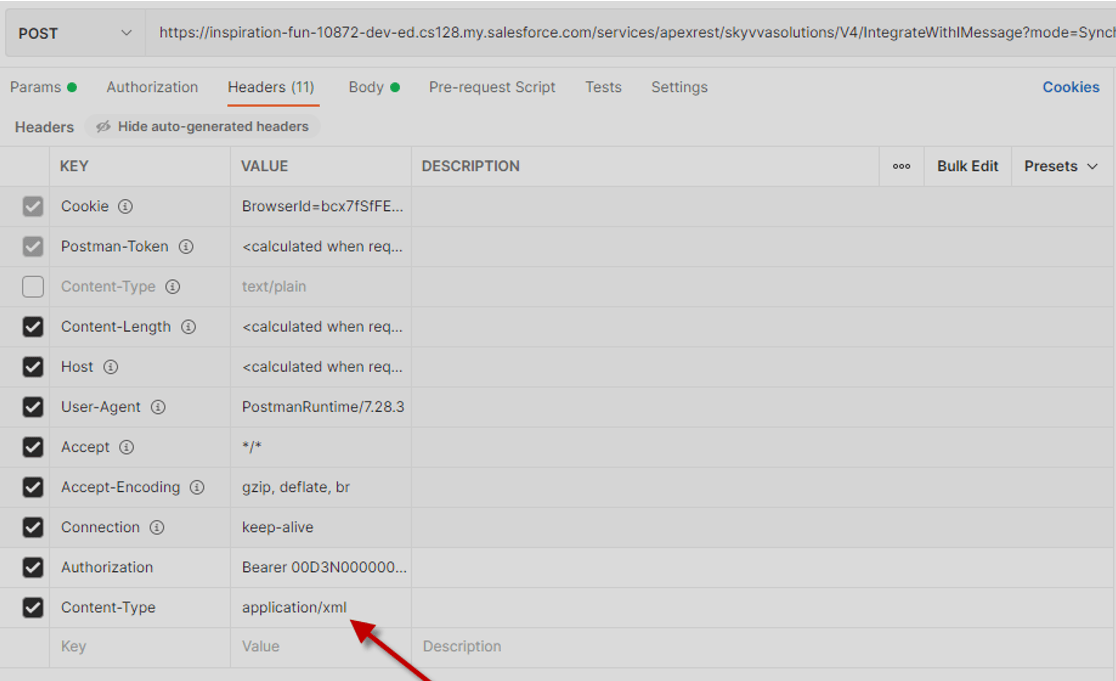
Here is the iMessage record XML format in the Body
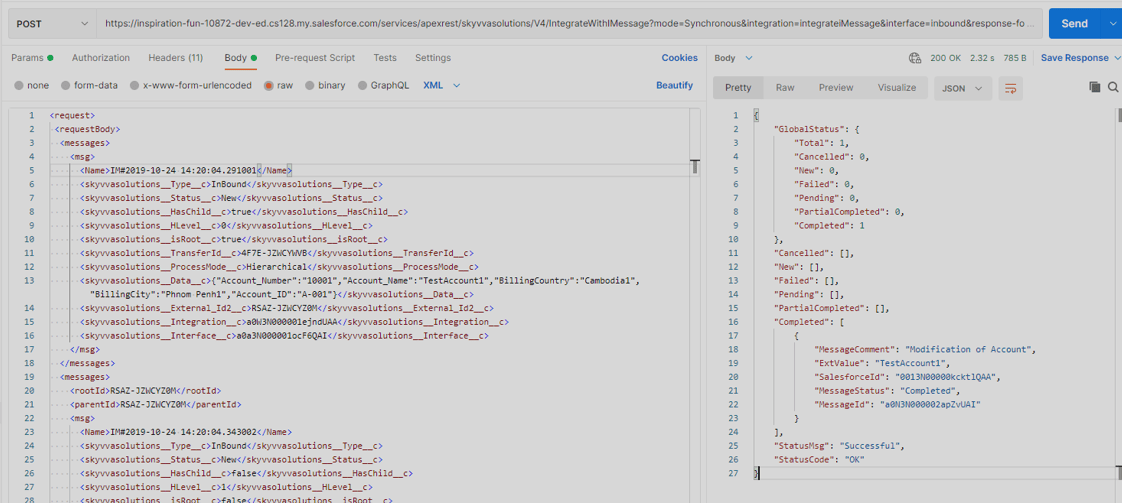
Here is a soft iMessage record
IM#2019-10-24 14:20:04.291001 Inbound New true true 4F7E-JZWCYWVB Hierarchical {"Account_Number":"10001","Account_Name":"TestAccount1","BillingCountry":"Cambodia1","BillingCity":"Phnom Penh1","Account_ID":"A-001"} RSAZ-JZWCYZ0M a0W3N000001ejndUAA a0a3N000001ocF6QAI RSAZ-JZWCYZ0M RSAZ-JZWCYZ0M IM#2019-10-24 14:20:04.343002 Inbound New false 1 false 4F7E-JZWCYWVB Hierarchical {"Cont_ID":"C001","Last_Name":"Dara1","First_Name":"Contact1","Email":"test.2019_1111@gmail.com","Phone":"1111"} HOIK-JZWCYZ1Z a0W3N000001ejndUAA a0a3N000001ocgDQAQ
Summary Now the user learned that the V4 user built only the iMessage structure and all configurations moved to URL parameters Easy to understand than V3.