1. Mapping
After you use the Mapping tool to define and configure a transformation's source and target, the Mapping screen appears. It is in this screen where you establish a relationship between the appropriate fields and/or records (also known as data elements or elements) of your source and target.
Mapping
Mapping is the process of selecting which source data element relates to which target data element. To do the integration for a specific interface, it is required to have a single External ID mapping, through which the data sent from the external system goes to a correct sObject record on Salesforce. There are three ways of mapping rule:
- Flat: one – one mapping
- Formula: complex mapping rules
- Hierarchical: Tree mapping
Mapping Tool
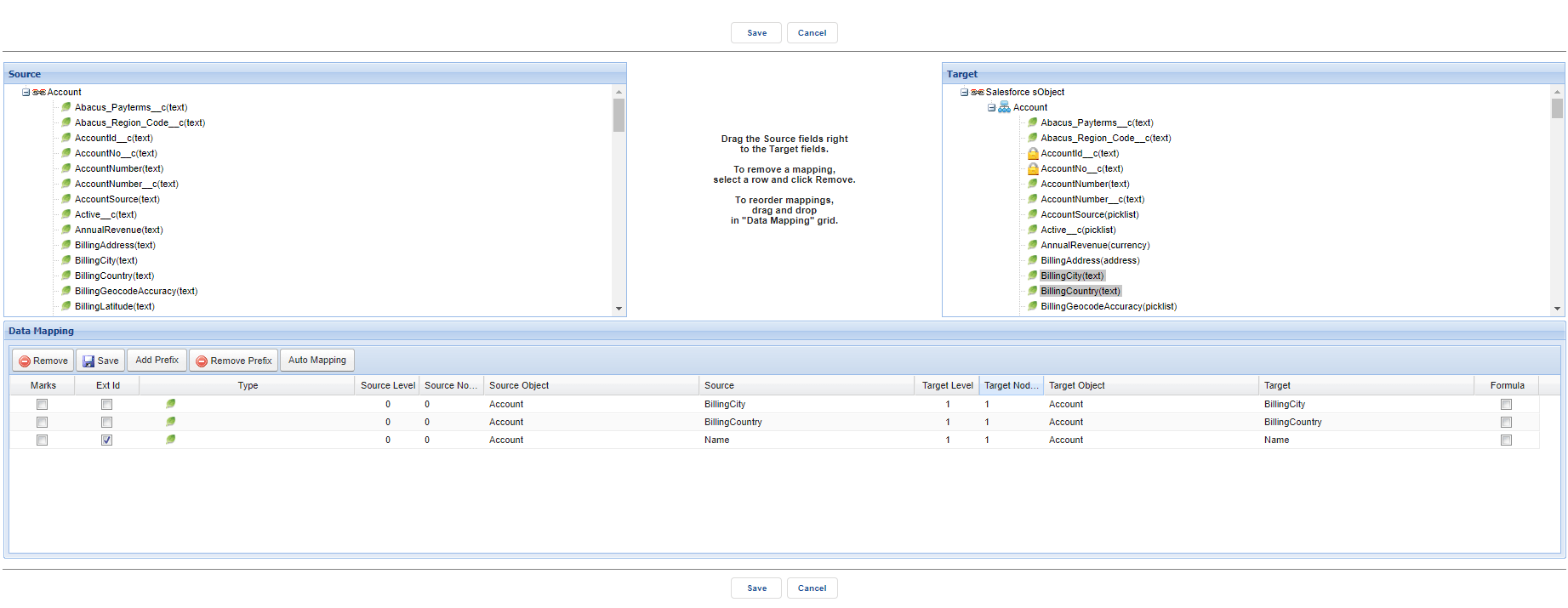
SKYVVA's Mapping tool is a tool to map other system objects and fields with the SFDC object field. A mapping is a collection of key-value pairs where each unique key maps to a single value. Here we will map source fields with target object fields. Mapping Tool (Drag and Drop/ Auto Mapping) Two-Way to do mapping is to use Mapping tool at the interface detail page to do mapping for the interface integration:
- Drag and Drop: From Source Definitions to sObject Field: Drag the desired element in the Source pane and drop to the corresponding target data element in the Target pane.
- Auto Mapping: Auto-mapping by clicking button Auto Mapping in the mapping tool. Map all fields, which have the same name and do node by node.
- The mapped relationship appears in the down section of mapping tool.
[su_box title="Note" box_color="#2a8af0" title_color="#000000"]
- To do auto mapping, we need to open the tree node both source and target first. After that, we click button Auto Mapping, so it will auto-create mapping on each leaf node, which has the same, name and writable.
- When using a formula for a child field and inside that formula, we need to refer to the parent we need to create the field with full reference from child to parent. Optional: If you need to manipulate the value of the source data element relative to the target data element, click the Formula checkbox to launch the Formula Builder
- Both the query editor and from the mapping of the SOQL statement can be overwritten. The user has both ways to change the SOQL using the query editor or the mapping by drag&drop in the graphical mapping screen. From both sides, we can overwrite each other the SOQL and the field mapping in the data mapping section have to be adjusted accordingly.[/su_box]
Graphical Mapping Editor
[su_box title="Warning" box_color="#F7DC6F" title_color="#000000"]
- The mapping editor is removed from the interface screen to have as an own screen.
- Some button like Save and Cancel has to be taken out from the data mapping section and put in the global section of the new screen.
- When save the screen is not close but remains open but gets refreshed. The user can still change the mapping. Only after he closes the screen it will return to the interface screen.[/su_box]