1. Metadata Provider
Metadata Provider
In the big data era, enterprises are collecting and storing more data than ever before. Metadata Provider tells the data processing layer of a library which metadata fields (types) they can extract. In Skyvva,Istructure repository is stored in metadata. Basically metadata provider is use for grouping. This metadata includes important object properties and their relationships with other objects. Lets take an example of SAP So right here sap is a metadata Name. If we are talking about the other organisation like Google, Salesforce and many all,they provides metadata api.
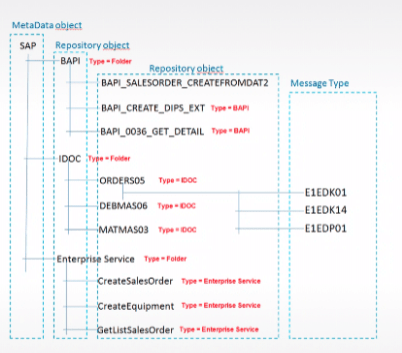
In the picture, we can see the hierarchical repository where different level are organise hierarchically. We can build a hierarchical structure of the repository. And in the table, we can see the example of the type and Hierarchical repository objects. Different API organise in the single repository. There are some Repository Object like BAPI, IDOC, and Enterprise Service with type Folder.
Types Hierarchical repository objects
BAPI
- BAPI_SALESORDER_CREATEFROMDAT2
- BAPI_CREATE_DIPS_EXT
- BAPI_0036_GET_DETAIL
IDOC
- ORDERS05
- DEBMAS06
- MATMAS03
Enterprise Service
- CreateSalesOrder
- CreateEquipment
- GetListSalesOrder
In the Repository, we have a message type. Message Type uses to represent the hierarchical structure of the Repository. For example, a service using Webservice. Message Type can be used to describe its request and response. In Skyvva, when we create metadata, the Name field is an only mandatory field. On MetaData the Name cannot be duplicated. Metadata Provider screen looks like as shown in the picture given below:-

The description of the highlighted fields(shown in the picture) is showed below:-
Button Name Description
[su_button url="#" style="flat" size="6"]Export MetaData Provider[/su_button] Use this button to Export MetaData Provider to the local computer.
[su_button url="#" style="flat" size="6"]Import MetaData Provider [/su_button] Use this button to Import MetaData Provider from the local computer.
[su_button url="#" style="flat" size="6"]Export MetaData Provider To Other Org[/su_button] Use this button to export the MetaData Provider to other organization.
[su_button url="#" style="flat" size="6"]New[/su_button] Use this button to create New MetaData Provider.
[su_button url="#" style="flat" size="6"]Delete[/su_button] Use this button to Delete existing MetaData Provider.
How to create a metadata Provider?
There are two different ways of creating the metadata:
- Manually create
- Using Import function
1 In the Metadata tab, perform the following steps:
- Click on New button on the Metadata provider page. A page appears with one mandatory field i,e Metadata Name.
- Click on the Save button with the required Field.

- Enter Metadata name in the MetaData Provider Name field.

2. By importing the file matadata can be created. We can Import metadata provider from our local machine if we have existing metadata in our local machine of the same repository and message type as we needed.
Metadata Page:
There are two section on metadata page.
- Detail
- Related
Detail Page:- Repository can be created by clicking on the "New" button from this page. This page contains detail information about metadata. Only name field is mandatory field here.
- MetaData Provider Name
- Owner ID
- Description
- Created By ID
- Created Date
- Last Modified By ID
- Last Modified Date
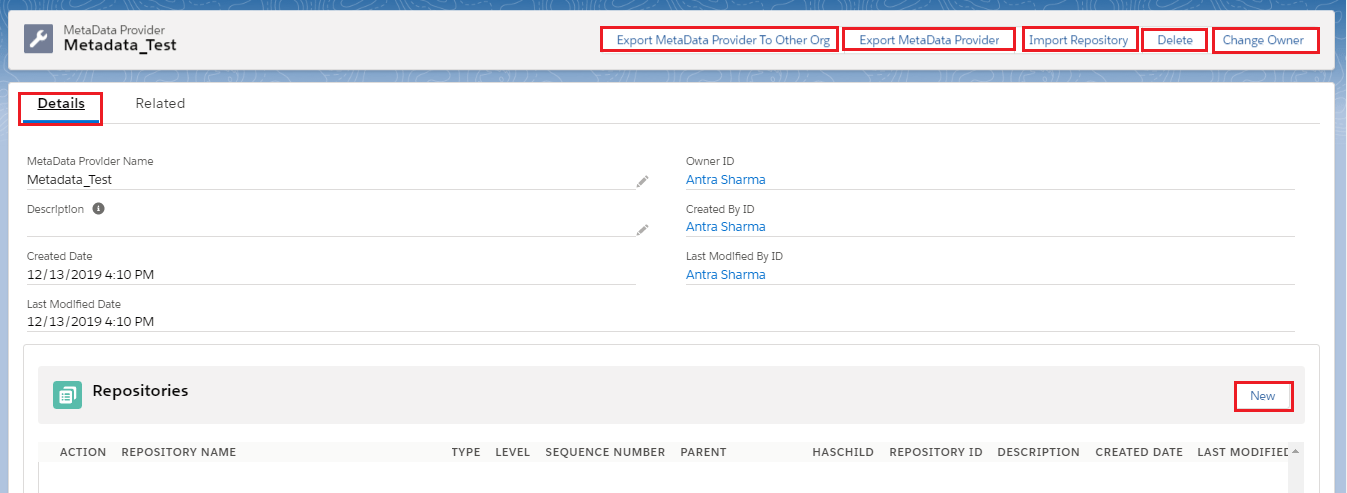
- The Detail page and related page contains same 5 Buttons at the top, Please check the table below:-
Button Name Description
[su_button url="#" style="flat" size="6"]Export MetaData Provider To Other Org[/su_button] Use this button to export the MetaData Provider to other organization.
[su_button url="#" style="flat" size="6"]Export MetaData Provider [/su_button] Use this button to Export MetaData Provider to the local computer.
[su_button url="#" style="flat" size="6"]Import Reository[/su_button] Use this button to Import Repository from the local machine.
[su_button url="#" style="flat" size="6"]Delete[/su_button] Use this button to create Delete MetaData Provider.
[su_button url="#" style="flat" size="6"]Change Owner[/su_button] Use this button to change Owner.
2. Related Page:-

- In the Related page we can see two sections:-
1. Interface:- Here we can see the list of Interfaces in which we have used this metadata provider. 2. Repository:- In this section, we can click on New and can create a repository.