3. Runtime Behavior
Runtime Behaviour
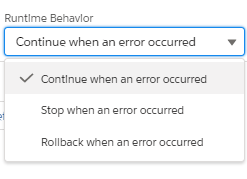
It contains 3 options:- We can see 3 options in Runtime behavior and we can select any one of them according to our requirement:-
- Continue when an error occurred:-
It is a default option if we process messages and suppose we met with error on 2nd or 3rd message. The other message will continue to process.
- Stop when an error occurred:-
If we process messages and suppose we met with error on the 2nd or 3rd message. We should stop there", for that processing the code will automatically stop the process, we don't have to manually stop pushing the message.
- Rollback when an error occurred:-
If we got some error while processing a message like perform DML operation based on mapping and we get some error like missing required field value, missing ExtId value that we need to considered as error. When workflow message met an error it will immediately stop processing and rollback.
Please check picture given below:-