8. Status of adapters
Status is a field, which is created in the adapter showing the status of an adapter whether it is still inactive or ready to run. To deactivate the adapter, we have created the field that contains a two-picklist value like the following:
Picklist Name
Description
1. Active If set to “Active” the adapter is ready to run.
2. Inactive If set to “Inactive” the adapter is still on development.
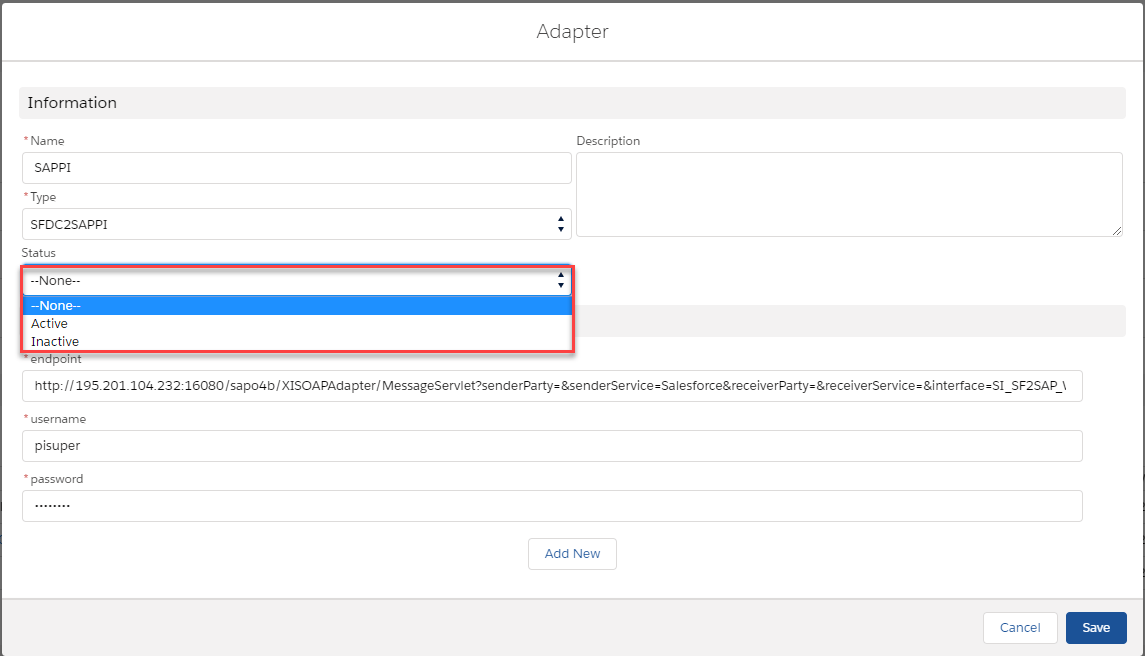
[su_box title="Note" box_color="#2a8af0" title_color="#000000"]No need to set the status of the interface to “Undeployed” as the right place to deactivate is in the adapter.[/su_box] [su_box title="Warning" box_color="#F7DC6F" title_color="#000000"] If you upgrade SKYVVA App to the newest release, you have to add the new picklist value manually since it will not overwrite. However, if you install the App you will have those picklist values included in the package.[/su_box]
Adding the picklist value
As mention above in the warning, the picklist value has to add manually when you try to upgrade the SKYVVA App. In general, each type of picklist requires setting up in Fields & Relationships of the interface. It is a custom field.
- You can click “Setup” on the top of the interface page.
- In the “Quick Find” box, type the word “Object Manager”.
- Click on Object Manager then scroll down the page to find the “Interface” object, click it.
- On the left side of the page, you will the panel select “Field & Relationship” field.
- You can search the “What to do with the failed message” field in the “Quick Find” box or scroll down the page to find it.
- Select the field and scroll the page down to find the value section. You will find some values are already there, so to add the new picklist just click the “New” button.
- You will land on the “Add Picklist Values” page, just write the value in the text box area and the label name must be the same as API Name. You can add one or more picklist values here.