1. What is an integration and how to create it?
Learning Objectives :- This unit describes:-
- The Integration feature in detail.
- Overview of Integration level settings.
Introduction
This tutorial is the first step and the basic to understand the concept of the SKYVVA integration Cloud. It describes the main SKYVVA object called "Integration".
What is Integration?
- In general, Integration is the act of bringing together smaller components into a single system that functions as one. It is the combination of technical and business processes used to combine data from disparate sources into meaningful and valuable information.
- SKYVVA integration is such a concept to create a container or folder to keep related interface together. So here Integration is a logical folder or group to hold interfaces belonging to the same business context. For example, create an integration with the name "Salesforce SAP Integration” in which you can create all interfaces related to the SAP connection. Create another integration with the name "Salesforce-Google Integration" to hold all interface related to Google business.
- Another good use for creating different integration is that you can create different integration for different training purposes in your company. One integration is for the real business and another integration is for training so you don't mess up the interfaces between training and production integration.
Why We Create Integration?
In Skyvva, an interface can be created for a different purpose. Normally the company has different and many interfaces to exchange data between exiting applications. For example, You have integration to connect SAP, Google or eBay to Salesforce. If you put all interface into one single view you would lose easily the overview. So the best approach is to create a logical folder or group to hold interfaces belonging to the same specific business context. Following are the main steps of the tutorial:- Step 1: Create a Salesforce organization You need to register with salesforce. Step 2: Install SKYVVA To install SKYVVA App you need a user with Admin rights. Request for this user and follow the screen below to install the SKYVVA software. The installation link you get from the SKYVVA support team. Step 3: Create Integration in your organization To Create Integration in Skyvva,
- Choose the Integration tab from Organization https://login.salesforce.com/lightning/n/skyvvasolutions__Integration1
- On the Integration page, find New button and click on it to create a new integration.

- In the Name field, enter the name of your integration that you want to create. The name of integration identifies your integration. The Name field is a mandatory field.
- Choose Save. You might need to wait a short while and refresh the page to see the new integration appear on the Integration tab.
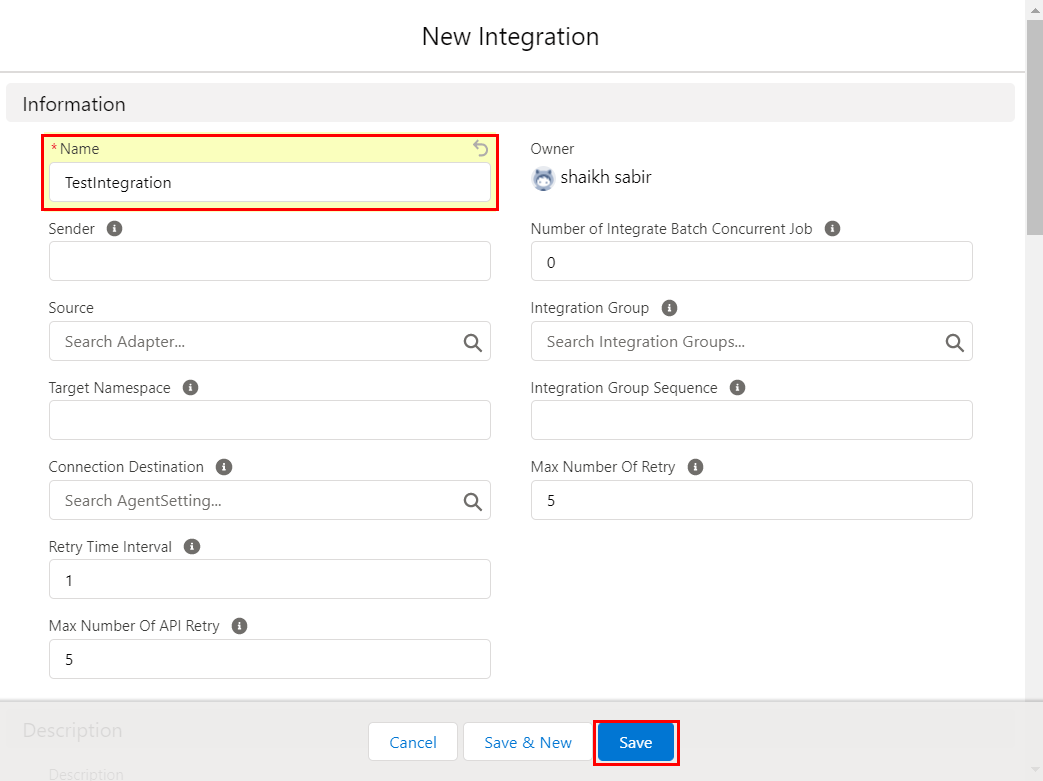
Field Information
On the integration object, the only name field is required to successfully save the integration. Other fields are optional. But you can describe your integration in the description field so that you know later what is the object or goal of this integration. There are some important parameter which is optional and have default value already when you don't set them. For example, the parameter "Max Number of Retry" is default by 5 which mean that failed or pending message are going to be reprocessed automatically only 5 times. If exceed 5 times the message will remain in status failed/pending forever. If your requirement is to do message reprocessing more the 5 times (default value) you can set this parameter to any value you like for example 17. This would mean that the failed/pending messages will be re-processed max. 17 times. Please, refer screenshot:

[su_box title="Note" box_color="#2a8af0" title_color="#000000"] That creating the Integration Object is a pre-requisite for further learning steps like creating an interface, mapping, etc. Without having an integration you cannot continue to develop an interface.[/su_box]
Integration Group
From the version, 2.x upward skyvva has introduced a new concept to create a so-called integration group. You group different integration into a logical group e.g. one integration group for Asian pacific and another integration group for Europe etc. The goal of creating an integration group is to have a small unit of integration for the processing. The integration will be processed by a scheduler e.g. an attachment process and attachment reprocesses scheduler. If the unit is quite small than the processing of the integration in this unit/group will be faster. If a unit/group is quite big than the processing will take longer until one integration got processed by the scheduler. Note: This concept of integration group is obsolete and not supported anymore. We should not use this concept and instead of that we should consider to use interface group. We can group the interface inside an integration in logical unit using the interface group. It is not needed anymore to split and organize a huge number of interface by using the integration group. Here the new concept is to create interface group if the number of the interface grows within an integration.
Alerting Setup
The alert setting on the integration level is used as a global setting in case the user forgot to set up an alerting rule on the interface level. If the user sets the alerting rule on the interface level then this should be valid and overwrite the setting on integration if any exist. We have a different type of alerting rules on the integration & interface level
- Send Email SFDC User
- CreateTask for User
- Send Email External Mails
- Chatter group Name
Message Setup
Delete Message is one of functionality that enables deletion of messages. The message deletion is not a default function. It works only after they set the flag 'Delete Message' on the integration.
- Additional Message Statuses to Delete
- Number of Days to Keep Messages
- Delete Basket Histories
- Delete Logs
- Delete Log File
- Log Levels to Delete