What is Queueable Apex Retry?
Overview
Queueable Apex Retry helps SKYVVA continue reprocessing messages when a Queueable Apex job becomes too large and reaches a Salesforce governor limit.
For example, a Queueable job may fail because it uses too much:
- Apex heap memory
- CPU time
- Callout time
In simple terms:
If a Queueable Apex job is too large to process successfully, SKYVVA retries the failed messages using a smaller chunk.
1. Required Configuration
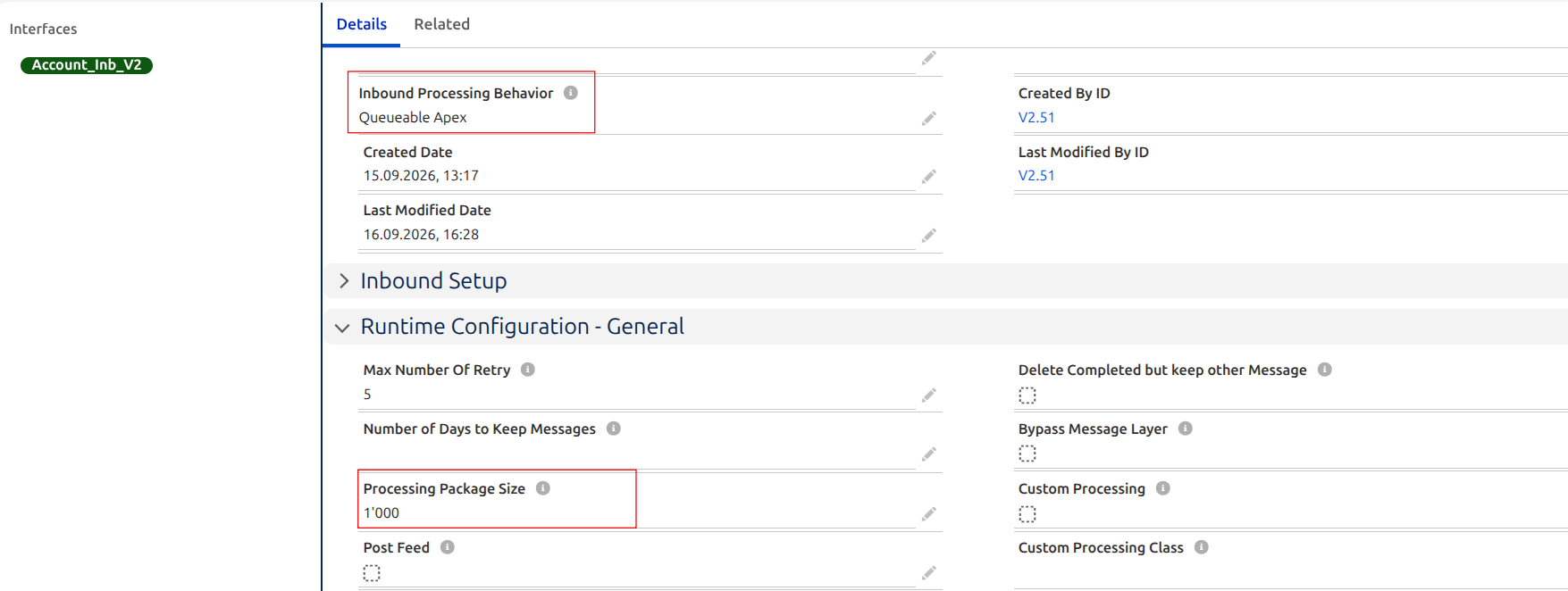
For an inbound interface, configure:
Inbound Processing Behavior = Queueable Apex
Configuration flow:
Integration
    ↓
Inbound Interface
    ↓
Details
    ↓
Inbound Processing Behavior
    ↓
Queueable Apex
    ↓
Save
For the feature tested in SKYVVA v2.51.18, Queueable Apex is used for this Reprocess Message feature.
2. Normal Reprocess Message
When failed messages are reprocessed, SKYVVA submits them to Queueable Apex.
Example:
Failed Messages
      ↓
Reprocess Message
      ↓
Queueable Apex
      ↓
Process Messages
      ↓
Completed
If the Queueable job finishes normally, no retry is required.
3. What Happens When the Queueable Job Reaches a Limit?
A large Queueable job can reach a Salesforce governor limit.
Example:
Queueable Apex
      ↓
Process a large message chunk
      ↓
Apex heap size becomes too large
      ↓
Queueable Job = Failed
Normally, the failed Queueable transaction cannot continue.
With Queueable Apex Retry, SKYVVA detects this failure and retries the failed work.
4. How Queueable Apex Retry Works
The retry process is:
Queueable Apex Job
        ↓
Process Message Chunk
        ↓
Governor Limit Reached
        ↓
Original Queueable Job Fails
        ↓
Finalizer detects the failure
        ↓
Failed chunk is put back into the queue
        ↓
Chunk size is reduced
        ↓
New Queueable Apex Job
        ↓
Retry Processing
The important point is:
The original failed Apex Job can still show Failed in Salesforce Apex Jobs. This does not automatically mean the complete Reprocess Message operation failed. SKYVVA can create another Queueable job to retry the failed work.
5. Simple Retry Example
Assume a Queueable job is trying to process a chunk of 1,000 messages.
1,000 messages
      ↓
Queueable Apex
      ↓
Governor Limit
      ↓
FAILED
SKYVVA requeues the failed chunk and retries with a smaller size.
1,000
  ↓ FAIL

500
  ↓ Retry

If 500 also fails:

500
 ↓ FAIL

250
 ↓ Retry

If necessary:

250 → 125 → ... → 1
For normal messages, the retry size is reduced progressively until processing succeeds or the minimum chunk size of 1 is reached.
6. Real Test Example
The feature was tested with the following configuration:
| Setting | Value |
|---|---|
| SKYVVA Version | 2.51.18 |
| Interface API | V2 |
| Interface Direction | Inbound |
| Processing Package Size | 1,000 |
| Inbound Processing Behavior | Queueable Apex |
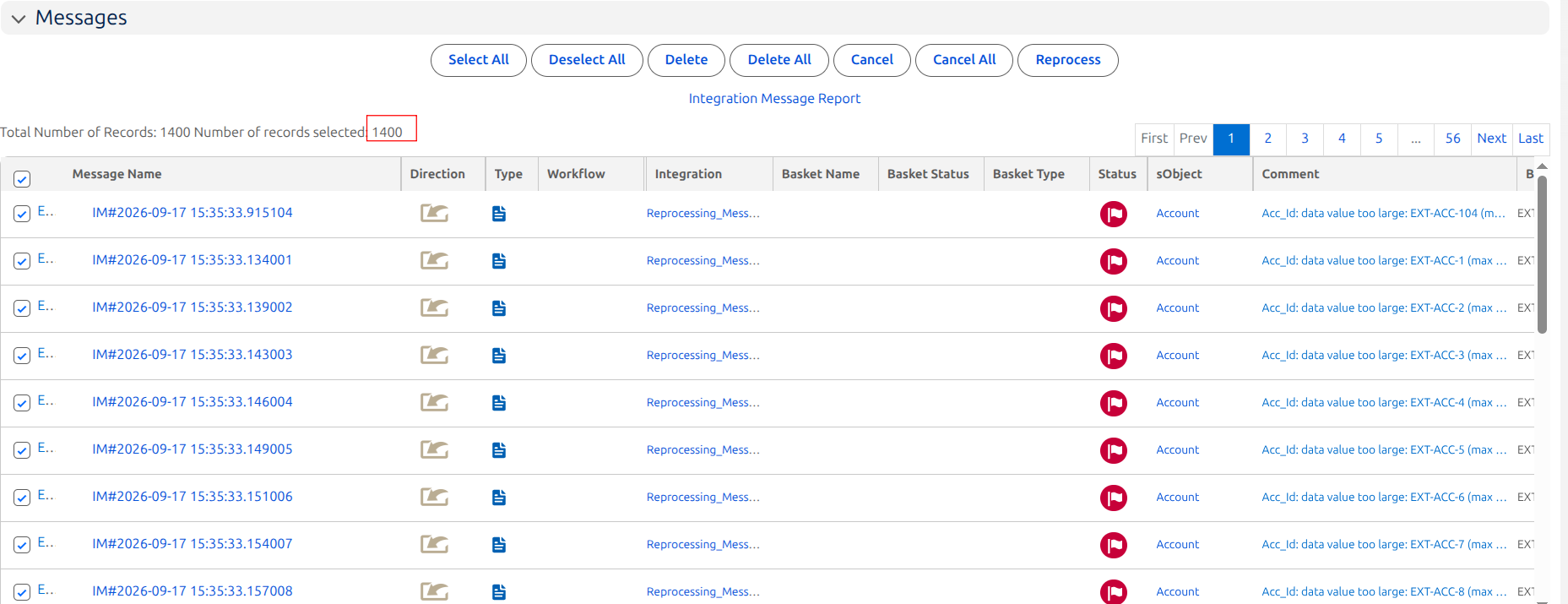
Failed Messages: 1,400
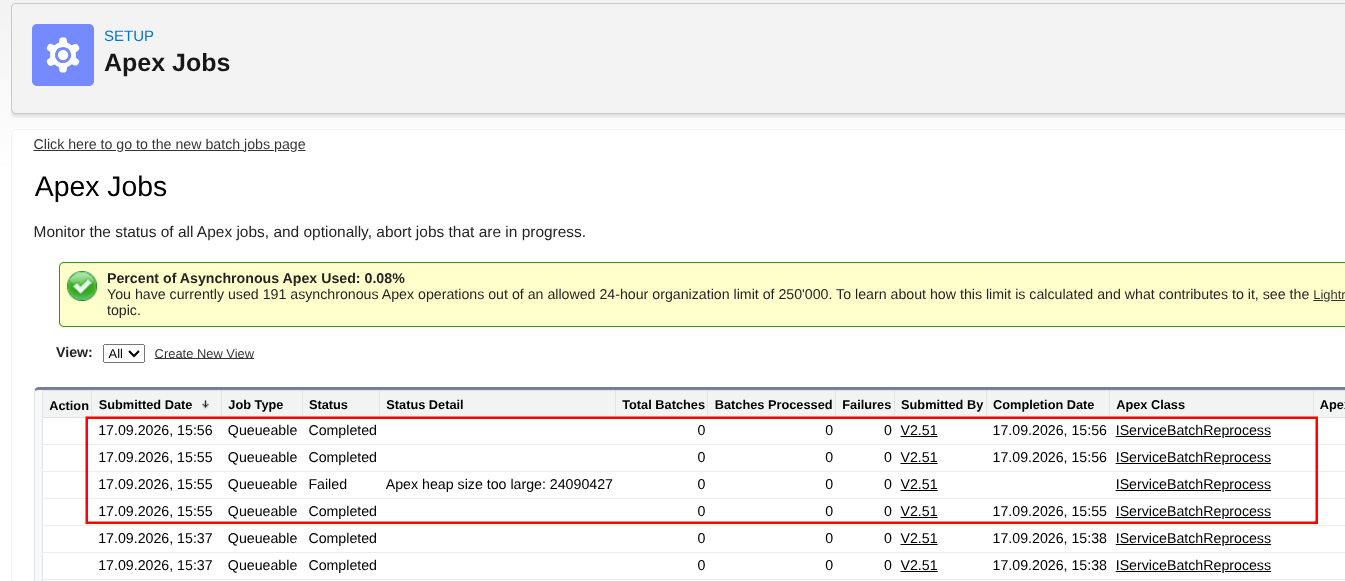
During Reprocess Message, one Queueable Apex job reached this Salesforce limit:
Apex heap size too large: 22928422
The Apex Job showed:
Job Type   : Queueable
Status     : Failed
Apex Class : IServiceBatchReprocess
After the failed job, additional IServiceBatchReprocess Queueable jobs were observed completing.
This is the expected retry scenario:
1,400 Failed Messages
        ↓
Reprocess Message
        ↓
Queueable Apex
        ↓
Large Chunk
        ↓
Apex Heap Limit
        ↓
Job Failed
        ↓
Requeue Failed Work
        ↓
Use Smaller Chunk
        ↓
New Queueable Job
        ↓
Retry
        ↓
Continue Processing
7. Why Is Queueable Apex Retry Useful?
Without retry:
Large Chunk
    ↓
Governor Limit
    ↓
FAILED
    ↓
Processing stops for that job
With Queueable Apex Retry:
Large Chunk
    ↓
Governor Limit
    ↓
FAILED
    ↓
Requeue
    ↓
Smaller Chunk
    ↓
Retry
    ↓
Continue Processing
This makes Reprocess Message more reliable when processing large or heavy messages.
8. Scheduler and Manual Reprocess
Queueable Apex Retry can be used after messages enter Queueable processing, but Scheduler and Manual Reprocess select messages differently.
Scheduler
Every scheduler run queries a maximum of 3,000 messages.
Example with 5,000 failed messages:
5,000 Failed Messages
        ↓
Scheduler Run 1
        ↓
Query 3,000
        ↓
2,000 remain

Next Scheduler Run
        ↓
Query remaining 2,000
The 3,000 value is the scheduler query limit per run.
Manual Reprocess
When the user manually selects messages, all selected messages are submitted.
Example:
User selects 5,000 messages
        ↓
Manual Reprocess
        ↓
All 5,000 selected messages are submitted
The scheduler's 3,000-message query limit does not apply to Manual Reprocess.
9. Processing Package Size vs. Retry Chunk
These are different concepts.
Processing Package Size
Controls how the selected messages are initially distributed into Queueable Apex processing.
Selected Messages
       ↓
Processing Package Size
       ↓
Queueable Apex Job(s)
Retry Chunk
Used only when Queueable processing fails because of a governor limit.
Queueable Job
      ↓
Governor Limit
      ↓
Failed Chunk
      ↓
Reduce Chunk Size
      ↓
Retry
Therefore:
Processing Package Size controls the initial processing. Queueable Apex Retry controls what happens after a Queueable processing chunk fails because of a governor limit.
10. What Should a User Check?
When testing or monitoring Queueable Apex Retry:
- Open Setup → Apex Jobs.
- Look for
IServiceBatchReprocess. - A Queueable job may show Failed with a governor-limit error.
- Check for new Queueable jobs created after the failed job.
- Verify the subsequent Queueable jobs complete.
- Check Message Monitoring and confirm the messages reach the expected final status.
Queueable
IServiceBatchReprocess
FAILED
Apex heap size too large
        ↓
Retry
        ↓
Queueable
IServiceBatchReprocess
COMPLETED
        ↓
Queueable
IServiceBatchReprocess
COMPLETED
Summary
Queueable Apex Retry means:
When Reprocess Message is running through Queueable Apex and a processing chunk fails because of an uncatchable Salesforce governor limit, SKYVVA requeues the failed work, reduces the chunk size, and retries it using another Queueable Apex job.
The easiest way to remember the feature is:
Process
   ↓
Limit Reached
   ↓
Fail
   ↓
Requeue
   ↓
Reduce Chunk
   ↓
Retry
   ↓
Continue
Version Note
This Queueable Apex Retry feature has been verified with:
- SKYVVA Version: 2.51.18 and 2.52
- Interface API: V2 and V3
- Direction: Inbound
- Processing Behavior: Queueable Apex