1. What is the different init-operation for the chained interface?
Learning Objectives:-
- Describe what are the different init-operation for the chained interface.
- Comfortably use different init-operation for the chained interface.
Introduction:-
SKYVVA provides the different init-operation for the chained interface i,e None, Delete First, Delete specific child, Delete Anyway and Delete + Upsert. In this tutorail we will learn how to config these init-operation with Interface which has hierarchical message type.
Pre-required:
- Upload Hierarchical Message Type.
- Create Integration and Inbound Interface.
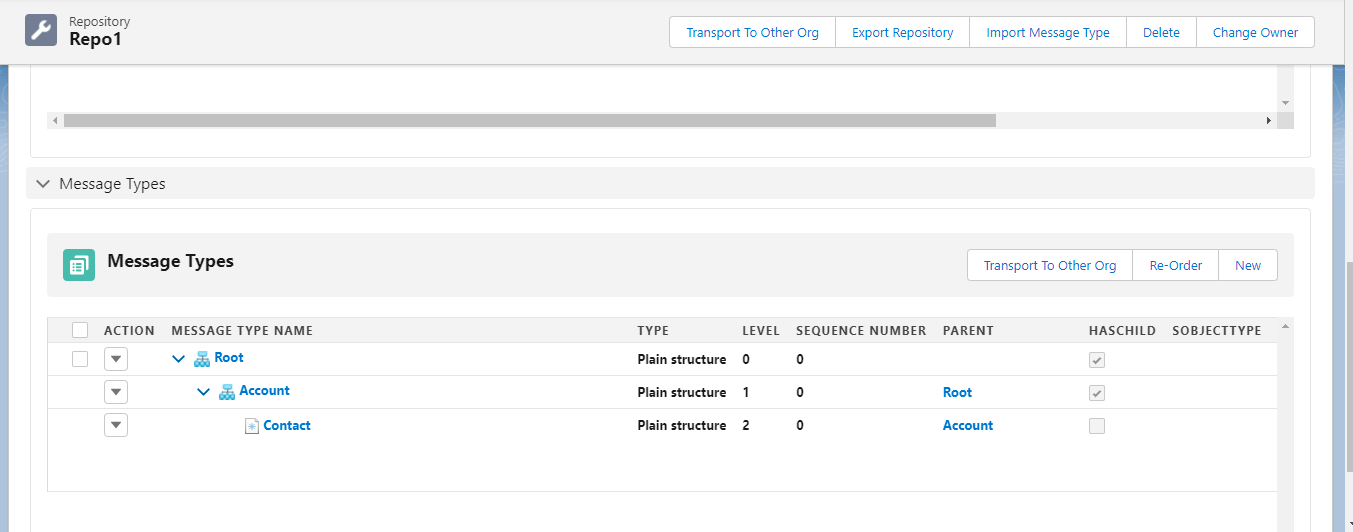
Step1: Upload Hierarchical Message Type or create Hierarchical Message Type.
- Here's the Hierarchical message Type
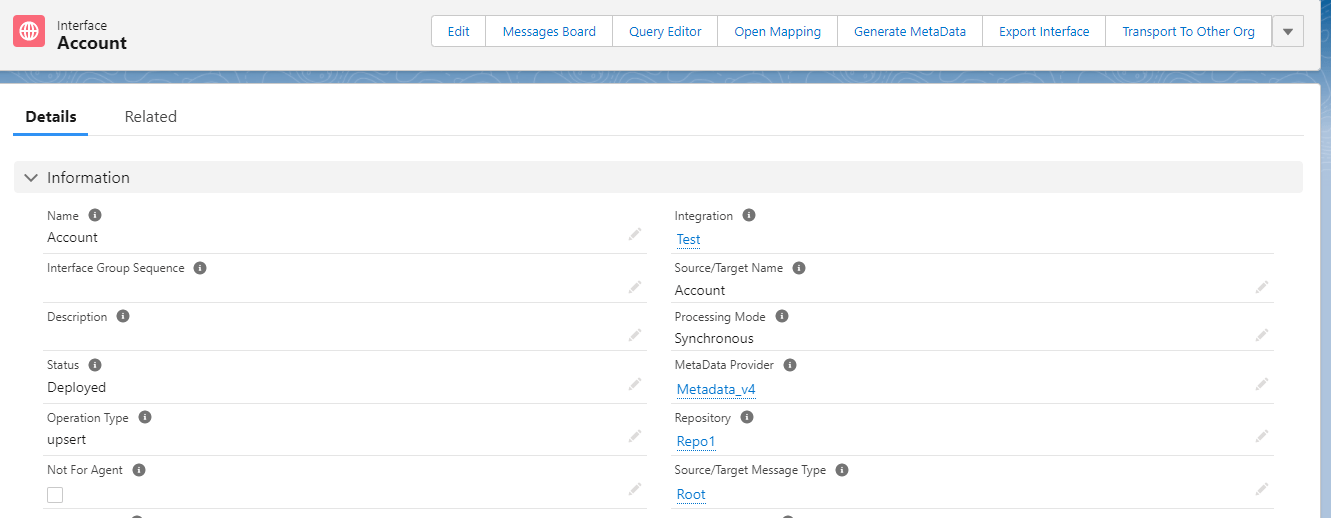
Step2: Create Inbound Interface and Linked Message Type.
- Here's the Inbound Interface which linked with Message Type.
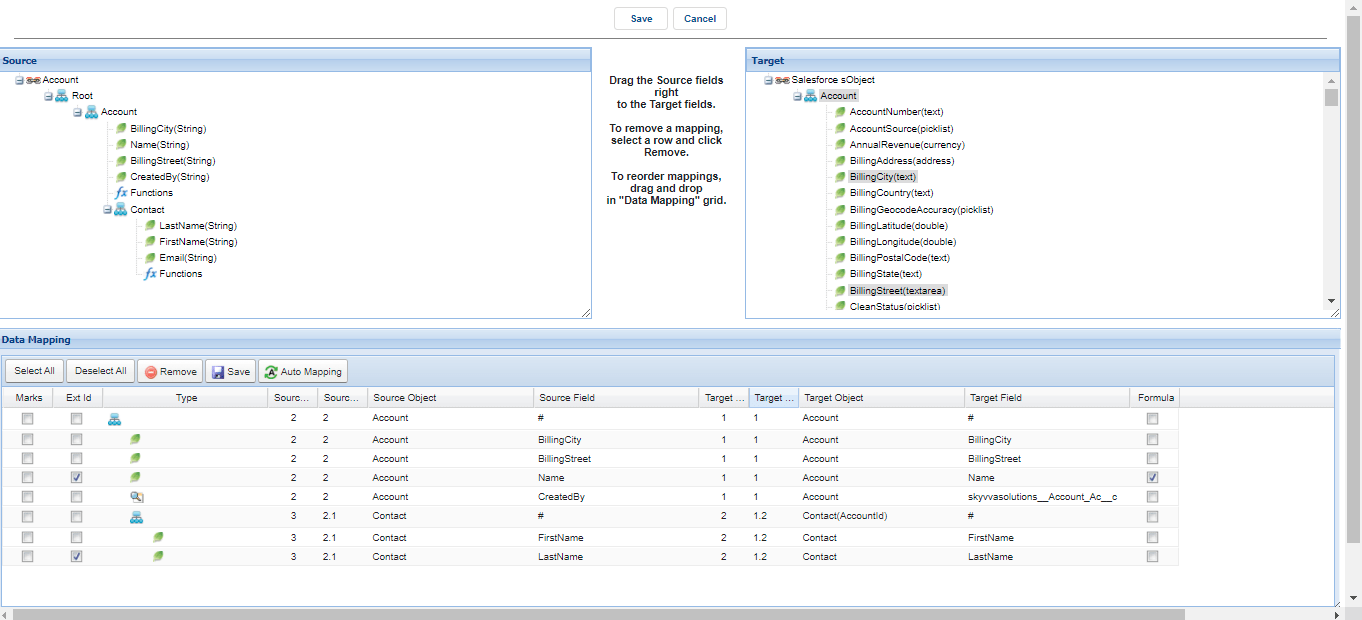
- Do mapping
How to configuration Ichain ?
To configuration IChain Interface we need to do mapping in hirachical and then go to Interface Related see the example bellow.
- Go to Interface Related
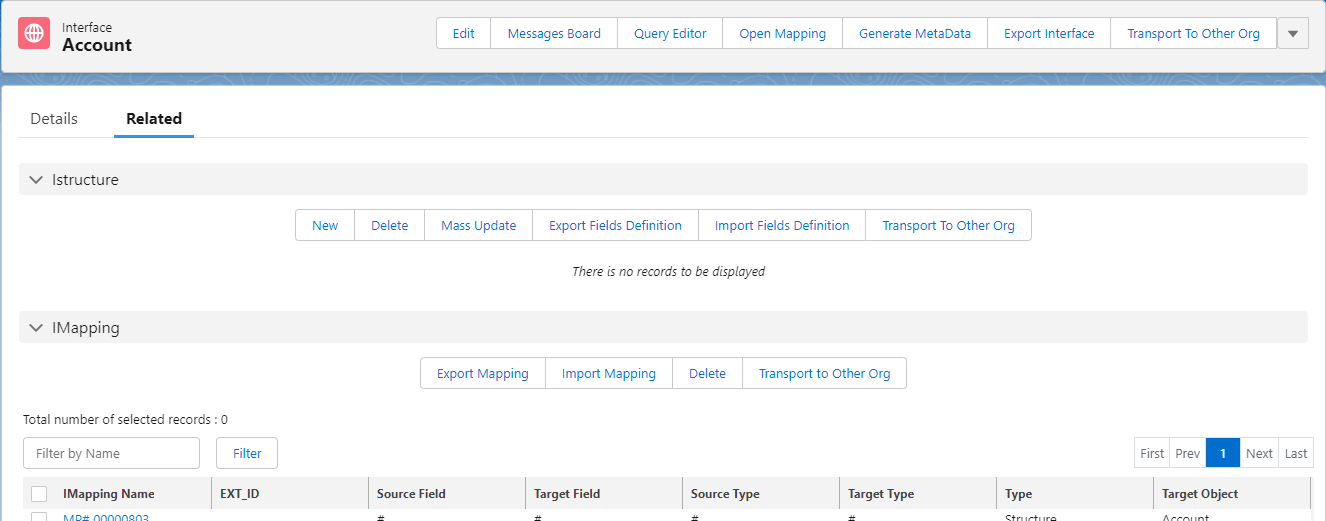
- Scroll Down to find Ichained Interface and click IChain Interfaces Name.

- Click Edit button.

- Now we can see How many Section in IChained Interface.
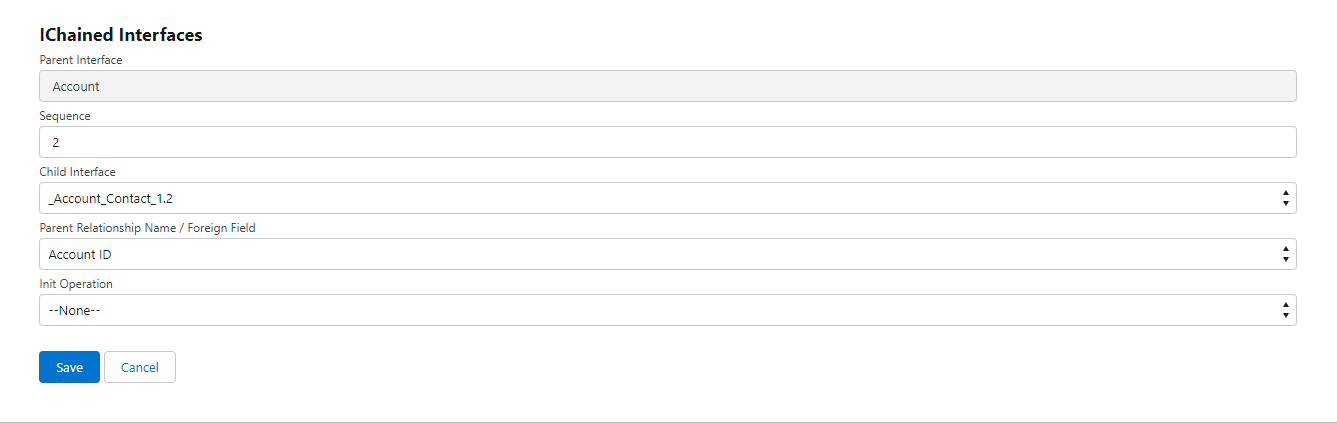
- Parent Interface refers to the Interface that we choose as the parent In this example we use using hierarchical mapping so the first mapping is the parent Interface.
- Sequence is refers to creating an order, an order sequence number is generated and can be used to identify the order.
- Child Interfaces refers to the Interfaces that we selected the other interface as the child. In this case if user want to use other Interface they can create the new IChain to config , If the user want to use the child interface as the match as the hierarchical mapping, user just select the Child Interface that contain _ParentInterface_ChildInterface_1.2 meaning that this is get from mapping, If the mapping have more object in one Interface it will generated the Interface to suffix 1.3,1.4 so on.
- Parent Relationship Name / Foreign Field is refers to the primary key between Parent Object to child Object depends on the primary key of each Objects. Example: We have many fields to look up to account depend on ID or depend on name so we can select the fields that we want to look up meaning that if the records that parents is exits as the same parent payload it will update the parent records and insert the child payload.
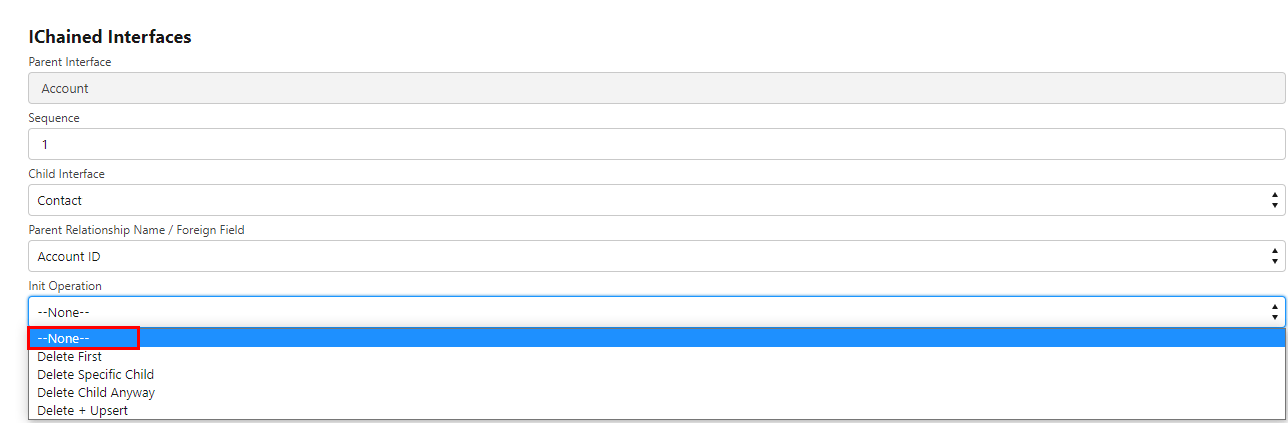
- Init Operation is the useful functions that allow users to modify the child Interface when we do inbound. In this function there are 5 operation such as None, Delete First, Delete Specific Child, Delete Child anyway, and Delete+ Upsert (we can Called delta ). See the picture below.
Which are different init-operation for the chained interface?
The feature with our inti operation for the chained interface is to handle the deletion of a child from the sending system. There are different init-operation for the chained interface as per the condition.
- None: Add a new child or update existing.
- Delete First: Delete all child records of a parent.
- Delete specific child: delete specific child of the parent.
- Delete Anyway: This will always delete the children, no matter if you only send Parent or Parent + Children.
- Delete + Upsert : that is about delete children does not come along with their parent
i.e. Existing account with contacts C1, C2, C3. if the system sends account with a contact C2, then C1, C3 will deleted from Account and insert/update C2, So Account has only 1 contact C2.
None:-
This is the default option when we create IChained Interface. Nothing is deleted here but the new children added or existing children updated. It is not correlated with previous data So there maybe different levels between order items in SAP and in Salesforce.
- Create Integration
- Create two interfaces -Account and contact where the account is parent interface and contact is a child.
- Click on the related tab of the account interface and scroll down the page to the IChained interface.
- Click on the new IChained interface.
Delete First:-
In this case, when the child record is inserted or updated the previous ones should be deleted. This ensures that the Salesforce page contains only the child, included in the latest payload. We have in the the option the set "Delete First" to delete first the existing children before adding new children. For example, the message comes with message A. If A contains a child record then the deletion works. In this case, we delete all existing children and create the new child coming with the new message. But if we send only the parent data only parent data get updated. No children get deleted. "Delete First" in Chain is that when we have child record in the message e.g. Parent + Child then it delete first all existing children and then adds the new children which come with the current message. The sender needs always to send all children. The sender cannot send only children which have been changed at the sender system. If he only sends a changed record which has been changed at the sender system the situation on both systems. e.g. sender and Salesforce are not consistent anymore. This mode does not support that the sender sent deltas. This mode works only correctly when the sender always sends in full mode e.g. all children every time! How to use "Delete First"? Follow the given steps:-
- Create a hierarchical interface Account, Contact where contact is a child interface.
- We use init Operation = Delete First.
Delete specific child:-
How to use Delete specific child. Follow the given steps:- step1: Create a hierarchical interface Account, Contact where contact is a child interface. We use init Operation = None Step2: Upload the following data. We have account parent fields Account (Parent fields):-
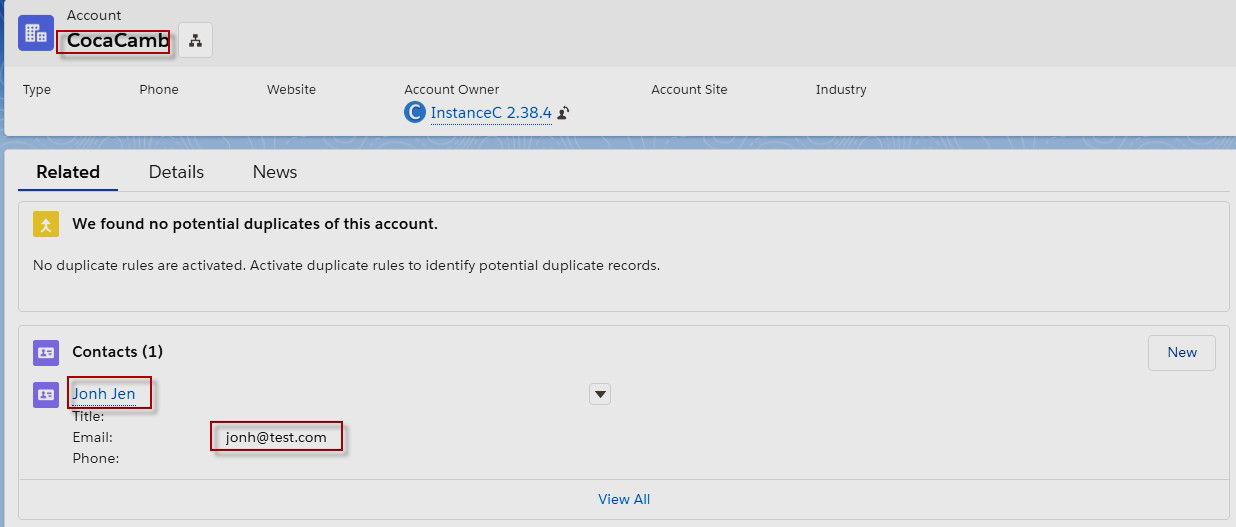
- AccountName=CacaCambo (ExternalID),
- BillingCountry=Cambodia and
Contact child fields:-
- LastName=Jen (ExternalID),
- FirstName=Jonh,
- Email = jonh@test.com
Here are the records account and contact after processed:-
Step3: Now We use init Operation = Delete Specific Child in IChained Interfaces to delete some values in child interface data but it is not External ID value. Now we want to change only email value I,e jonh@test.com to jen@test.com where,
- LastName=Jen (ExternalID),
- FirstName=Jonh like before.
So user just push above data again the data will be created again with last change email= jen@test.com
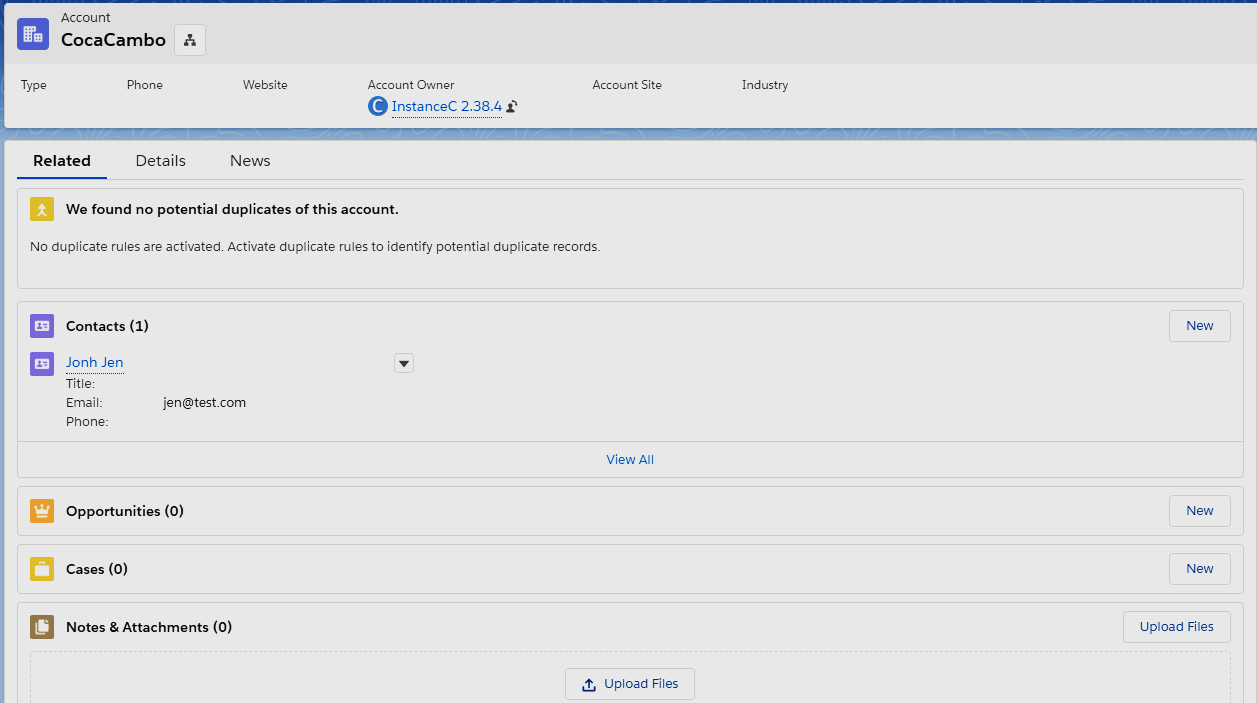
Here is the result of contact data on message monitoring change email value:-

Delete Child Anyway:-
Delete Child Anyway meaning that it will delete all children even have one or more and it will create new child as the payload we sent.
- Here's the Interface Delete Child Anyway
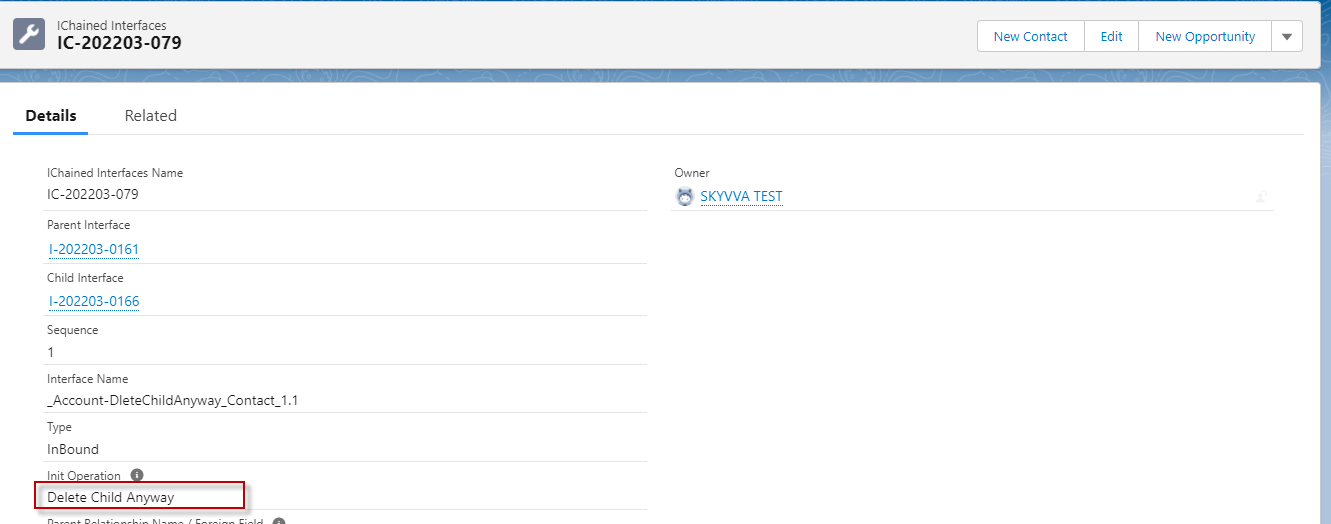
- Here's the records that has existing in salesforce.
- Here's the data that has existing in Salesforce

- Here's the payload to processing that will delete these are three contact and add the new one from payload.

- Go to monitor to see the result and click Related To link to see the account that has modify.

- Here's the account in salesforce

Delete + Upsert :-
Deleting children do not contain in the coming payload of their parent, that means delete all not children base on parent external value and children’s external-values do not contains in the payload. How to use Delete+Upsert. Follow the given steps:- step1: Create a hierarchical interface Account, Contact where contact is a child interface. We use init Operation = Delete + Upsert Step2: Upload the following data. We have Account (Parent Field):-
- AccountName = COCA_COLATest1(ExternalID),
- BillingCity = pp1
Contact1 (Child Field):-
- FirstName = COCA3,
- LastName = COLA_3New(ExternalID)
Contact2 (Child Field):-
- FirstName = COCA2_UpdateNew,
- LastName = COLA_2
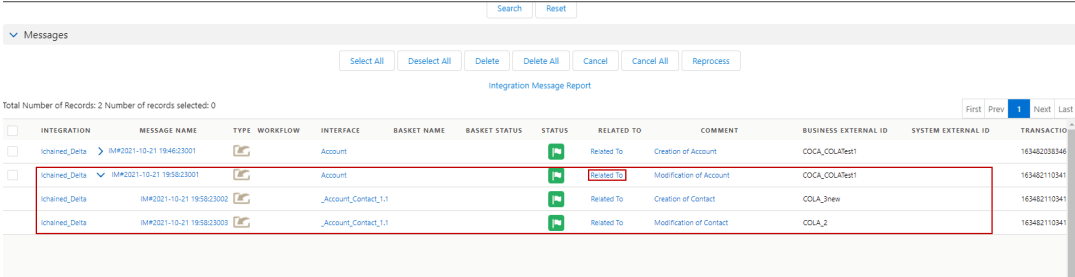
Here are the records account and contact after processed:-
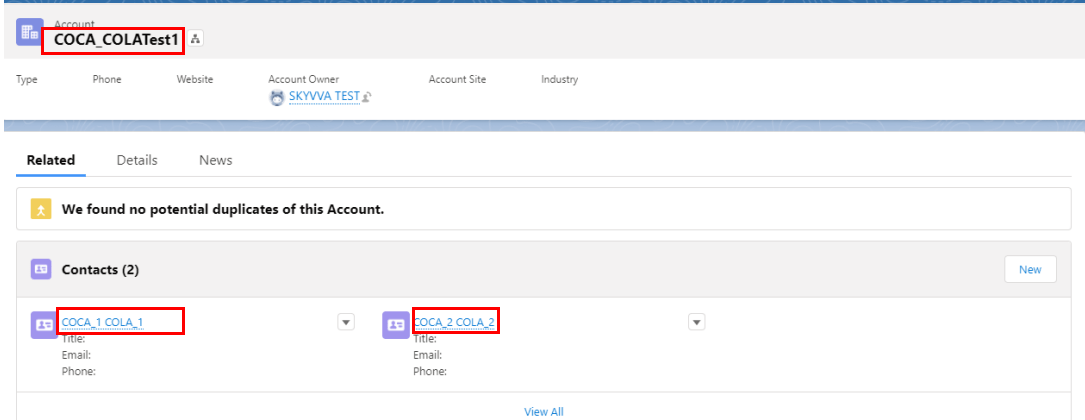
In this case, we have Records Account that contained 2 Contacts which external ID are COLA_1 and COLA_2, so when we push the same Account name and 2 contacts which external ID are COLA_2 and COLA_3. The processing Upsert + Delete will work like to Update the COLA_2, Delete COLA_1 and add COLA_3. Contact2 (Child Field):-
- FirstName = COCA2_UpdateNew,
- LastName = COLA_2

Here is the result of contact data on message monitoring change Contact FirstName & LastName value updated:-